Urban Landscape Graphics0.1.0
ulg

UrbanSens · Ecological Vector Style

Urban Landscape Graphics

The UrbanSens Ecological Vector Style as a library. One catalog of colours, lightly hand-drawn textures and symbols for urban landscape maps (lawns and meadows, trees, water, pavings, land use, planning status), tied to German and European standards, with renderers for Python and exporters for QGIS, GeoServer, MapLibre and design tools.

Version 0.1.0 · a project by UrbanSens

Start with the historyUse it in Python

Angerpark, the demo quarter, drawn in the house style at 1:1500
import ulg

ulg.element("wildflower_meadow").fill        # '#DADDBC': look colours up, never invent them
ulg.resolve("osm", landuse="meadow", meadow="wildflower")    # 'wildflower_meadow'
ulg.resolve("alkis", objart="41008", funktion="4420")         # 'green_space'

gdf["element"] = ulg.classify(gdf, "osm")     # OSM, ALKIS, XPlanung, CORINE … → elements
ulg.render_svg(gdf, scale=500, path="plan.svg")         # print-ready SVG, true to scale
ulg.render_svg(gdf, scale=1500, theme="planzv")         # the same data as a Bauleitplan
ulg.indicators(ulg.flatten(gdf))              # sealing, biotope area factor, runoff, canopy

What it is#

  • 173 elements in English and German (vegetation, trees, water, ground, 33 surfaces, land use, buildings, furniture, boundaries, planning and analysis overlays), each with a fill, a texture per level of detail, a line or point symbol, aliases and documented coefficients.
  • A style that stays GIS-exact. Marks are placed on the ground, not on the feature, so patterns continue across polygons and tile seamlessly; the hand-drawn outline never moves more than half a line width off the true edge.
  • 26 crosswalks from OSM tags, ALKIS/NAK, XPlanung, PlanZV, basemap.de, LBM-DE, BKompV, BayKompV, FFH, the Berlin biotope map, DIN 276, CORINE, Urban Atlas, CLC+, EUNIS, HILUCS, LUCAS, ESA WorldCover, LCZ, and the Dutch, Swiss, Austrian and English national models: 3 926 classes, each with a fit grade.
  • Seven themes: the mellow house style plus PlanZV, ALKIS, basemap.de, BfN landscape planning, OpenStreetMap Carto and a black-and-white drawing, with the published colour values.
  • Standards built in: ISO 11091 and PlanZV status symbols for trees, DIN 18920 root protection zones, Berlin BFF, DIN 1986-100 runoff, the EU Nature Restoration Regulation's urban green space, WCAG-checked legibility including colour-vision deficiencies.
  • Everywhere: SVG and Matplotlib; QGIS (QML with the hand-drawn outline and scale-dependent detail); OGC SLD; MapLibre sprites and layers with trees and streets in metres; CSS and DTCG design tokens; a command line; a skill for AI coding agents.
One quarter, seven conventions

Install#

pip install "urban-landscape-graphics[all] @ git+https://github.com/UrbanSens/Urban-Landscape-Graphics"

Python 3.10+. Core dependencies are NumPy and Shapely; [all] adds GeoPandas and Matplotlib. PNG output uses rsvg-convert, CairoSVG or Inkscape if one is installed. Check the installation:

ulg check

To try the examples or to work on the library, use a clone:

git clone https://github.com/UrbanSens/Urban-Landscape-Graphics.git
cd Urban-Landscape-Graphics
pip install -e ".[dev]"
python examples/quickstart.py

Documentation#

Start at Contents:

  1. Origins: from the Englischer Garten and the 1808 Bavarian survey to GIS
  2. The style guide: principles, palette, textures, symbols, drawing order, legibility
  3. The catalog: all elements and their coefficients
  4. Python: drawing, classifying, measuring, the command line
  5. GIS and web: QGIS, GeoServer, MapLibre, tokens
  6. Standards: what the style conforms to, with the full standards report
  7. For AI agents: ulg agent install
  8. Extending: how the style guide grows
The style sheet, generated from the catalog

Repository#

src/ulg/          the package; src/ulg/data holds the catalog, palette, themes and crosswalks as JSON
docs/             documentation (German, English in docs/en), generated reference pages, research
examples/         runnable examples, sample data, a MapLibre page
tools/            builders for the documentation images, logo, reference pages and HTML; data formatter
tests/            pytest suite
.github/          tests and the documentation site (GitHub Pages) run on every push

Working on the library: the rules and commands are in Working on ulg (for people and coding agents alike) and in the chapter Extending.

Licence and credit#

ulg is free software under the MIT licence: use it, change it, ship it in commercial products, and keep the licence notice with the code. The maps and sheets you draw with it are yours.

Please reference us. If ulg or the UrbanSens Ecological Vector Style helped with a map, a plan, a report, a tender or a paper, say so in the caption or in the list of sources:

Map style: UrbanSens Ecological Vector Style (ulg), urbansens.de

ulg.credit_line() returns it as a string (with the version number; ulg.credit_line("de") gives the German one). The style sheets and the catalog sheets (the inventory of all elements) that ulg draws carry a small UrbanSens mark in the corner. Leave it on when you share them (credit=False turns it off); your own maps are never stamped. BibTeX, APA, the logo rules and third-party notices: Licence and credit.

Status#

Version 0.1.0 (2026-09-30), UrbanSens. See Changelog. Standards were researched on 2026-09-30; the standards report lists what was verified, what is paywalled and what to re-check when standards change.

Guide · Chapter 1 of 8

Origins

Where the look of this style comes from: two centuries of washed garden plans, survey sheets and plan symbols, and why a library is the way to carry them into GIS.

7 min read

Landscapes were drawn by hand long before they were mapped by computer. The mellow palette, the small tufts and crowns and the calm outlines of the UrbanSens style are not an invention; they are a selection from a tradition that began in the garden plans and survey offices of the early nineteenth century, several of them in Munich, where UrbanSens works.

Timeline

1.1 A park painted in green: Munich, 1789–1806#

In August 1789 Elector Karl Theodor decreed a public park along the Isar in Munich, at the initiative of Benjamin Thompson, later Count Rumford. Friedrich Ludwig von Sckell shaped it as a landscape garden; it opened in 1792 and, at 3.75 km², is one of the largest city parks in the world: the Englischer Garten. Sckell directed Munich's court gardens from 1804 until his death in 1823.

Detail of the 1806 plan of the Englischer Garten: the Kleinhesseloher See, the village of Schwabing, meadows, woods and paths in watercolour
Detail of the plan of the Englischer Garten, 1806: the Kleinhesseloher See, the village of Schwabing, meadows and clumps of trees. Königlich bayerische Direction des Topographischen Bureaus. Public domain, via Wikimedia Commons.

Look at the colours of this sheet: pale greens for the meadows, a deeper green for woods, clear blue for water, brick red for roofs, all on warm paper. Two hundred and twenty years later the UrbanSens palette uses the same relations: light, low-chroma fills, darker marks of the same hue, saturated colour only where something needs attention.

The Monopteros in the Englischer Garten, 2014
The Monopteros in the Englischer Garten, 26 October 2014. Photo: Julian Herzog, CC BY 4.0, via Wikimedia Commons.

1.2 Stone, ink and the survey: the Bavarian Uraufnahme, 1808–1864#

In the 1790s Alois Senefelder found that a smooth slab of Solnhofen limestone, drawn on with greasy ink and wetted, would print: lithography. From 1809 he served as inspector of the royal lithographic institute in Munich, and the Bavarian survey took up the new technique early.

In 1808 Bavaria began the Uraufnahme, the first complete survey of every parcel in the kingdom, for the land tax. Surveyors worked at 1:5 000, at 1:2 500 for villages and in parts of Franconia even at 1:1 250. More than 23 000 sheets were drawn, engraved on limestone plates and printed; the stones are still kept by the Bavarian surveying office (LDBV).

A lithographic stone and the print made from it: a map of Munich with the Hofgarten and the Englischer Garten
A lithographic stone and the print made from it: an old map of Munich with the Hofgarten and the Englischer Garten, mirrored on the stone, as printing requires. Photo: Chris 73, CC BY-SA 3.0, via Wikimedia Commons.

The surveyors did not choose their marks freely. The 1808 instruction for the tax survey prescribed a sign for every kind of ground, and it reads like the first draft of a texture catalog:

Vorschrift zur Zeichnungsart für die Pläne der Steuer-Rectifications-Vermessung: signs for fields, woods, bushes, meadows, mossy meadows, pastures, moss, gardens, vineyards, hop gardens, buildings, boundaries, roads, rivers and bridges
"Vorschrift zur Zeichnungsart für die Pläne der Steuer-Rectifications-Vermessung": the drawing rules of the Bavarian tax survey, after the instruction of 1808. Königlich Bayerisches Vermessungsamt, c. 1840. Public domain, via Wikimedia Commons.

Deciduous and coniferous woods, bushes, meadows, mossy meadows, pastures and waste ground, moss, gardens, vineyards and hop gardens each have their own small mark; buildings, boundaries, paths, rivers and bridges their own line. Replace Wiesen with meadow, Waldungen · Laubholz with woodland_deciduous and Gärten with garden, and this page becomes a legend of the catalog in chapter 3.

1.3 Crowns, tufts and washes: the language of garden plans#

Landscape architects drew with the same means. In Peter Joseph Lenné's plan for the Berlin Tiergarten the woods are built out of thousands of small crowns, the open lawns keep the paper tone and the paths are left white.

Lenné's plan for the Berlin Tiergarten, 1835
"Verschönerungs-Plan" for the royal Tiergarten in Berlin by Peter Joseph Lenné, drawn by Gerhard Koeber in quill, pencil and watercolour, 1835. Landesarchiv Berlin. Public domain, via Wikimedia Commons.

Rural maps followed conventions every reader knew. The archive description of this manuscript map from Württemberg lists them: houses red, fields brown, vineyards with vine symbols, meadows green, woods as tree symbols, paths brown, the rivers blue ("drawn by eye and freehand").

Manuscript plan of the Enzberg hunting district, Württemberg
Plan of the Enzberg hunting district and Markung, manuscript, undated. Landesarchiv Baden-Württemberg, Hauptstaatsarchiv Stuttgart N 3 Nr. 47, CC BY 4.0, via Wikimedia Commons.

der nach dem Aug und freier Faust ist gezeichnet worden

end of the title of the Enzberg plan, Landesarchiv Baden-Württemberg, Hauptstaatsarchiv Stuttgart N 3 Nr. 47 (in English: which was drawn by eye and freehand)

Three habits of these drawings became rules of the style: marks are made by hand but placed with care (the wobble never hides the true edge); texture says what a surface is (crowns for trees, tufts for meadow, waves for water); and colour stays quiet so that the plan can carry a message.

1.4 From colour words to codes: the twentieth century#

Planning law turned conventions into rules. The German Planzeichenverordnung (PlanZV) first set federal plan symbols for land-use and zoning plans on 19 January 1965; the current version dates from 18 December 1990 and was last amended on 12 August 2025. It names its colours only in words (Grün mittel, Blau mittel) and gives one of the most useful rules for vegetation symbols: an open centre marks a tree to be planted, a filled centre a tree to be preserved (No. 13.2).

Die Planzeichen sollen in Farbton, Strichstärke und Dichte den Planunterlagen so angepaßt werden, daß deren Inhalt erkennbar bleibt.

Planzeichenverordnung 1990, § 2 Abs. 3 (in English: the symbols are to be adapted in hue, line weight and density to the base map so that its content stays recognisable)

In 1969 Ian McHarg's Design with Nature laid transparent maps of soils, water, slopes and vegetation on top of one another to find where building would do least harm: the layered map that geographic information systems made routine. The international standard for landscape drawings, ISO 11091 (1994), fixed how plans tell existing from proposed: thin lines for what is there, thick lines for what is planned. The cadastre went digital with the ALKIS model of the German surveying authorities, its object types and its signature catalogue.

1.5 Open data and ecological targets: the twenty-first century#

Since 2004 OpenStreetMap has described the surface of the world in open tags (landuse=meadow, surface=gravel, natural=tree), and its Carto style made them a common visual language. In 2017 the Federal Agency for Nature Conservation (BfN) published a catalogue of plan symbols for landscape plans: light tints without outlines for areas of low to moderate value, saturated colours with a black outline for areas of high value, and brown vertical dashes for fallow. This style adopts that convention.

In 2024 the EU Nature Restoration Regulation (2024/1991) made urban green space and tree canopy a legal target: no net loss by 2030 compared with 2024, and an increasing trend from 2031, measured with Copernicus data. What a map shows as green is now also what a city reports.

By 31 December 2030, Member States shall ensure that there is no net loss in the total national area of urban green space and of urban tree canopy cover in urban ecosystem areas […] compared to 2024.

Regulation (EU) 2024/1991 (Nature Restoration Regulation), Article 8(1)

1.6 2026: one catalog#

UrbanSens set out the visual language it wanted for its maps on one sheet: habitat types and surface materials in a clean, mellow, lightly hand-drawn vector style that works at every scale.

A clean, consistent and scalable visual language to represent nature, surfaces and biodiversity in a professional, architectural style, using simple vector patterns and symbols.

UrbanSens, reference sheet of the Ecological Vector Style

The UrbanSens brief The same sheet generated by ulg
The brief: the UrbanSens reference sheet for the Ecological Vector Style. The result: the same sheet, generated by ulg sheet from the catalog.

ulg turns that sheet into a library. It keeps the look (quiet colours, textures that say what a surface is, trees drawn to scale) and ties every element to the conventions this chapter traced: the codes of ALKIS, XPlanung, the biotope lists and OpenStreetMap, the status symbols of PlanZV and ISO 11091, the coefficients planners report, and the official colours of each convention when a map has to follow them.

One quarter, seven conventions
One quarter, seven conventions: the demo quarter in the house style and in six official or familiar conventions, from the same data.

Image credits#

Image Author, date Licence Source
Plan of the Englischer Garten (detail) Königlich bayerische Direction des Topographischen Bureaus, 1806 public domain Commons
Monopteros, Englischer Garten Julian Herzog, 2014 CC BY 4.0 Commons
Lithographic stone and print Chris 73, 2006 CC BY-SA 3.0 Commons
Drawing rules of the Bavarian tax survey Königlich Bayerisches Vermessungsamt, c. 1840 public domain Commons
Tiergarten plan Peter Joseph Lenné (design), Gerhard Koeber (drawing), 1835; Landesarchiv Berlin public domain Commons
Plan of the Enzberg hunting district unknown, undated; Landesarchiv Baden-Württemberg, HStA Stuttgart N 3 Nr. 47 CC BY 4.0 Commons
Timeline, reference sheet, style sheet, conventions UrbanSens / generated with ulg none this repository

The historical images are linked from Wikimedia Commons, not copied into the repository; they need an internet connection to display.

Guide · Chapter 2 of 8

The style guide

The rules of the UrbanSens Ecological Vector Style: what a map in this style looks like, and why.

10 min read

The style sheet, generated from the catalog

The sheet above is not a drawing of the style but a product of it: ulg sheet renders it from the same data that styles your maps, so the guide and the maps cannot drift apart. The German version is img/style-sheet-de.png.


2.1 Five principles#

The UrbanSens reference sheet names five design principles. The library turns each of them into something that can be checked:

Vector-based (polygonizable, GIS compatible) · Subtle, natural color palette · Consistent iconography and line weights · Minimal, non-photorealistic, architectural style · Scalable detail (works at all zoom levels)

UrbanSens, reference sheet of the Ecological Vector Style, "Design principles"

# Principle What it means in practice
1 Vector-based, GIS-exact Every mark is a vector path computed from the feature geometry. Polygons stay the polygons of your data: the hand-drawn wobble moves only the drawn outline, and never by more than half the line width (0.09 mm on the standard 0.18 mm outline), so the ink always covers the true edge.
2 Subtle, natural palette High lightness, low chroma, warm paper. Colours come from named palette tokens (grass.300), never from ad-hoc hex values.
3 Consistent iconography and line weights One line-weight series (ISO 128: 0.13 · 0.18 · 0.25 · 0.35 · 0.5 · 0.7 · 1.0 mm), one outline rule, one symbol grammar for trees and status.
4 Minimal, non-photorealistic Textures are abstract marks (tufts, ticks, crowns, pebbles, waves) that say what a surface is, not what a photo of it looks like.
5 Scalable detail Four levels of detail follow the map scale. A meadow is a tinted area at 1:20 000, tufts at 1:5 000 and single blades and flowers at 1:500.

2.2 Colour#

Palette

The palette has 21 families of primitive colours, addressed as family.step. Elements, themes and exporters refer to tokens only; changing a token changes every map, sheet and export at once.

Family Role
paper page and map background (paper.base #F5F5F1), white, shade
ink text, outlines, boundaries (ink.900 #112D36 down to ink.200)
grass, fallow lawns, meadows, pasture, fallow and dry grass
leaf, pine shrubs and broadleaved crowns; conifers
reed, marsh, lichen reeds and wetlands; wet meadows; grey-greens (salt marsh, permeable surfaces)
water, aqua natural water; pools, basins and other built water
earth, sand, wood soil, mulch; sand and water-bound surfaces; decks and timber
stone, granite, clay pavings, concrete, buildings; natural stone and commercial land; clinker, clay courts, residential land
straw, heather, bloom fields and bedding; heath and public facilities; flower accents
signal planning status and analysis: highlight orange, planned red, remove yellow, protect green, info blue, each with a -soft tint

Rules

  • Areas use the light steps (100–400); texture marks use darker steps of the same family (600–900), so a texture always reads as part of its surface.
  • Outlines are the fill darkened by a fixed amount (settings.json → outline_darken), unless an element sets its own.
  • Saturated colour is reserved for meaning: the signal family marks what is planned, removed, protected or highlighted. Never use it for land cover.
  • Neighbouring land covers must differ by at least ΔE₀₀ 10 in colour, or else in texture or outline (checked by ulg check, see 2.8).

For analysis layers there are ready ramps and class palettes in the same tonal range:

Name Kind Use
heat, cool, vitality, biodiversity, sealing sequential thermal load, cooling and shade, vegetation vitality, biodiversity value, degree of sealing
diverging diverging change and anomaly
klimatop classes climatopes with the class names of VDI 3787 Blatt 1 (house colours in the usual hue order)
utci, pet classes with limits thermal comfort classes (10 UTCI classes, 9 PET classes)
ulg.ramp("heat", 5)                  # ['#F7F1DC', '#F6D5A5', '#EFAC77', '#DB805F', '#B5574F']
ulg.category_of("utci", 34.2)        # {'id': 'strong_heat', 'min': 32, 'max': 38, 'color': '#F0B273', ...}

2.3 Textures#

Texture tiles

Seventeen texture motifs draw every surface. Each element picks one or two motifs and their inks from the palette:

Motif Marks Used for, for example
grass_ticks short leaning ticks lawn, golf course
grass_tufts tufts of blades meadow, heath, bog, salt marsh, dune
flowers small heads on stems wildflower meadow, flower strip, heath
reeds upright stems with heads reed, sedge marsh
canopy lobed crowns with a branch star woodland, grove, orchard meadow, wood pasture
rosettes small star plants and dots perennials, green roofs, recreation areas
rows planting rows with plants vineyard, vegetable garden, allotments, horticulture
waves short wave strokes water, wetland water, mudflat
stipple dots of varying size sand, soil, dune, mudflat, concrete grain
pebbles outlined stones gravel, rock, bunkers, floating leaves
chips short splinters wood chips, bark mulch
bond, herringbone, cells paving joints and grids concrete pavers, setts, slabs, clinker, grass pavers, solar panels
hatch parallel lines, optionally crossed land use, sports grounds, airports, snow and ice, planning overlays
stripes exact bands mown sports turf, running-track lanes
wash faint tonal variation the watercolour feel of large vegetated areas

How textures behave

  • Anchored to the ground. Mark positions are derived from ground coordinates, not from the feature. Two neighbouring polygons of the same element continue each other's pattern, and a map panned or tiled shows the same marks in the same places.
  • Seamless tiles. For QGIS, SLD and the web the same motifs are drawn into periodic tiles that repeat without seams.
  • Clipped to their area. Crowns and marks never spill over the feature edge, so drawing order never changes the look of clean data.
  • Density by level of detail (2.6), not by feature size, so a texture looks the same on a small and a large polygon.

2.4 Lines#

Line elements use the ISO 128 series from settings.json → line_weights: hair 0.13, fine 0.18, regular 0.25, medium 0.35, bold 0.5, heavy 0.7, extra 1.0 mm. Texture marks are drawn finer than the finest outline on purpose: they must never compete with a boundary.

Line Look Basis
Area outline 0.18 mm, fill darkened, lightly wobbled house rule
Site / parcel boundary dark continuous / thin grey plan conventions
Plan area boundary bold dashed dark band PlanZV 15.13 (black-and-white form)
Compensation area border with T-ticks pointing inwards PlanZV 13.1
Areas to plant / to preserve border with open circles / filled dots on the inside PlanZV 13.2.1 / 13.2.2
Protected area boundary green chain line house convention (PlanZV 13.3 uses stroke groups)
Root protection zone green chain line with a light tint DIN 18920 geometry, ISO 11091 protection line
Fence, retaining wall, embankment, contour small crosses, ticks on the high side, hachures, fine brown lines topographic conventions

Lines and roads or paths that arrive as centre lines (OpenStreetMap highways) are drawn above all land cover. Area elements such as roads and footways become strips of their real width (see 2.7).

2.5 Symbols#

Tree symbols

Trees are drawn to scale. A crown is a lobed outline of the tree's real diameter (attribute crown_diameter, or the element default), with a branch star from 1:1 500 upwards. When a stem diameter or girth (stammumfang in cm) is known, the stem is drawn to scale too.

Status follows the standards. One grammar serves all planning drawings:

Status Element Drawing Source
existing tree … thin outline, branch star ISO 11091 (existing = thin)
to plant tree_planned, shrub_planned thick red outline, small cross in an open ring ISO 11091 (proposed = thick, centre cross); PlanZV 13.2 (open centre = to plant)
to keep tree_protected filled centre, chain-line square frame, root zone PlanZV 13.2 (filled = to preserve); ISO 11091 protection frame
to fell tree_remove dashed yellow outline with a cross ISO 11091 removal; Bavarian building-submission colours (grey existing, red new, yellow removal)

The root protection zone (ulg.root_protection_zone()) is the crown drip line plus 1.50 m (columnar trees plus 5.00 m) after DIN 18920; the minimum distance for trenches is four times the stem girth, at least 2.50 m.

Pictograms mark furniture and ecological structures (bench, bin, lamp, bicycle stand, sign, play equipment, planter, bollard, deadwood, stone pile, nesting aid …). They are drawn at a fixed paper size, so they stay legible at every scale, and enlarged automatically in legends and sheets.

Land use, buildings, furniture

2.6 Levels of detail#

Levels of detail
LOD Scale What is drawn
3 1:750 and larger single blades, flowers, pebbles, crowns with stems; plan drawings
2 1:750 to 1:2 500 tufts, clusters, crowns with branch stars; site plans and park maps
1 1:2 500 to 1:10 000 fine sparse marks, simplified crowns; district maps
0 smaller than 1:10 000 flat colours; city maps and overviews

ulg.lod_for_scale(500) → 3, ulg.lod_for_zoom(18) → 2. Give the scale; do not switch textures off by hand.

2.7 Drawing order#

Real data is often stacked: OpenStreetMap maps a park as one polygon and the lawn, the pond and the paths inside it as further polygons on top. The style draws in bands so that stacked data looks right and clean data is unaffected:

z Band Elements
1–5 fallback, context unknown, grey context buildings, roads, green and water
20 ground, drawn largest first land use and complexes (residential land, parks, cemeteries, playgrounds, airports …), grass, meadows, plantings, woodland, fields, soil, sand, all paved and loose surfaces
30–33 water, then what lies on water ponds, rivers, pools; mudflats; reeds, marsh, floating leaves; decks and jetties
35 lines and centre-line strips paths, streets, streams and ditches given as lines
50–66 hedges and built hedges, bridges, stairs, buildings, green roofs, solar panels, walls
66–76 trees and points crowns, furniture, ecology
84–98 overlays boundaries, planning, analysis

Inside the ground band smaller areas are drawn on top of larger ones, the rule OpenStreetMap Carto uses for land cover. A playground inside a park, a lawn covering the park, a meadow inside the lawn and a clearing inside a wood all stay visible, and a complex such as a park never hides the surfaces mapped inside it. Water comes above the ground band because ponds are routinely mapped on top of parks and woods. ulg.flatten() applies the same order to the geometry itself, which turns stacked data into a clean partition for area statistics.

2.8 Legibility#

Colour-vision simulation

ulg check (and the test suite) enforces three rules:

  1. Distinguishable. Two land covers that are closer than ΔE₀₀ 10 must differ in texture or outline. Pairs that differ in nothing are errors.
  2. Colour-vision safe. The same test is repeated after simulating protanopia, deuteranopia and tritanopia (Machado et al. 2009). Meaning never depends on hue alone (WCAG 2 success criterion 1.4.1).
  3. Marks with contrast. Texture marks are measured against their fill; the report lists the weakest, and symbols and boundaries follow WCAG 1.4.11 for non-text contrast.

2.9 Typography and layout#

Sheets, legends and titles use a humanist sans-serif (Avenir Next, falling back to Nunito Sans, Source Sans 3, Helvetica Neue, Arial), ink.900 for titles and ink.500 for secondary text, small capitals with wide tracking for section heads, and thin ink.200 rules. Maps are laid out in paper millimetres at the chosen scale.

2.10 Themes: the same map in other conventions#

One quarter, seven conventions

The house style is mellow. Six further themes redraw the same data in an official or familiar convention, with the colour values of the published source: planzv (land-use and zoning plans), alkis (cadastral map), basemap (basemap.de), bfn (landscape planning), osm (OpenStreetMap Carto) and mono (black-and-white drawing after ISO 11091). Official themes use flat colours and exact lines. Sources and evidence: Standards and reference/themes.md.

2.11 Do and don't#

Do Don't
Look an element up (ulg.find("Schotterrasen")) Invent a colour or texture for a surface that exists in the catalog
Classify external data with a crosswalk Map codes to colours by hand
Give the map scale Switch textures on or off by hand
Keep planning status in the status elements Colour a planned tree green because it will be green
Use signal colours for meaning only Use orange or red for land cover
Fix unknown features at the source Hide unclassified features
Work in a metric CRS (EPSG:25832 in Bavaria) Measure or texture in degrees

2.12 The mark#

The logo spells ulg with three things of a landscape plan, each drawn by the library from a catalog element: a pond in the shape of a u (water), a tree-lined path as the l (waterbound and tree), and a tree crown with a stream as the tail of the g (tree and watercourse). The hand-drawn outline and the texture marks are the renderer's, so the mark is a specimen of the style: exact geometry underneath, an imperfect drawing on top.

The ulg logo: name, mark and tagline
How the mark is made: exact geometry with its vertices, then the drawing the renderer makes of it
Left: the geometry in metres, polygons with their vertices and trees as points with a crown radius. Right: the same data drawn at 1:300 by the renderer that ulg.render_svg uses.
File in docs/img/logo/ Use
ulg-logo.svg, .png mark, name and tagline side by side; the default
ulg-logo-stacked.svg, .png the same, centred, for square spaces
ulg-logo-dark.svg, .png for dark backgrounds (ink.900)
ulg-mark.svg, ulg-mark-dark.svg the mark alone
ulg-mark-small.svg the mark without texture marks and with a stronger outline, for sizes below 40 px
ulg-favicon.svg, favicon.ico, apple-touch-icon.png the g on a rounded tile: crown and stream stay readable at 16 px

The name is set in Rethink Sans (SIL Open Font License) and converted to outlines, so the files need no font. Keep a free margin of half the height of the mark around it, show it at no less than 24 px tall (use ulg-mark-small.svg below 40 px), and do not recolour it: the colours are palette tokens (water.300, sand.300, leaf.300–leaf.600). python tools/build_logo.py redraws every file from the catalog, so a change of the palette changes the logo with it.

The UrbanSens mark. The style sheet, the catalog sheets and the figures of this documentation carry the small UrbanSens logo in a corner, with the website and the version; credit=False leaves it out. Details and the credit request: Licence and credit.

Guide · Chapter 3 of 8

The catalog

173 elements: everything a map of an urban landscape needs to show, each with its look, its names, its codes in other classifications and its standard coefficients.

4 min read

An element is one kind of thing you can put on a map: a wildflower meadow, gravel turf, a street tree, a retaining wall, a planned tree, a heat hotspot. Every map, sheet, legend and export of the library is drawn from these elements, and every external classification is translated into them.

3.1 What is in it#

Group Elements Examples
vegetation.* 48 lawns and meadows, plantings, parks and gardens, woodland and hedges, fields, wetlands, green roofs
blue_green 3 infiltration swale, rain garden, retention basin
trees 12 deciduous, conifer, fruit, street and veteran trees; planned, protected and felled trees; shrubs; tree rows; canopy
water 8 water body, watercourse, ditch, temporary water, pool, mudflat, fountain, spring
ground 7 bare soil, sand, dune, rock, mulch, snow and ice, construction site
surface.* 33 sealed, paved, permeable, loose, sport and rail surfaces; roads, footways, cycleways, squares, parking
landuse 10 residential, mixed, commercial, public, sports, recreation, quarry, landfill, airport, port
built 11 buildings (existing, minor, planned), greenhouse, solar panels, underground structure, steps, bridge, walls
furniture, ecology 12 bench, bin, lamp, bicycle stand, sign, play equipment, artwork, planter, bollard; deadwood, stone pile, nesting aid
boundary, relief 10 site, parcel and plan-area boundaries, fence, kerb, protection zones; contours, embankment
planning, analysis 14 planned/removal status, protected biotope, compensation, planting and preservation areas, habitat corridor, flood zone; sensor, survey point, highlight, heat hotspot, cool spot, no data
context, other 5 grey context for surroundings; unknown for unclassified features

The complete list with ids, English and German names and aliases is reference/element-list.md; every element is drawn on the catalog pages below.

3.2 The pages#

Vegetation and blue-green infrastructure
Trees, water and open ground
Surfaces and pavings
Land use, buildings, furniture, ecological structures
Lines, planning and analysis overlays, context

All pages together: img/catalog-sheet.svg (vector, true to size). Regenerate with ulg sheet --catalog -o catalog.svg or python tools/build_docs.py sheets.

3.3 Anatomy of an element#

Elements live in src/ulg/data/elements/*.json, one file per theme group, keyed by id:

"meadow": {
  "group": "vegetation.grass",
  "geometry": ["polygon"],
  "z": 20,
  "label":       {"en": "Meadow", "de": "Wiese"},
  "description": {"en": "Taller, more diverse grass, mown once or twice a year. Medium biodiversity.",
                  "de": "Höherer, vielfältigerer Bewuchs, ein- bis zweischürig. Mittlere Biodiversität."},
  "fill": "grass.400",
  "wash": true,
  "textures": [{"motif": "grass_tufts", "ink": "grass.700", "ink2": "grass.600"}],
  "attributes": {"sealing": "unsealed", "vegetated": true, "biodiversity": 3, "bdla_class": 1,
                 "bff": 1.0, "bff_1990": 1.0, "runoff_cs": 0.2, "runoff_cm": 0.1,
                 "albedo": 0.18, "emissivity": 0.97, "nrr_urban_green": true, "layer": "ground"},
  "aliases": ["Mähwiese", "Extensivwiese", "Extensivgrünland", "hay meadow", "grassland"]
}
Field Meaning
group where the element belongs; the first part (vegetation, surface …) is the family
geometry polygon, line, point: what the element can be drawn from. Area-only elements such as road also accept centre lines, drawn as strips of their width
z drawing band (see style guide 2.7)
label, description English and German, for legends, sheets and search
fill, outline, fill_opacity, outline_width, outline_dash flat look, as palette tokens
textures one or two texture motifs with inks and per-LOD settings
line for line elements: colour, width, dash, casing, marks along the line (ticks, crosses, dots, crowns, hachures)
symbol for points: crown (drawn to scale), dot, or a pictogram (bench, lamp, planter …)
border marks along a polygon edge (PlanZV borders: tees, open circles, filled dots)
attributes standard coefficients and flags, each documented with its source
aliases other names in German and English, used by search and by agents

In Python:

el = ulg.element("gravel_turf")
el.name("de")          # 'Schotterrasen'
el.fill                # hex colour, resolved from the palette token
el.attributes          # {'sealing': 'partly', 'bdla_class': 3, 'bff': 0.4, 'bff_1990': 0.5, 'runoff_cs': 0.3, 'runoff_cm': 0.2, ...}
ulg.codes_for("wildflower_meadow")   # the classes of other schemes that map onto it

3.4 Attributes: coefficients that travel with the style#

The same id that picks a colour also carries the numbers planners need. Values are copied from the named sources and never interpolated: a surface without a published value has none, and ulg.indicators() reports how much of the site had a value (coverage) instead of guessing.

Attribute Meaning Source
sealing sealed / partly / unsealed / built Umweltbundesamt
bdla_class five surface classes of the qualified open-space plan bdla (2022)
bff, bff_1990 Berlin biotope area factor weights, current list and 1990 list SenUVK Berlin (2021), BFF report (1990)
runoff_cm, runoff_cs mean and peak runoff coefficients DIN 1986-100:2016-12, Table 9 (via a municipal reproduction)
albedo, emissivity radiative properties for microclimate models PALM model system 6.0 tables
belagsklasse Berlin paving impact classes Berlin Umweltatlas 01.02
nrr_urban_green counts as urban green space under the EU Nature Restoration Regulation Regulation (EU) 2024/1991, Art. 3(20) and the Copernicus data it names
canopy, layer, is_complex, vegetated, water flags used by the indicators and the drawing order house
biodiversity rough 1–5 heuristic for quick maps and legend order, not a valuation house

Full table per element: reference/attributes.md.

Layers. layer: ground elements tile the site (land cover). layer: roof elements (green roofs, solar panels) lie on buildings and replace the building surface in runoff and albedo; they add their BFF credit on top. layer: overlay elements (boundaries, planning and analysis overlays, tree canopy) are drawn over everything and never counted as area.

Complexes. Elements with is_complex (residential area, park, cemetery, allotments, airport …) stand for a whole site with its internal surfaces. Map either the complex or its parts; if you map both, the parts are drawn on top and ulg.flatten() gives each square metre to the part.

3.5 Finding the right element#

ulg.find("Schotterrasen")      # [gravel_turf, lawn, gravel, wood_deck]
ulg.find("Rasengitter")        # [grass_pavers, grass_joint_paving]
ulg.resolve("osm", highway="footway", surface="compacted")    # 'waterbound'
ulg find Blumenwiese
ulg show wildflower_meadow --json
ulg list --group surface

Search looks at ids, English and German names and all aliases. If nothing fits, the feature should become unknown (drawn as a neutral hatch) until an element is added, see Extending.

Guide · Chapter 4 of 8

Using the library in Python

Install, look things up, classify your data, draw maps, legends and sheets, compute site figures.

7 min read

4.1 Install#

pip install -e ".[all]"

Python 3.10 or newer. The core needs only NumPy and Shapely; geopandas (reading GIS files, indicators on data frames) and matplotlib (plots, the MapLibre sprite) come with the all extra. PNG output uses the first SVG rasteriser it finds: rsvg-convert, CairoSVG or Inkscape.

Check the installation:

ulg --version
ulg check

ulg check prints the legibility report of the catalog and ends with OK.

4.2 The style as data#

import ulg

lawn = ulg.element("lawn")
lawn.name("de"), lawn.fill              # ('Rasen', '#CDD2A9')

[el.id for el in ulg.find("Schotterrasen")]   # ['gravel_turf', 'lawn', 'gravel', 'wood_deck']
ulg.color("water.300")                  # '#BED2DD', a palette token
ulg.color("lawn")                       # '#CDD2A9', an element's fill
ulg.fills("polygon")                    # {'lawn': '#CDD2A9', 'meadow': '#C5CB9D', ...}
ulg.ramp("heat", 5)                     # ['#F7F1DC', '#F6D5A5', '#EFAC77', '#DB805F', '#B5574F']
ulg.categories("klimatop")              # climatope classes with labels and colours
ulg.themes()                            # {'mellow': 'UrbanSens mellow (house style)', 'alkis': ..., ...}

ulg.fills() alone already styles a map in any tool:

gdf.plot(color=gdf.element.map(ulg.fills()))

4.3 Your data#

Everything that draws or measures accepts

  • a GeoDataFrame with a column of element ids (by="element" by default),
  • a GeoJSON FeatureCollection (dict) with the id in the properties,
  • a list of (geometry, element_id) or (geometry, element_id, properties) tuples.

Use a projected CRS in metres (EPSG:25832 for Bavaria). Geographic GeoDataFrames are reprojected to UTM automatically; textures, widths and areas need metres.

Useful attributes are read when present: crown_diameter (also diameter_crown, kronendurchmesser …) sizes tree crowns, stammumfang (cm) or stem_diameter (m) draws stems to scale, and width, lanes or the OSM highway class set the width of roads and paths given as centre lines.

If your data uses another classification, translate it (4.5). If it uses your own codes, pass a mapping:

ulg.render_svg(gdf, by="nutzung", mapping={"Rasen": "lawn", "Weg": "waterbound", "Teich": "water"})

4.4 Drawing#

SVG, true to scale#

from ulg.datasets import demo_park_gdf

gdf = demo_park_gdf()                                  # Angerpark, the demo quarter, EPSG:25832
svg = ulg.render_svg(gdf, scale=1500, path="park.svg") # 1:1500, in paper millimetres
svg.lod                                                # 2, the level of detail chosen from the scale
Angerpark, the demo quarter, at 1:1500

Options that matter:

Argument Effect
scale=500 / width=180 map scale, or the page width in mm (the scale follows)
extent=(minx, miny, maxx, maxy) the window to draw, in data coordinates
theme="planzv" draw in another convention (ulg.themes())
lod=3 force a level of detail (normally chosen from the scale)
handdrawn=0 exact lines; 1 house style; up to 2 sketchy. Official themes default to 0
seed=7 another, equally valid, arrangement of marks (deterministic for a seed)
background=None transparent page (default: the theme's paper)
options=ulg.Options(textures=False, outline_width=0.25, ...) fine control, see help(ulg.Options)

PNG and PDF: ulg.render.rasterize("park.svg", "park.png", dpi=200), or convert the SVG with Inkscape (inkscape park.svg --export-type=pdf). The SVG opens true to size in Inkscape, Illustrator and Affinity, and every feature group carries its element id as data-element.

Matplotlib#

ax = ulg.plot(gdf, scale=3000)            # a new figure sized so that 1 paper mm is 1 mm
ax.figure.savefig("park.png", dpi=150)

import matplotlib.pyplot as plt
fig, ax = plt.subplots(figsize=(8, 6))
ulg.plot(gdf, ax=ax)                      # into an existing axes; the axes decide the scale
other_layer.plot(ax=ax, zorder=10)        # then draw your own layers on top

Legends#

from ulg.legend import used_elements

ids = used_elements(zip(gdf.geometry, gdf.element))           # the elements on the map, in order
ulg.legend_svg(ids, lang="de", title="Legende", columns=2).save("legend.svg")

ax.legend(handles=ulg.legend_handles(["lawn", "meadow", "water"], lang="de"))   # flat Matplotlib legend
A German legend

Style sheets#

ulg.style_sheet("style.svg")                       # the one-page overview (section 2)
ulg.style_sheet("style-de.svg", lang="de")
ulg.catalog_sheet("catalog.svg")                   # every element
ulg.catalog_sheet("trees.svg", groups=["trees"], title="Trees")
ulg.style_sheet("plain.svg", credit=False)         # without the small UrbanSens mark in the corner

The sheets carry that mark by default; ulg.legend_svg(..., credit=True) adds it to a legend, and your own maps never get one. ulg.credit_line() returns the line for a caption or a list of sources ('Style: UrbanSens Ecological Vector Style (ulg 0.1.0) · urbansens.de', German with lang="de"). More in Licence and credit.

4.5 Classifying external data#

A crosswalk translates the classes of another scheme (OSM tags, ALKIS object types, XPlanung, BKompV/BayKompV biotope codes, CORINE, Urban Atlas and 20 more) into element ids.

ulg.resolve("osm", landuse="grass")                       # 'lawn'
ulg.resolve("osm", highway="footway", surface="compacted") # 'waterbound'
ulg.resolve("alkis", objart="41008", funktion="4420")     # 'green_space'
ulg.resolve("clc", "141")                                 # 'green_space'
ulg.explain("clc", "141")
# {'code': '141', 'name': 'Green urban areas', 'element': 'green_space', 'fit': 'exact',
#  'color': '#FFA6FF', 'evidence': 'V', 'level': 3, 'maes': 'Urban', 'note': 'Pink in the official legend, not green.'}

gdf["element"] = ulg.classify(gdf, "osm")        # every column of every row takes part in matching
gdf["element"] = ulg.classify(gdf, "clc", column="code_18")   # or a single code column
ulg.official_colors("clc")["141"]                 # '#FFA6FF', the scheme's own legend colour
ulg.codes_for("wildflower_meadow")                # the reverse: which classes map onto an element

Rules worth knowing:

  • The most specific entry wins (natural=wetland + wetland=reedbed beats natural=wetland).
  • Column names are matched through aliases (Objektart, OBJART, objart all work).
  • Hierarchical codes fall back to their group (EUNIS E2.64 → E2.6 → E2).
  • Unmatched rows become unknown and are drawn as a neutral hatch, so gaps stay visible. Pass default=None to get None instead.
  • Each entry has a fit grade (exact, narrower, broader, nearest or none), so you can see how faithful a translation is.

All schemes: ulg.schemes(), or reference/crosswalks.md.

4.6 OpenStreetMap: stacked areas and centre lines#

OSM data stacks areas (park → grass → pond) and maps streets and paths as lines. The renderer handles both: areas are layered like OSM Carto (smaller on top within the land-cover band), and roads, footways and squares that arrive as lines are drawn as strips of their real width.

import geopandas as gpd

osm = gpd.read_file("examples/data/osm_sample.geojson").to_crs(25832)
osm["element"] = ulg.classify(osm, "osm")
ulg.render_svg(osm, scale=1000, path="block.svg")
An OSM-style block drawn by ulg

For figures, flatten first: ulg.flatten() cuts every area by those drawn above it and turns centre lines into areas, so each square metre is counted once.

flat = ulg.flatten(osm)          # GeoDataFrame in a metric CRS, no overlaps in the ground cover
ulg.indicators(flat)["sealed_share"]

Carriageways are drawn as road whatever their surface tag; paths, squares and pitches show their material. The full walk-through is examples/osm_workflow.py.

4.7 Site figures#

site = gdf[gdf.layer.isin(["landcover", "trees"])]
figures = ulg.indicators(site)
Key Angerpark Meaning
plot_area_m2 54 043 plot area (or pass plot_area=)
sealed_share, partly_share, unsealed_share, built_share 2 %, 11 %, 83 %, 0.3 % sealing in UBA terms
bff 0.86 Berlin biotope area factor: ground factors plus roof credits over the plot
runoff_cm, runoff_cs 0.21, 0.31 area-weighted runoff coefficients (DIN 1986-100)
albedo 0.21 area-weighted albedo (PALM tables)
nrr_green_share 86 % urban green space in the sense of the EU Nature Restoration Regulation
canopy_share 26 % tree canopy seen from above, from canopy areas and crown discs of point trees
*_coverage 0.83 to 0.98 share of the area for which a coefficient was known
by_element_m2 {...} area per element
Coefficients travel with the style

Coefficients are never guessed: a surface without a published value lowers the coverage figure instead. Green roofs and solar panels count on top of the buildings they cover.

Trees. ulg.root_protection_zone(trees) returns DIN 18920 root protection zones (crown drip line plus 1.50 m, columnar trees plus 5.00 m) and the minimum trench distance (min_trench_distance_m, four times the girth, at least 2.50 m):

zones = ulg.root_protection_zone(trees, columnar_field="saeulenform")
zones.to_file("root_zones.gpkg")

4.8 From the terminal#

The ulg command (also python -m ulg) does the same without writing code; add --json for machine-readable output and --lang de for German names.

Command Does
ulg list --group surface list elements
ulg find Rasengitter / ulg show gravel_turf search / everything about one element
ulg schemes / ulg resolve osm landuse=meadow meadow=wildflower crosswalks
ulg themes / ulg categories utci themes and class palettes
ulg render plan.gpkg --layer flaechen --by nutzung --scheme alkis --scale 500 --png draw a GIS file
ulg indicators plan.gpkg --scheme osm site figures
ulg sheet -o style.svg --lang de / ulg sheet --catalog -o catalog.svg style sheets
ulg export qgis out/ --lod auto --theme mellow style files for other tools (chapter 5)
ulg check legibility report
ulg agent / ulg agent install the guide for coding agents (chapter 7)

4.9 Recipes#

A 1:500 site plan from an ALKIS extract

alkis = gpd.read_file("alkis.gpkg", layer="tatsaechliche_nutzung")
alkis["element"] = ulg.classify(alkis, "alkis")
ulg.render_svg(alkis, scale=500, path="lageplan.svg")

A Bauleitplan look for a draft

ulg.render_svg(plan, scale=1000, theme="planzv", path="entwurf.svg")

Analysis colours on top of the style

ax = ulg.plot(site, theme="mono", lod=1)                       # quiet base map
cells.plot(ax=ax, zorder=50, alpha=0.8,
           color=[ulg.category_of("utci", v)["color"] for v in cells.utci])

A web map with folium

import folium
m = folium.Map(location=[48.15, 11.58], zoom_start=17, tiles=None)
folium.GeoJson(gdf.to_crs(4326), style_function=ulg.style_function()).add_to(m)

More: examples/ · API: reference/api.md

Guide · Chapter 5 of 8

GIS and web

The same style in QGIS, GeoServer, MapLibre, Leaflet and design tools, exported from the one catalog.

5 min read

ulg export all out/            # everything below; or: qgis | sld | web | tokens
Target Command You get
QGIS ulg export qgis out/ --lod auto layer styles for polygons, lines and points, a style library, a palette
GeoServer, MapServer, QGIS Server, INSPIRE view services ulg export sld out/ OGC SLD 1.0 files with pattern tiles and symbols
MapLibre GL, Mapbox GL ulg export web out/ sprite, style layers, pattern tiles, tokens, catalog
Figma, CSS, apps ulg export tokens out/ CSS custom properties, DTCG design tokens, flat JSON, catalog JSON

Every export takes --theme (mellow, planzv, alkis, basemap, bfn, osm, mono) and --lang de for German labels. Your data needs one attribute with element ids (default element); classify it first if it comes in another scheme (4.5).

5.1 QGIS#

The demo quarter styled in QGIS by the exported QML
Headless QGIS render of the demo quarter at 1:2000 with the exported styles: hand-drawn outlines, detail that follows the map scale, streets and buildings as plain fills.
An OpenStreetMap-style block in QGIS
The OSM-style sample in QGIS: the pond, playground and meadow sit on top of the park lawn, and the footpaths (mapped as lines) are drawn as strips of their width.

Files

File Use
ulg_polygons.qml, ulg_lines.qml, ulg_points.qml Layer Properties → Symbology → Style → Load Style…
ulg_style_library.xml Settings → Style Manager → Import: every element as a named symbol, for hand styling
ulg_palette.gpl colour palette for the colour pickers

What the styles do

  • Textures are seamless SVG pattern tiles embedded in the file (base64:), so the QML needs no SVG search path and no plugin.
  • Hand-drawn outline: a geometry generator applies wave_randomized() in paper millimetres, seeded by the feature id; the amplitude stays under half the line width, so the ink covers the true edge. Needs QGIS 3.24 or later; official themes use exact lines.
  • Level of detail (--lod auto): a rule-based renderer switches textures at 1:750, 1:2 500 and 1:10 000, exactly like the Python renderer. A fixed --lod 2 gives a simpler categorized renderer.
  • Trees are SVG markers sized in map units from crown_diameter (or the element default), so crowns are true to scale at every zoom.
  • Roads and paths given as centre lines (OSM highways) are drawn in the lines style as strips of their real width: a geometry generator buffers the line by width, lanes or the highway class.
  • Drawing order follows the catalog bands, then larger areas first ($area DESC), so stacked data looks as in Python.

Tested by rendering headlessly with PyQGIS 3.36 (tools/qgis_render.py); the XML follows what QGIS writes itself and loads in 3.28 and later. A ready project: python examples/qgis_project.py.

5.2 OGC SLD for GeoServer and INSPIRE#

ulg export sld out/ writes ulg_polygons.sld, ulg_lines.sld and ulg_points.sld, one Rule per element filtered on the element attribute, with

  • a flat PolygonSymbolizer fill plus a GraphicFill of the element's pattern tile (patterns/<id>.svg),
  • stroke widths converted from millimetres to pixels at 96 dpi, dashes and casings for lines,
  • ExternalGraphic point symbols (symbols/<id>.svg) for pictograms and crowns, well-known marks for dots.

SLD cannot express the procedural outline or scale-dependent detail, so the style degrades gracefully: flat fill, pattern tile, plain outline. That is also the form INSPIRE view services expect. Upload the folder with its patterns/ and symbols/ subfolders into the GeoServer style directory.

5.3 MapLibre GL#

MapLibre, the demo quarter at zoom 17 MapLibre, detail at zoom 19
The demo quarter in MapLibre GL, zoom 17. Detail at zoom 19: pattern tiles, pond, reed belt and boardwalk.
The OSM-style block in MapLibre
The OpenStreetMap-style block in MapLibre: stacked areas in the right order, trees sized from diameter_crown, streets and footways drawn in metres from their centre lines.

ulg export web out/ writes, among others:

File Content
ulg-sprite.png/.json, ulg-sprite@2x.png/.json pattern tiles ulg-<id>, pictograms ulg-icon-<id>, crowns ulg-crown-<id>
maplibre-layers.json style layers to append to your style's layers
patterns/*.svg, patterns.svg the tiles as SVG files and as one <defs> sheet
ulg.css, ulg.tokens.json, ulg-colors.json, catalog.json tokens and catalog (5.5)

Prepare the data with to_geojson(): it writes RFC 7946 GeoJSON in WGS 84 and adds area_m2, which the layers use to draw smaller areas above larger ones.

from ulg.export.web import to_geojson
to_geojson(gdf, "site.geojson", columns=["element", "crown_diameter"])

Use the layers

const layers = await (await fetch("ulg/maplibre-layers.json")).json();
new maplibregl.Map({
  container: "map",
  style: {
    version: 8,
    sprite: new URL("ulg/ulg-sprite", location.href).href,
    sources: { ulg: { type: "geojson", data: "site.geojson" } },
    layers: [{ id: "paper", type: "background", paint: { "background-color": "#F5F5F1" } }, ...layers]
  }
});
Layer Draws
ulg-fill, ulg-pattern, ulg-outline flat fills below zoom 15.5, then tiles that carry their own fill colour, so textures stack per feature; outlines. Sorted by z, then area
ulg-strips-casing, ulg-strips roads and paths given as centre lines, in metres at every zoom
ulg-lines line elements: hedges, walls, fences, boundaries, ditches
ulg-trees, ulg-crowns trees as circles in metres below zoom 15, then as drawn crown icons scaled to their real diameter
ulg-points, ulg-icons dots (sensors, bollards) and pictograms (from zoom 17)

For vector tiles, pass source_layer= to maplibre_layers(). Metre-based sizes use the latitude of your data (latitude= in export_web). Crown sizes are read from crown_diameter, diameter_crown, kronendurchmesser and the other size attributes the Python renderer knows. MapLibre cross-fades fill patterns between zoom levels, so textures are sharpest at whole zoom levels.

The example. examples/web/ is a complete page. Build it and serve it:

python examples/web/build.py
python -m http.server 8765 --directory examples/web

Open http://localhost:8765 for the demo quarter, or http://localhost:8765/?data=osm for the OpenStreetMap-style block with stacked areas and streets as centre lines. The same page is live at urbansens.github.io/Urban-Landscape-Graphics/demo/ (the documentation workflow rebuilds it on every push). The page is in German by default; add ?lang=en for English (/?lang=en&data=osm).

5.4 Leaflet, folium, OpenLayers#

Leaflet-style APIs take a style callback with flat colours:

folium.GeoJson(gdf.to_crs(4326), style_function=ulg.style_function()).add_to(m)

For textures in SVG-based renderers, include patterns.svg (one <pattern id="ulg-<id>"> per element) and fill paths with url(#ulg-lawn). OpenLayers and deck.gl can use the sprite PNG and its JSON index as an atlas.

5.5 Design tokens and apps#

ulg export tokens out/
File Format For
ulg.css CSS custom properties (--ulg-grass-300, --ulg-lawn-fill, --ulg-lawn-ink …) web apps, the example page
ulg.tokens.json W3C Design Tokens Community Group format Figma (Tokens Studio), Style Dictionary
ulg-colors.json flat {token: hex} any tool
catalog.json the full catalog: elements, names, colours, attributes apps, dashboards, agents

5.6 Print and illustration#

SVG output is laid out in millimetres at the map scale: open it in Inkscape, Illustrator or Affinity and it is true to size. Every feature group carries data-element="<id>", so layers can be selected and restyled by element. For PDF:

inkscape plan.svg --export-type=pdf

Guide · Chapter 6 of 8

Standards and conformance

Which German and European standards the style follows, how, and where it deliberately does not. The full evidence is in the standards report.

5 min read

6.1 What "conform" means here#

Colour is almost never law. The only statutory plan symbology in Germany, the PlanZV, names colours in words, applies only to land-use and zoning plans and allows deviations as long as the plan stays legible. What is fixed are codes, symbols with a meaning, and numbers.

Eine Verletzung von Vorschriften der Absätze 1 bis 4 ist unbeachtlich, wenn die Darstellung, Festsetzung, Kennzeichnung, nachrichtliche Übernahme oder der Vermerk hinreichend deutlich erkennbar ist.

Planzeichenverordnung 1990, § 2 Abs. 5 (in English: a breach of the rules of paragraphs 1 to 4 is immaterial when the content is clearly recognisable)

The library therefore conforms in five ways:

Layer What is standardised How ulg follows it
Codes the classes of cadastral, planning, biotope, land-cover and OSM schemes 26 crosswalks translate 3 926 classes into elements, each with a fit grade and an evidence mark (6.3)
Official looks published colour values of ALKIS, basemap.de, BfN, OSM Carto, PlanZV practice six themes redraw any map in those colours (6.2); crosswalk entries carry a scheme's own colour where it was verified
Symbols with meaning existing / proposed / preserved / removed; plan borders; root protection tree and shrub status symbols, PlanZV borders, DIN 18920 zones (style guide 2.5)
Numbers weighting factors, runoff coefficients, sealing classes, EU green-space definitions element attributes with their sources, ulg.indicators() (6.4)
Legibility WCAG 2.2 criteria 1.4.1 and 1.4.11, colour-vision deficiency ulg check in the test suite (style guide 2.8)

The research behind this was done in seven streams on 2026-09-30, each value marked by how it was verified: V read in the primary source, V* read through an extraction or sampled from an official swatch, S from a secondary source, R recalled and not verified.

6.2 Themes#

Theme Convention Edition used Evidence
mellow UrbanSens house style this library none
planzv colours of German land-use and zoning plans PlanZV 1990 (amended 2025), hex values of the XPlanung reference implementation xPlanBox colour words V; hex V from xPlanBox
alkis cadastral map (Liegenschaftskarte) ALKIS-Signaturenkatalog 2.1.0 (01.10.2024) V
basemap the federal web basemap basemap.de Web Vektor bm_web_col 5.0.3 V
bfn landscape plans BfN-Skripten 461/2 (2017), pastel series V
osm OpenStreetMap OSM Carto v6.1.0 V
mono black-and-white drawing after ISO 11091 conventions house interpretation

Official themes switch the hand-drawn outline off and use flat fills, as the originals do. Elements without an entry of their own take the colour of the category they belong to in that convention; the evidence of every colour is written into the theme file (see reference/themes.md).

6.3 Crosswalks#

Family Schemes (entries)
German planning and cadastre planzv (72), xplanung (357), alkis (292), alkis_nak (138), adv_lbln (141), basemap_de (140), lbm_de (116)
Biotopes, compensation, costs bkompv (369), baykompv (345), ffh_lrt (41), berlin_biotope (33), din276 (70)
European and global clc (64), urban_atlas (44), clcplus (14), eunis (381), hilucs (92), lucas (111), esa_worldcover (11), lcz (24)
OpenStreetMap and national models osm (457), bgt (NL, 114), swiss_av (CH, 96), at_dkm (AT, 126), uk_metric (121), ukhab (157)

Every entry states how faithful the translation is:

Fit Meaning Example
exact same concept CLC 141 Green urban areas → green_space
narrower the element is more specific than the class ALKIS Pflaster → concrete_pavers
broader the element is more general than the class ALKIS Salzweide → salt_marsh
nearest no real equivalent; the closest drawing OSM landuse=greenery → perennials
none not a drawable class OSM highway=proposed

Biotope schemes carry their valuation: BKompV entries hold the biotope value (0–24, or per age class), BayKompV entries the value points (0–15) and the legal protection. Official legend colours are kept per class (ulg.official_colors("clc")), so a map that must use CORINE's pink for green urban areas can. Details, sources and licence notes per scheme: reference/crosswalks.md.

6.4 Coefficients#

Attribute Standard Evidence
bff, bff_1990 Berlin Biotopflächenfaktor, brochure 02/2021 (16 types) and the 1990 list V
runoff_cs, runoff_cm DIN 1986-100:2016-12, Table 9 S (municipal reproduction; the standard is paywalled)
sealing Umweltbundesamt definitions V
bdla_class bdla, qualified open-space plan (07/2022) V
belagsklasse Berlin Umweltatlas 01.02 (2017) V
albedo, emissivity PALM model system 6.0 lookup tables V
nrr_urban_green Regulation (EU) 2024/1991 Art. 3(20); CLC+ Backbone classes 2, 3, 4, 5, 6, 8, 10 V

Values are copied, never interpolated. Where two instruments disagree (a water-bound path has a low BFF weight but a high runoff coefficient), both are kept, because they answer different questions.

6.5 Drawing conventions#

Convention Source In ulg
existing thin, proposed thick; protected with a chain-line frame; removal dashed and crossed ISO 11091 tree and shrub status symbols, mono theme
open centre = to plant, filled centre = to preserve PlanZV 13.2 tree_planned, shrub_planned, tree_protected
borders with inward T-ticks, open circles, filled dots; plan area boundary PlanZV 13.1, 13.2.1, 13.2.2, 15.13 compensation_area, planting_area, preservation_area, planning_boundary
grey existing, red new, yellow removal; new works cross-hatched Bavarian Bauvorlagenverordnung, Anlage 1 signal.* tokens, status_planned (red cross-hatch), status_removal, tree_remove
removal as a thin dashed hatch ISO 11091 status_removal (yellow, dashed hatch)
root zone = drip line + 1.50 m (columnar + 5.00 m); trenches ≥ 4 × girth, at least 2.50 m DIN 18920 (2014 text), R SBB ulg.root_protection_zone()
brown vertical dashes for fallow BfN 461/2 grassland_fallow
line widths ISO 128 series settings.json → line_weights
scales per work stage HOAI Anlage 11 level-of-detail breaks 1:750 / 1:2 500 / 1:10 000

6.6 Deliberate departures#

The house style is free where no rule binds it, and says so:

  • Protected biotopes are a green hatch; the Bavarian biotope viewer uses magenta. Use the bfn theme or recolour the overlay where the local convention matters.
  • Boundaries follow landscape-plan practice rather than every official line: the site boundary is a neutral solid line (the Bauvorlagenverordnung uses a violet long dash), protected-area boundaries a green chain line (PlanZV 13.3 uses groups of strokes), flood zones a hatch (PlanZV 10.2 a wavy border).
  • Lawn, meadow and wildflower meadow share one colour family, as in every scheme researched; the house style separates them by texture, not by hue.
  • Paving materials are a house-level distinction: no European scheme and only a few German ones know them, so external codes resolve to generic elements (sealed, concrete_pavers) rather than to a guessed material.
  • Climate classes (klimatop, utci, pet) use house colours in the customary hue order; no numeric colour standard exists yet (VDI 3787 Blatt 12 is in preparation).

6.7 Keeping current#

Standards change: PlanZV was amended in 2025, CLC 2024 is due, DIN 18920 appeared in a new edition in 2026. The report lists what to watch and the state on 2026-09-30 (report 5.4). When a source changes, update the element, theme or crosswalk file, note the edition in its version or evidence field, run the tests and regenerate the sheets (Extending).

Licences. Codes and published colour values are facts and are cited, not copied as artwork. Symbol files of the BfN (CC BY-ND / all rights reserved) and UKHab (licence-gated) are not bundled; the library draws its own symbols after the same conventions. When you publish a map in the basemap theme, credit "© basemap.de / BKG" (report 5.3).

Guide · Chapter 7 of 8

For AI agents

How coding agents (Claude Code and others) use the library, so that every map they make for UrbanSens looks right without anyone checking colours by hand.

3 min read

An agent asked to "make a map of the site with the meadows and the new trees" will otherwise invent a green and a tree symbol. With ulg installed it can look everything up instead. The library ships its own instructions for agents and a command to install them into any project.

7.1 Install the guide into a project#

ulg agent install --dir path/to/project

This writes

  • .claude/skills/urban-landscape-graphics/SKILL.md: an Agent Skill that Claude Code loads when a task involves maps, plans, habitats, land cover, legends or indicators (use --agents for the cross-agent .agents/skills/ location, or both flags);
  • a short section between <!-- ulg:start --> and <!-- ulg:end --> in the project's AGENTS.md (created if missing, never duplicated), which agents read at the start of every session.
ulg agent

prints the full guide (the same text as src/ulg/data/agent/AGENTS.md).

7.2 The rules agents follow#

  1. Look up, never invent. Colours, textures and symbols come from the catalog: ulg find "Blumenwiese" --json, ulg show wildflower_meadow --json, ulg.element(id).
  2. Classify with crosswalks. ulg.classify(gdf, "osm"), ulg.resolve("alkis", objart=..., funktion=...). ulg schemes lists the 26 schemes. Unmatched features become unknown: report them, do not hide them.
  3. Metric data. Render and measure in metres (EPSG:25832 in Bavaria).
  4. Scale, not detail. Pass scale=; the level of detail follows.
  5. Themes for official looks. theme="planzv", "alkis", "basemap", "bfn", "osm", "mono"; never recolour the house style by hand.
  6. Coefficients have sources. Missing values stay missing; coverage says how much was known.
  7. Stacked data. OSM and sketch data overlap; drawing handles it, measuring needs ulg.flatten().
  8. Credit UrbanSens. ulg is MIT licensed and asks to be mentioned. When an agent delivers or describes a map, it suggests ulg.credit_line() for the caption or the sources. The sheets the library draws keep their small UrbanSens mark (credit=False only on request); agents never put logos on the user's own maps.

7.3 Machine-readable answers#

Every command answers in JSON with --json, and names in German with --lang de:

ulg find Schotterrasen --json -n 1
[{"id": "gravel_turf", "label": {"en": "Gravel turf", "de": "Schotterrasen"}, "group": "surface.permeable",
  "geometry": ["polygon"], "fill": "#CDD4C8", "outline": "#AAB6A2", "ink": "#9A9A98",
  "motifs": ["pebbles", "grass_ticks"]}]
ulg resolve osm leisure=pitch surface=artificial_turf --json
{"scheme": "osm", "query": {"leisure": "pitch", "surface": "artificial_turf"}, "element": "artificial_turf",
 "fill": "#BFCBB8", "outline": "#9DAD93", "ink": "#7C907F", "official_color": "#88E0BE",
 "name": "leisure=pitch + surface=artificial_turf", "note": null}

ulg show <id> --json adds the description, textures, symbol, attributes and aliases.

The whole catalog as one file for tools in other languages: ulg export tokens out/ → catalog.json.

7.4 Example requests and what the agent does#

Request Agent actions
"Draw the site plan from bestand.gpkg at 1:500" reads the file, checks the element column (or classifies with the right scheme), ulg render bestand.gpkg --scale 500 --png
"Make an OSM basemap of Schwabing in our style" fetches OSM features with osmnx, ulg.classify(osm, "osm"), ulg.render_svg(osm, scale=5000); reports the unknown tags
"How green is the courtyard? We need the BFF" ulg.indicators(gdf) → bff, bff_coverage, the unsealed share; names the Berlin 2021 list as source
"Show the trees to be felled and the root zones" tree_remove for the trees, ulg.root_protection_zone(trees) for the zones, legend in German
"Give me the QGIS styles" ulg export qgis styles/ --lod auto and explains how to load the QML files
"Which colour does CORINE use for parks?" ulg resolve clc 141 → element green_space, official legend colour #FFA6FF

7.5 Working on the library itself#

Agents that change the library follow the repository's own AGENTS.md: data first, palette tokens only, sources for every value, ulg check and the tests must pass, and the reference pages and images are regenerated after data changes (Extending).

Guide · Chapter 8 of 8

Extending the style

How the style guide grows: adding elements, colours, textures, themes and crosswalks, checking them, and releasing a new version that every map, app and agent picks up.

7 min read

8.1 Where things live#

src/ulg/
  data/
    palette.json            colour tokens (family.step)
    settings.json           line weights, LOD breaks, ramps, class palettes, attribute docs, centre-line widths
    elements/*.json         the catalog, one file per theme group, keyed by element id
    themes/*.json           official conventions (planzv, alkis, basemap, bfn, osm, mono)
    crosswalks/*.json       26 external classifications -> element ids
    agent/                  SKILL.md, AGENTS.md, AGENTS.snippet.md for coding agents
  catalog.py                loading, palette resolution, themes
  crosswalk.py              resolve / classify / explain
  render/                   renderer: geometry, texture motifs, scene, SVG and Matplotlib backends
  export/                   QGIS, SLD, web (MapLibre), design tokens
  analysis.py               indicators, flatten, root protection zones
  check.py                  legibility report
  legend.py, sheet.py       legends and style sheets
  brand.py                  the UrbanSens credit: website, logo, credit line, the small mark on the sheets
tools/                      build_docs.py, build_html.py, build_logo.py, build_reference.py, format_data.py, qgis_render.py
  html/                     style sheet, script and font of the HTML documentation
tests/                      pytest suite
docs/                       the documentation in German (default); docs/en is the English version;
                            docs/reference and docs/html are generated, docs/img holds the figures
examples/                   runnable examples and the MapLibre page
LICENSE, CITATION.cff       MIT licence and the machine-readable reference

Data first. Almost every change is a change to a JSON file. Python code changes only when the style needs a new kind of mark (a motif or a pictogram) or a new capability.

8.2 Add an element#

  1. Check that it is missing. ulg find "<German and English names>". Many "new" things are aliases of an existing element. Then add the alias instead.
  2. Pick the group and file. Vegetation in 10_…/20_…, trees in 30_trees.json, water, ground, surfaces, land use, built, points, lines, overlays in their files.
  3. Write the entry with palette tokens only:
"wood_pasture": {
  "group": "vegetation.woody",
  "geometry": ["polygon"],
  "z": 20,
  "label":       {"en": "Wood pasture", "de": "Hutewald / Weide mit Bäumen"},
  "description": {"en": "Grazed grassland with scattered old trees. Very high biodiversity.",
                  "de": "Beweidetes Grünland mit locker stehenden alten Bäumen. Sehr hohe Biodiversität."},
  "fill": "fallow.200",
  "textures": [
    {"motif": "grass_tufts", "ink": "fallow.700", "ink2": "grass.700", "keep": 0.45},
    {"motif": "canopy", "ink": "leaf.800", "tones": ["leaf.400", "leaf.500", "leaf.300"],
     "crown_m": 12.0, "pack": 3.4, "keep": 0.7}
  ],
  "attributes": {"sealing": "unsealed", "bff": 1.0, "runoff_cm": 0.1, "nrr_urban_green": true, "layer": "ground"},
  "aliases": ["Hutewald", "Hutung", "Waldweide", "wood pasture", "wooded pasture"]
}
  1. Choose z by band (style guide 2.7): 20 for anything that covers the ground (including complexes), 30–33 for water and what lies on it, 50–66 for hedges and built structures, 66–76 for trees and points, 84–98 for overlays.
  2. Attributes only with a source. Use the keys documented in settings.json → attributes; leave a coefficient out rather than estimate it. A new attribute needs its own entry there (meaning, source, evidence).
  3. Aliases in both languages, including the terms of the standards that name this thing (ALKIS, BKompV, OSM): search and agents rely on them.
  4. Connect it: point the crosswalk entries that describe it to the new id (8.6).
  5. Check and regenerate (8.8).

8.3 Add or change a colour#

Colours live only in palette.json. Stay in the tonal range of the family: light steps (100–400) for fills, darker steps (500–900) for marks. ulg check shows whether a change brings two land covers closer than ΔE₀₀ 10 without a texture difference, also for simulated colour-vision deficiencies. Changing a token changes every element, theme export and sheet that uses it. That is the point, but note it in the changelog.

8.4 Add a texture motif#

A motif is a function in src/ulg/render/motifs.py:

def my_motif(region, p, ctx: Ctx) -> list:
    """What it draws, in one line."""
    x, y, s = G.scatter(region, ctx, p["spacing"], salt=p.get("salt", 31), keep=p["keep"])
    ...
    return [Paths(...), Dots(...)]
  • region is the polygon, p the parameters merged from DEFAULTS[motif] (per LOD) and the element's texture entry, ctx carries the scale (ctx.u metres per paper mm), the LOD and the hand-drawn factor.
  • Place marks with the ground-anchored helpers (G.scatter, _span_lines, the R streams), never with an unseeded random generator: that keeps patterns continuous across neighbouring polygons, reproducible, and seamless when drawn into tiles (ctx.period).
  • Sizes are in paper millimetres; convert with ctx.u.
  • Register it in MOTIFS and give it DEFAULTS for LOD 1–3. tests/test_render_engine.py checks that tiles repeat without seams.

8.5 Add a pictogram or a theme#

Pictograms are small vector drawings in PICTOGRAMS (src/ulg/render/scene.py): a list of parts (kind, coordinates, fill role, stroke role, width), coordinates in units of the symbol radius, roles fill, ink, paper, accent taken from the element's symbol.

Themes are JSON files in src/ulg/data/themes/:

Key Meaning
title, description, source, evidence what the convention is and where the values come from
handdrawn outline wobble for this theme (0 = exact lines)
textures "none" (flat fills; overlays keep their hatches) or "mono" (every mark in ink)
background, ink, paper page colours
default, groups, elements fill/outline overrides, from general to specific; each with an evidence note

A new theme appears in ulg.themes(), the CLI --theme options and all exporters automatically.

8.6 Add or extend a crosswalk#

One file per scheme in src/ulg/data/crosswalks/; the format is in reference/crosswalk-format.md. Essentials:

  • metadata: title, publisher, version, source, license_note, key, fields (column aliases), optional hierarchy, suffixes, fallback_pattern;
  • one entry per class with code or match, name, element (or null), fit, and color only if the scheme's own legend colour was verified;
  • the most specific match wins, then file order.

python -m pytest tests/test_crosswalks.py validates every file. Add spot checks for the lookups your project relies on.

8.7 Tools#

Command Does
python tools/format_data.py normalises the layout of all JSON data files (--check only reports)
python tools/build_reference.py regenerates docs/reference/*.md from the data and docstrings
python tools/build_docs.py [names] regenerates the images in docs/img/, in both languages (sheets, textures, maps, QGIS renders, the banners of the HTML pages)
python tools/build_logo.py redraws the logo, its variants and the favicons in docs/img/logo/ from the catalog
python tools/build_html.py builds docs/html/: the German site (root) and the English site (en/), each with a single file (banner, serif text, numbered figures, quotations with their source); checks every link
python -m pytest the test suite (-m "not slow" skips sprite rasterisation)
ulg check the legibility report

8.8 Checklist for every change#

python tools/format_data.py
ulg check
python -m pytest
python tools/build_reference.py
python tools/build_docs.py sheets
python tools/build_html.py

Then look at the regenerated sheets: the style is visual, and the sheets are its review copy. A change to the text of the documentation is made in both languages (8.11).

8.9 Versions and the living style guide#

The style is versioned with the package (pyproject.toml, ulg.__version__ and palette.json → version move together) and every release is described in CHANGELOG.md:

Change Version step
an element id removed or renamed, or its meaning changed major
new elements, themes, crosswalks, motifs; visible colour or texture changes minor
fixes that do not change how existing maps look patch

Proposals for the style work best as a picture: a crop of the sheet or a map with the problem, the element ids involved, and, for anything official, the source. Apps pick up a release through ulg export tokens / ulg export web; QGIS projects by reloading the exported QML files; agents through the installed skill, which reads the installed package.

8.10 Publishing#

Two GitHub workflows in .github/workflows/ run on every push to main:

Workflow Does
ci.yml (Tests) installs the package on Python 3.10, 3.12 and 3.13, checks the data layout, runs ulg check and the test suite
pages.yml (Documentation) builds both sites and their single files with python tools/build_html.py --out _site (it fails on a broken link), exports and copies the MapLibre demo, and publishes everything with GitHub Pages at https://urbansens.github.io/Urban-Landscape-Graphics/ (German) and https://urbansens.github.io/Urban-Landscape-Graphics/en/ (English)

Generated files are not committed: docs/html/, examples/output/ and the exported web style in examples/web/ulg/ are rebuilt by the workflows or by the commands in 8.7. What is committed are the images in docs/img/ (sheets, maps, banners, logos), because they are the review copy of the style. Regenerate them with python tools/build_docs.py and python tools/build_logo.py before committing a change that alters how the style looks. The GitHub social preview (1280 × 640 px, set by hand under Settings > General) is docs/img/social-preview.png (German) or social-preview-en.png, made by python tools/build_docs.py social.

8.11 Two languages#

The documentation exists in German and English, and German is the default:

German (default) English
Start page README.md README.en.md
Chapters docs/index.md, docs/01-origins.md ... docs/08-extending.md, docs/licence-and-credit.md the same file names in docs/en/
Figures with text docs/img/name-de.png docs/img/name.png
Published root of the site /en/

The reference pages, the research files, the examples, the changelog and AGENTS.md are English only; both sites contain them, and the German menu marks them with EN. The German text uses the formal Sie, and it is translated for meaning and idiom rather than word by word. Keep file names, heading numbers, figures and the number of code blocks identical in both languages; tests/test_docs_i18n.py compares the two trees. Text in figures comes from tools/build_docs.py, which draws every language-dependent image twice. The language switch of the site needs nothing: the builder pairs the pages by file name.

Two house rules apply to all text, in both languages: no em dashes (write a comma, a colon, parentheses or a full stop) and no spaced en dashes in their place. tests/test_style_rules.py checks this.

Reference

Element list

All 173 element ids of the catalog with geometry, names, aliases and description, grouped as in the data files. Pictures of every element: catalog pages.

vegetation.grass#

id geometry en de aliases description
lawn polygon Lawn Rasen Gebrauchsrasen, Zierrasen, Scherrasen, Parkrasen, Trittrasen, Rasenfläche, turf, amenity grass, mown grass, amenity grassland Short, even grass, mown often. Low biodiversity.
lawn_extensive polygon Extensive lawn Landschaftsrasen Extensivrasen, Landschaftsrasen, Langgras, rough grass, extensive turf, Straßenbegleitgrün Grass on banks and margins, mown a few times a year. Low to medium biodiversity.
flower_lawn polygon Flower lawn Blumenrasen Kräuterrasen, Blumenkräuterrasen, herb lawn, flowering lawn Low herb-rich turf that still takes footfall. Medium biodiversity.
meadow polygon Meadow Wiese Mähwiese, Extensivwiese, Extensivgrünland, Langgraswiese, hay meadow, grassland, other neutral grassland, Fettwiese Taller, more diverse grass, mown once or twice a year. Medium biodiversity.
wildflower_meadow polygon Wildflower meadow Blumenwiese artenreiche Wiese, Blühwiese, artenreiches Extensivgrünland, Magerwiese, Glatthaferwiese, Flachland-Mähwiese, species-rich grassland, flower meadow, wild flower meadow Species-rich grassland with many flowering herbs. High biodiversity.
flower_strip polygon Flower strip Blühstreifen Blühfläche, Blühmischung, Saum, Ackerrandstreifen, pollinator strip, flower margin Sown annual or perennial flower mix along edges and fields. High value for pollinators.
dry_grassland polygon Dry grassland Magerrasen Trockenrasen, Halbtrockenrasen, Sandmagerrasen, Kalkmagerrasen, calcareous grassland, nutrient-poor grassland, xeric grassland Sparse, nutrient-poor grassland on dry, sandy or chalky ground. Very high biodiversity, often protected.
meadow_wet polygon Wet meadow Feuchtwiese Nasswiese, Feuchtgrünland, Streuwiese, Pfeifengraswiese, wet grassland, marshy grassland Meadow on wet ground with rushes and sedges. High biodiversity, often protected.
grassland_intensive polygon Intensive grassland Intensivgrünland Wirtschaftsgrünland, Fettweide, Weide, Mähweide, Grünland, pasture, improved grassland, modified grassland Fertilised, species-poor grassland cut or grazed often. Low biodiversity.
tall_forbs polygon Tall herb vegetation Hochstaudenflur Staudenflur, Saum, Krautsaum, Uferstaudenflur, tall forb community, fringe Tall perennial herbs along edges, banks and damp ground. High biodiversity.
ruderal polygon Ruderal vegetation Ruderalflur Ruderalvegetation, Spontanvegetation, Brache, Stadtbrache, Krautflur, wasteland vegetation, brownfield, ruderal/ephemeral, open mosaic habitat Spontaneous vegetation on disturbed or abandoned ground. Medium to high biodiversity in cities.
grassland_fallow polygon Grassland fallow Grünlandbrache / Altgras Grünlandbrache, Altgrasstreifen, Altgras, Brache, Brachland, Ackerbrache, Wiesenbrache, fallow, old grass, rough grassland Unmown grassland left for two years or more: old grass, litter, first young shrubs. Brown vertical dashes follow the landscape-planning convention for fallow.
succession polygon Succession area Sukzessionsfläche Gehölzsukzession, Vorwald, Verbuschung, Brache mit Gehölzaufwuchs, scrub succession Fallow ground turning to scrub and young trees. High structural diversity.

vegetation.planting#

id geometry en de aliases description
perennials polygon Perennial planting Staudenpflanzung Staudenbeet, Staudenmischpflanzung, Staudenfläche, herbaceous border, flower bed, planting bed Designed beds of perennials and grasses. Medium biodiversity, high if native and varied.
bedding polygon Seasonal bedding Wechselflor Sommerblumen, Schmuckbeet, Wechselbepflanzung, annual bedding, ornamental bed Annual display planting, replaced each season. Low biodiversity.
groundcover polygon Ground cover Bodendecker Bodendeckende Gehölze, Bodendeckerpflanzung, Efeu, ground-cover planting Low woody or perennial cover under trees and on slopes. Low to medium biodiversity.
vegetable_garden polygon Vegetable garden Nutzgarten Gemüsebeet, Gemüsegarten, Grabeland, Hochbeet, Gemeinschaftsgarten, urban gardening, kitchen garden, community garden Beds for vegetables and herbs, including raised beds and community gardens.

vegetation.greenspace#

id geometry en de aliases description
green_space polygon Green space Grünanlage Park, Parkanlage, Grünfläche, öffentliche Grünfläche, green urban area, urban green, park Public green or park whose internal land cover is not mapped. Use specific elements where known.
garden polygon Garden Garten Hausgarten, Privatgarten, Vorgarten, Ziergarten, Wohngrün, Abstandsgrün, residential garden, vegetated garden, domestic garden Private or residential garden with mixed lawn, beds and shrubs.
allotment polygon Allotment gardens Kleingarten Kleingartenanlage, Dauerkleingarten, Schrebergarten, Gartenland, allotments Allotment site with small cultivated plots, huts and hedges. Medium biodiversity.
cemetery polygon Cemetery Friedhof Friedhofsfläche, Grabfeld, graveyard, burial ground Burial ground: graves, lawns and old trees. Often high biodiversity in cities.
playground polygon Playground Spielplatz Spielfläche, Kinderspielplatz, Bolzplatz, play area Play area whose surfaces are not mapped individually.
golf_course polygon Golf course Golfplatz Golfanlage, Golfplatz, Golfgelände, golf course, golf links Golf course with fairways, greens, roughs and bunkers, when its parts are not mapped.

vegetation.woody#

id geometry en de aliases description
shrubs polygon Shrubs Sträucher Strauchpflanzung, Gebüsch, Gehölzpflanzung, Ziersträucher, Strauchfläche, scrub, shrubbery, introduced shrub, mixed scrub, Gehölzfläche Grouped shrub planting or scrub. Olive green tone. Medium biodiversity, high if native.
hedge line, polygon Hedge Hecke Feldhecke, freiwachsende Hecke, Wildhecke, Strauchhecke, hedgerow, native hedge Free-growing hedge or hedgerow of native shrubs. High value as a corridor.
hedge_clipped line, polygon Clipped hedge Schnitthecke Formhecke, geschnittene Hecke, Hainbuchenhecke, Ligusterhecke, formal hedge, trimmed hedge Formally clipped hedge. Crisp edge, dense texture. Low to medium biodiversity.
woodland polygon Woodland Wald / Gehölz Wald, Gehölz, Baumbestand, Forst, Waldfläche, forest, wood, tree cover, woods Closed tree cover of unspecified type. Canopy symbols of varying size. Darker green tone.
woodland_deciduous polygon Deciduous woodland Laubwald Laubholz, Laubmischwald, Buchenwald, Eichenwald, broadleaved woodland, broad-leaved forest Broadleaved woodland. High biodiversity when old and structured.
woodland_coniferous polygon Coniferous woodland Nadelwald Nadelholz, Fichtenforst, Kiefernwald, coniferous forest, conifer plantation Conifer woodland or plantation. Pointed crown symbols, blue-green tone.
woodland_mixed polygon Mixed woodland Mischwald Laub- und Nadelholz, Laub-Nadel-Mischwald, mixed forest Woodland of broadleaves and conifers mixed.
grove polygon Grove Feldgehölz Gehölz, Baumgruppe, Gehölzgruppe, Gehölzinsel, copse, tree group, spinney Small stand of trees and shrubs in open land or a park. High value as a stepping stone.
riparian_woodland polygon Riparian woodland Auwald / Ufergehölz Auwald, Ufergehölz, Uferwald, Erlenbruch, Weichholzaue, Bruchwald, wet woodland, alluvial forest, gallery woodland Alder, willow and ash along water, periodically wet. Very high biodiversity, protected.
orchard_meadow polygon Orchard meadow Streuobstwiese Streuobst, Streuobstbestand, Obstwiese, Obstbaumwiese, traditional orchard Scattered tall fruit trees over meadow. Very high biodiversity, protected in Germany.
wood_pasture polygon Wood pasture Hutewald / Weide mit Bäumen Hutewald, Hudewald, Hutung, Waldweide, Weide mit Einzelbäumen, Wytweide, wood pasture, wooded pasture, parkland, pasture woodland Grazed grassland with scattered old trees (wood pasture, parkland). Very high biodiversity.
heath polygon Heath Heide Zwergstrauchheide, Calluna-Heide, Sandheide, heathland, moor and heathland Dwarf-shrub heath on poor sandy soil. High biodiversity, protected.

vegetation.agri#

id geometry en de aliases description
orchard polygon Orchard Obstanlage Obstplantage, Obstbaumplantage, Intensivobst, fruit plantation, fruit trees Intensive fruit growing in regular rows.
arable polygon Arable land Acker Ackerland, Ackerfläche, Feld, cropland, non-irrigated arable land, farmland Cropland under the plough. Low biodiversity unless managed extensively.
vineyard polygon Vineyard Rebfläche Weinberg, Weingarten, Rebland, Weinbau, vines Vines in rows. Steep dry-stone terraces can be of high ecological value.
horticulture polygon Horticulture Gartenbau Gartenbaufläche, Gemüsebau, Baumschule, Sonderkultur, market garden, plant nursery, tree nursery Market gardening, field vegetables and nurseries.

vegetation.wetland#

id geometry en de aliases description
reed polygon Reed / wetland Röhricht / Feuchtfläche Röhricht, Schilf, Schilfröhricht, Schilfgürtel, Landröhricht, reedbed, reed bed, wetland, Verlandungszone Water-loving vegetation: reed, cattail, rushes. Blue-green tone. High biodiversity, protected.
sedge_marsh polygon Sedge marsh Seggenried / Sumpf Großseggenried, Sumpf, Nassstandort, Kleinseggenried, Niedermoor, marsh, swamp, fen Tall-sedge swamp and marsh on permanently wet ground. High biodiversity, protected.
bog polygon Bog Moor Hochmoor, Übergangsmoor, Torfmoor, peat bog, raised bog, mire, peatland Peatland: raised bog or transitional mire. Very high biodiversity, protected.
salt_marsh polygon Salt marsh Salzwiese Salzwiese, Salzrasen, Salzmarsch, Andelrasen, Quellerwatt, Binnensalzstelle, salt meadow, saltmarsh, coastal saltmarsh, salt marshes Salt meadow and salt marsh on the coast or at inland salt springs, flooded now and then by salt water. Very high biodiversity, protected.
aquatic_vegetation polygon Floating-leaf vegetation Schwimmblatt- und Unterwasservegetation Schwimmblattzone, Schwimmblattgesellschaft, Schwimmblattvegetation, Seerosen, Laichkrautgesellschaft, Unterwasservegetation, Wasserpflanzen, floating vegetation, water lilies, submerged vegetation, aquatic vegetation Water lilies, pondweeds and other floating or submerged plants in still or slow water. High biodiversity.
riparian_strip polygon Riparian strip Gewässerrandstreifen Ufersaum, Uferstreifen, Uferrandstreifen, Ufervegetation, bank vegetation, buffer strip Unmown bank vegetation between water and land use. High value as buffer and corridor.

blue_green#

id geometry en de aliases description
swale polygon Infiltration swale Versickerungsmulde Mulde, Sickermulde, Rasenmulde, Mulden-Rigolen-System, Retentionsmulde, bioswale, SuDS swale, infiltration basin Grassed hollow that collects and infiltrates rainwater.
rain_garden polygon Rain garden Regengarten Tiefbeet, Versickerungsbeet, Retentionsbeet, Baumrigole, bioretention, SuDS planter Planted depression fed by runoff from roofs and paving. Medium to high biodiversity.
retention_basin polygon Retention basin Regenrückhaltebecken RRB, Rückhaltebecken, Regenbecken, Retentionsbecken, detention basin, attenuation pond Engineered basin that stores stormwater; dry or with permanent water.

vegetation.roof#

id geometry en de aliases description
green_roof_extensive polygon Green roof (extensive) Dachbegrünung (extensiv) Extensivbegrünung, Sedumdach, Gründach, Extensivdach, sedum roof, extensive green roof, biodiverse green roof Thin substrate with sedum, moss and herbs. Medium biodiversity; retains rain, cools the roof.
green_roof_intensive polygon Green roof (intensive) Dachbegrünung (intensiv) Intensivbegrünung, Dachgarten, Tiefgaragenbegrünung, roof garden, intensive green roof Roof garden with deep substrate: lawn, perennials, shrubs.
green_facade line Green façade Fassadenbegrünung Vertikalbegrünung, Wandbegrünung, Kletterpflanzen, living wall, green wall, vertical greening Climbers or living-wall systems on a façade, drawn along the wall line.

trees#

id geometry en de aliases description
tree point Tree (deciduous) Laubbaum Baum, Einzelbaum, Parkbaum, Solitärbaum, urban tree, single tree, individual tree Existing tree: crown to scale with a branch star; the stem is drawn to scale when a stem diameter or girth is given (ISO 11091, 3.22).
tree_conifer point Tree (conifer) Nadelbaum Konifere, Nadelgehölz, coniferous tree, evergreen tree Conifer: pointed crown outline, blue-green tone.
tree_fruit point Fruit tree Obstbaum Obstgehölz, Hochstamm, Streuobstbaum, orchard tree Fruit tree: lighter crown with blossom dots.
tree_street point Street tree Straßenbaum Alleebaum, Baumscheibe, Baumgrube, Stadtbaum, street tree, tree pit Tree in a paved street with its tree pit drawn underneath.
tree_veteran point Veteran tree Alt- und Biotopbaum Altbaum, Biotopbaum, Habitatbaum, Höhlenbaum, Naturdenkmal, Methusalembaum, ancient tree, habitat tree Old tree with habitat structures such as cavities and deadwood. Very high ecological value.
tree_planned point Tree (planned) Baum (Neupflanzung) Neupflanzung, Baumpflanzung, Pflanzgebot, Anpflanzung, Ersatzpflanzung, proposed tree, new tree Tree to be planted: thick outline and a small cross in an open ring at the centre (ISO 11091 proposed tree, PlanZV 13.2 open centre = to plant), red for new works.
tree_protected point Tree (to be retained) Baum (zu erhalten) Erhaltungsgebot, zu erhaltender Baum, geschützter Baum, Baumschutz, Bindung für Erhaltung, retained tree, protected tree Existing tree to be kept and protected: filled centre dot (PlanZV 13.2 = to preserve) and a chain-line square around the crown (ISO 11091, 3.6).
tree_remove point Tree (to be removed) Baum (Fällung) Fällung, zu fällender Baum, Rodung, entfallender Baum, tree to fell, tree removal Tree to be felled: pale yellow crown, dashed outline, crossed out (the removal cross and the yellow of the Bavarian Bauvorlagenverordnung, the dashed line of ISO 11091).
shrub point Shrub (single) Strauch (einzeln) Solitärstrauch, Einzelstrauch, Busch, bush Individual shrub symbol with a scalloped outline.
shrub_planned point Shrub (planned) Strauch (Neupflanzung) Strauchpflanzung, Neupflanzung Strauch, Pflanzgebot Strauch, Anpflanzung Strauch, proposed shrub, new shrub Shrub to be planted: thick red outline with a small cross in an open ring (ISO 11091 proposed planting, PlanZV 13.2 open centre = to plant).
tree_row line Tree row Baumreihe Allee, Baumzeile, Alleebäume, avenue, line of trees Line of trees or avenue, drawn as evenly spaced crowns along the line.
tree_canopy polygon Tree canopy Baumkronen (Überschirmung) Kronendach, Überschirmung, Baumüberschirmung, Kronenfläche, canopy cover, tree cover, crown projection, urban tree canopy Crown cover drawn on top of whatever lies beneath, e.g. from LiDAR or the Copernicus tree cover layers. Use it for canopy-cover indicators.

water#

id geometry en de aliases description
water polygon Water body Gewässer Teich, Weiher, See, Stillgewässer, stehendes Gewässer, Wasserfläche, Tümpel, pond, lake, standing water Standing water: pond, lake, basin. Calm water texture, blue-grey tone.
watercourse polygon, line Watercourse Fließgewässer Bach, Fluss, Kanal, Flusslauf, Bachlauf, river, stream, canal, running water River, stream or canal. Longer flow marks than standing water.
ditch line Ditch Graben Entwässerungsgraben, Wassergraben, Straßengraben, drain, drainage ditch Drainage ditch, often dry for part of the year: dashed blue line.
water_intermittent polygon Temporary water Temporäres Gewässer Tümpel, temporäres Kleingewässer, Blänke, ephemeres Gewässer, ephemeral pond, seasonal pool Water that dries out seasonally. Valuable for amphibians.
mudflat polygon Mudflat Watt / Schlickfläche Watt, Wattfläche, Schlickfläche, Schlammfläche, Schlammbank, Wattenmeer, tidal flat, intertidal flat, intertidal flats, mud flat, mud Bare mud or sand flats that fall dry at low tide or low water: tidal flats, exposed pond and river beds.
pool polygon Pool / basin Wasserbecken Schwimmbecken, Zierbecken, Planschbecken, Becken, swimming pool, ornamental pool Built, sealed water basin: swimming pool, ornamental basin, paddling pool.
fountain point Fountain Brunnen Wasserspiel, Trinkbrunnen, Springbrunnen, water feature, drinking fountain Fountain, water feature or drinking fountain.
spring point Spring Quelle Quellbereich, Quellaustritt, Sickerquelle, spring, source Natural spring or seep. Near-natural springs are legally protected habitats.

ground#

id geometry en de aliases description
bare_soil polygon Soil / bare ground Offener Boden Rohboden, Offenboden, vegetationsfreie Fläche, unbefestigte Fläche, Erde, bare earth, bare ground, unsealed ground, dirt Earth texture with scattered dots. Brown tone. Open ground matters for ground-nesting bees.
sand polygon Sand Sand Sandfläche, Spielsand, Sandkasten, Strand, Fallschutzsand, beach, sandpit Fine, sandy texture. Warm ochre tone. Play sand, beach, open sand habitat.
dune polygon Dune Düne Düne, Binnendüne, Küstendüne, Sanddüne, Weißdüne, Graudüne, dune, sand dune, dunes Wind-blown sand with sparse grasses: coastal and inland dunes. High biodiversity, often protected.
rock polygon Rock / boulders Fels / Steinschüttung Felsen, Steinschüttung, Blocksteine, Findlinge, Wasserbausteine, Gabione, riprap, boulders, bare rock Bedrock, boulders, riprap or gabion fill.
mulch polygon Bark mulch Rindenmulch Mulch, Mulchfläche, Rindenhäcksel, bark, mulched bed Organic mulch on planting beds and under play equipment.
construction_site polygon Construction site Baustelle Baufeld, Baufläche, im Bau, construction, building site Ground under construction; final surface unknown.
snow_ice polygon Snow and ice Schnee und Eis Gletscher, Firn, Firnfeld, Schneefeld, Eis, glacier, permanent snow, snowfield, ice Permanent snow fields and glaciers.

surface.sealed#

id geometry en de aliases description
asphalt polygon Asphalt Asphalt Asphaltdecke, Bitumen, Schwarzdecke, Asphaltfläche, tarmac, bituminous surface Fine grain texture. Dark grey tone. Fully sealed.
concrete polygon Concrete Beton Ortbeton, Betondecke, Betonfläche, Betonplatte, in-situ concrete, cement Subtle grain texture. Cool grey tone. Fully sealed.
sealed polygon Sealed surface Versiegelte Fläche versiegelt, vollversiegelt, befestigte Fläche, impervious surface, sealed surface, hardstanding, developed land sealed surface Impervious surface of unknown material.

surface.paved#

id geometry en de aliases description
paving_light polygon Paving (light) Pflaster (hell) Pflaster, Betonpflaster hell, Pflasterfläche, Pflasterbelag, paving stones, block paving, pavers Subtle herringbone pattern for light paving stones.
paving_dark polygon Paving (dark) Pflaster (dunkel) Betonpflaster dunkel, Basaltpflaster, anthrazit, dark pavers Darker tone, same family of pattern, different contrast.
concrete_pavers polygon Concrete block paving Betonsteinpflaster Betonpflaster, Rechteckpflaster, Verbundpflaster, Läuferverband, Betonstein, concrete pavers, interlocking pavers Rectangular concrete blocks in running bond, tight joints.
slabs polygon Slab paving Plattenbelag Gehwegplatten, Betonplatten, Natursteinplatten, Platten, Kreuzfuge, flagstones, paving slabs Large slabs laid with aligned joints.
natural_stone_paving polygon Natural stone setts Natursteinpflaster Kleinpflaster, Granitpflaster, Mosaikpflaster, Naturstein, Kleinsteinpflaster, setts, sett paving, granite setts Small granite or basalt setts with irregular joints. Warm grey tone.
cobblestone polygon Cobblestones Großpflaster Kopfsteinpflaster, Katzenkopfpflaster, Großsteinpflaster, cobbles, cobblestone, unhewn cobblestone Large historic setts or rounded cobbles, wide joints.
clinker polygon Clinker paving Klinkerpflaster Pflasterklinker, Ziegelpflaster, Backsteinpflaster, brick paving, clay pavers Fired clay pavers in herringbone. Mellow brick-red tone.
wood_deck polygon Wood (decking) Holzdeck Holzbelag, Holzterrasse, Holzsteg, Bohlenweg, Holzdielen, decking, boardwalk, timber deck Linear wood texture. Warm brown tone. Decks, boardwalks, jetties.

surface.permeable#

id geometry en de aliases description
permeable_paving polygon Permeable paving Sickerpflaster Drainpflaster, Dränpflaster, Ökopflaster, Pflaster mit offenen Fugen, Porenpflaster, versickerungsfähiges Pflaster, pervious pavers, porous paving Paving with open or porous joints that lets rain soak in. Partly sealed.
grass_joint_paving polygon Grass-joint paving Rasenfugenpflaster Rasenfuge, Rasenfugenstein, Rasenliner, grass joint, green-joint paving Pavers with wide joints sown with grass. Partly sealed, green joints.
grass_pavers polygon Grass pavers Rasengittersteine Rasengitter, Rasengitterplatten, Rasenwaben, Rasenkammerstein, grasscrete, grass paver, turf pavers Concrete grid with grass-filled cells. Partly sealed.
gravel_turf polygon Gravel turf Schotterrasen Schotterrasenfläche, begrünbarer Belag, gravel lawn, reinforced grass Compacted gravel-soil mix sown with grass; carries occasional traffic. Mostly unsealed.

surface.loose#

id geometry en de aliases description
waterbound polygon Water-bound surface Wassergebundene Decke wassergebundene Wegedecke, Tennenweg, Splittdecke, Parkweg, Mineralgemisch, hoggin, compacted gravel path, unbound surface, fine gravel Compacted fine mineral surface for paths and squares. Warm sand tone, water-permeable.
gravel polygon Gravel Kies Kiesfläche, Splitt, Schotter, Schotterfläche, Kiesweg, Zierkies, Schottergarten, chippings, pebbles, shingle Irregular dot texture. Beige-grey tone. Loose gravel or chippings.
wood_chips polygon Wood chips Holzhäcksel Hackschnitzel, Holzschnitzel, Holzhackschnitzel, Fallschutz Holz, woodchip, bark chips Loose wood-chip surface on paths and play areas.

surface.sport#

id geometry en de aliases description
sports_turf polygon Sports turf Sportrasen Strapazierrasen, Rasenspielfeld, Rasensportplatz, Spielfeld, Fußballplatz, pitch, playing field, sports field Hard-wearing turf of pitches, shown with mowing stripes. Low biodiversity.
artificial_turf polygon Artificial turf Kunststoffrasen Kunstrasen, Kunstrasenplatz, synthetic turf, astroturf Synthetic turf. Cooler, bluer green and a regular fine texture. Partly sealed (drained base), heats up strongly.
synthetic_track polygon Synthetic sports surface Kunststoffbelag Tartanbahn, Tartan, Kunststofflaufbahn, Laufbahn, Multifunktionsfeld, running track, tartan track Polyurethane track and court surface. Mellow red tone.
clay_court polygon Clay surface Tennenbelag Tenne, Tennenfläche, Tennisplatz, Ascheplatz, Hartplatz, Rotgrand, clay court, cinder pitch Red mineral surface of tennis courts and older pitches. Water-permeable.
safety_surface polygon Safety surfacing Fallschutzbelag Fallschutz, EPDM, Fallschutzplatten, Gummibelag, wet pour, rubber surfacing Poured rubber surface under play equipment. Partly sealed (water-permeable).

surface.rail#

id geometry en de aliases description
rail_ballast polygon Track ballast Gleisschotter Gleisbett, Schottergleis, Bahnschotter, Gleisanlage, railway ballast, rail track Ballasted railway track. Dry, stony habitat of its own.
green_track polygon Green track Rasengleis Grüngleis, begrüntes Gleis, Sedumgleis, grass track, green tramway Tram track bedded in grass or sedum.

surface.function#

id geometry en de aliases description
road polygon Road Fahrbahn Straße, Straßenfläche, Straßenverkehr, Verkehrsfläche, street, carriageway, roadway Carriageway when the surface material is not mapped. Kept pale so roads do not dominate the plan.
footway polygon Footway Gehweg Bürgersteig, Fußweg, Gehsteig, Fußgängerzone, Trottoir, sidewalk, pavement, pedestrian area Pavement, sidewalk or pedestrian area when the material is not mapped.
cycleway polygon Cycleway Radweg Fahrradweg, Radverkehrsanlage, Radfahrstreifen, cycle path, bike lane, cycle track Cycle path, in the muted red that German cycle paths are often paved in.
parking polygon Parking area Parkplatz Stellplatz, Stellplätze, Parkfläche, Parkstand, car park, parking lot, parking bays Car park or parking bays when the material is not mapped; white bay lines.
plaza polygon Square Platz Stadtplatz, Vorplatz, Marktplatz, Hoffläche, Hof, square, forecourt, courtyard Public square or forecourt when the material is not mapped.
path polygon, line Path Weg Fußweg, Parkweg, Wirtschaftsweg, Feldweg, Pfad, track, footpath, trail Path of unknown surface; as a line it is drawn at its real width.
path_unpaved polygon, line Unpaved path Unbefestigter Weg Trampelpfad, Erdweg, Graspfad, Feldweg, Pfad, Waldweg, dirt path, earth path, trail, desire line, track Earth or grass path, desire line, trail. Unsealed and often species-rich at the edges.
rail_area polygon Railway land Bahnfläche Bahnverkehr, Bahngelände, Gleisfeld, Bahnanlage, railway, rail yard Railway land whose surfaces are not mapped individually.

landuse#

id geometry en de aliases description
residential_area polygon Residential area Wohnbaufläche Wohngebiet, Wohnbebauung, Wohnfläche, residential, housing, urban fabric, continuous urban fabric, discontinuous urban fabric Land used mainly for housing, with its gardens and yards. For overview maps; draw buildings and open spaces separately where they are known.
mixed_use_area polygon Mixed-use area Gemischte Baufläche Mischgebiet, Kerngebiet, Dorfgebiet, urbanes Gebiet, Fläche gemischter Nutzung, mixed use, town centre Housing mixed with trade, services and small businesses; village and town-centre areas.
commercial_area polygon Commercial / industrial area Gewerbe- und Industriefläche Gewerbegebiet, Industriegebiet, Gewerbefläche, Industriefläche, industrial, commercial, retail, industrial or commercial units Industry, trade, logistics and utilities, including their yards and parking.
public_facility_area polygon Public facilities Gemeinbedarfsfläche Gemeinbedarf, Fläche besonderer funktionaler Prägung, öffentliche Einrichtung, Schule, Krankenhaus, public facility, institutional, civic Schools, hospitals, administration, culture and religion, with their grounds.
sports_ground polygon Sports ground Sportanlage Sportplatz, Sportgelände, Sportfläche, Stadion, Bezirkssportanlage, sports centre, sports facility, sport and leisure facilities Sports facility whose surfaces are not mapped individually; pale pitch lines on green.
recreation_area polygon Recreation area Freizeit- und Erholungsfläche Erholungsfläche, Freizeitanlage, Campingplatz, Freibad, Zoo, Freizeitpark, leisure, camp site, recreation ground Leisure grounds such as camp sites, open-air pools, zoos and leisure parks, when their parts are not mapped.
quarry polygon Quarry / extraction site Abbaufläche Tagebau, Grube, Steinbruch, Kiesgrube, Sandgrube, Abbaugebiet, mineral extraction site, quarry, gravel pit Open-cast mining: quarries, gravel and sand pits.
landfill polygon Landfill / spoil heap Deponie / Halde Deponie, Halde, Abraumhalde, Aufschüttung, dump site, landfill, spoil heap Waste disposal site, spoil or slag heap.
airport polygon Airport / airfield Flughafen / Flugplatz Flughafen, Flugplatz, Verkehrslandeplatz, Segelfluggelände, Landeplatz, Flugverkehr, airport, airfield, aerodrome, airports Airport or airfield with runways, aprons and grass strips, when its parts are not mapped.
port polygon Port area Hafengebiet Hafen, Hafengebiet, Hafenanlage, Binnenhafen, Kai, Schiffsverkehr, port, harbour, harbor, docks, port areas Port and harbour land: quays, docks, container and cargo areas.

built#

id geometry en de aliases description
building polygon Building Gebäude Bestandsgebäude, Hauptgebäude, Wohngebäude, Bauwerk, Haus, house, structure Building footprint in the area of interest. Flat grey, firm outline.
building_minor polygon Outbuilding Nebengebäude Garage, Schuppen, Carport, Laube, Gartenhaus, Nebenanlage, shed, outbuilding Garage, shed, carport, shelter.
building_planned polygon Building (planned) Gebäude (geplant) Neubau, geplantes Gebäude, Planung, proposed building, new building Proposed building: soft red fill and dashed red outline, the German convention for new works.
greenhouse polygon Greenhouse Gewächshaus Glashaus, Treibhaus, Folientunnel, glasshouse, polytunnel Glasshouse or polytunnel: glassy pale tone with a fine grid.
roof_pv polygon Solar panels Photovoltaik PV-Anlage, Solaranlage, Solardach, Solarmodule, Freiflächen-PV, photovoltaics, solar roof, PV Photovoltaic or solar-thermal modules on roofs or on the ground.
underground_structure polygon Underground structure Unterbauung Tiefgarage, unterbaute Fläche, Unterkellerung, Tiefgaragenumriss, underground car park, basement outline Outline of an underground car park or basement beneath open space: dashed, no fill.
stairs polygon Steps Treppe Außentreppe, Stufen, Freitreppe, Sitzstufen, stairs, steps Outdoor steps; tread lines run across the direction of travel.
bridge polygon Bridge Brücke Steg, Überführung, Fußgängerbrücke, Durchlass, footbridge, culvert Bridge or culvert deck; use Wood (decking) for timber footbridges.
wall line Wall Mauer Gartenmauer, Einfriedungsmauer, Trockenmauer, garden wall, dry stone wall Free-standing wall.
retaining_wall line Retaining wall Stützmauer Stützwand, Hangsicherung, Geländesprung, Gabionenwand, retaining structure Wall holding back higher ground; ticks point to the low side.
dry_stone_wall line Dry-stone wall Trockenmauer Natursteinmauer, Lesesteinmauer, Weinbergsmauer, Steinriegel, dry stone wall, drystone wall Wall of unmortared natural stone. Habitat for reptiles, insects and wall plants; legally protected in Germany.

furniture#

id geometry en de aliases description
bench point Bench Bank Sitzbank, Parkbank, Sitzgelegenheit, seat Seat or bench.
litter_bin point Litter bin Abfallbehälter Mülleimer, Papierkorb, Abfalleimer, waste basket, rubbish bin Litter or recycling bin.
lamp point Lamp Leuchte Laterne, Straßenlaterne, Mastleuchte, Beleuchtung, street light, lamp post Street or path light (ISO 11091 luminaire: circle with a diagonal cross).
bike_rack point Bicycle stand Fahrradständer Fahrradbügel, Radständer, Fahrradabstellanlage, bicycle parking, cycle stand Bicycle parking stand.
play_equipment point Play equipment Spielgerät Schaukel, Rutsche, Klettergerüst, Spielgeräte, swing, slide Swing, slide, climbing frame.
sign point Sign / information board Schild / Infotafel Infotafel, Hinweisschild, Lehrtafel, Beschilderung, information board Sign, information or interpretation board.
artwork point Artwork Kunstobjekt Skulptur, Denkmal, Plastik, sculpture, monument Sculpture, memorial or art object.
planter point Planter Pflanzkübel Pflanzkübel, Pflanzgefäß, Pflanztrog, Kübel, Hochbeet, planter, plant container, raised bed Movable planting container or raised planter.
bollard point Bollard Poller Poller, Absperrpfosten, Sperrpfosten, Pfosten, bollard, post Bollard or post that keeps vehicles out.

ecology#

id geometry en de aliases description
deadwood point Deadwood Totholz Totholzhaufen, Benjeshecke, Reisighaufen, Baumstubben, Käferbank, log pile, dead wood Lying or standing deadwood, log pile, brash heap. Key habitat for insects and fungi.
stone_pile point Stone pile Steinhaufen Lesesteinhaufen, Steinriegel, Eidechsenburg, Steinlinse, stone heap, rock pile Stone heap or dry-stone structure: shelter for reptiles and insects.
nesting_aid point Nesting aid Nisthilfe Nistkasten, Insektenhotel, Fledermauskasten, Wildbienenhotel, bird box, bat box, insect hotel Bird or bat box, insect hotel, swift brick.

analysis#

id geometry en de aliases description
sensor point Sensor / station Sensor / Messstation Messpunkt, Messstelle, Klimastation, Wetterstation, Logger, monitoring station, weather station Measuring point of a sensor network: climate, soil moisture, acoustics.
sample_point point Survey point Aufnahmepunkt Probepunkt, Probefläche, Kartierpunkt, Fundpunkt, Beobachtungspunkt, sampling point, observation Survey plot, sampling or observation point.
highlight polygon Highlight Hervorhebung Markierung, Auswahl, Fokus, Analyse, selection, focus, area of interest The one accent of the palette: marks a finding, a selection, a focus area.
heat_hotspot polygon Heat hotspot Hitze-Hotspot Hitzeinsel, Wärmeinsel, Überwärmung, thermische Belastung, urban heat island, hot spot Area of high thermal load.
cool_spot polygon Cool spot Kühlinsel Kühloase, Entlastungsfläche, Kaltluftentstehungsgebiet, Kaltluft, cool island, cold air area Cool, shaded or evaporating area that relieves heat.
no_data polygon No data Keine Daten keine Angabe, unbekannt, nicht kartiert, not surveyed, missing Area without information.

boundary#

id geometry en de aliases description
site_boundary line, polygon Site boundary Grundstücksgrenze Projektgrenze, Bearbeitungsgrenze, Planungsgebiet, Untersuchungsgebiet, Grundstück, red line boundary, project boundary, study area Boundary of the site or project area: one firm line.
parcel_boundary line, polygon Parcel boundary Flurstücksgrenze Flurstück, Katastergrenze, Parzellengrenze, Liegenschaftsgrenze, cadastral boundary, lot line Cadastral parcel boundary: fine neutral line.
planning_boundary line, polygon Plan area boundary Geltungsbereich Grenze des räumlichen Geltungsbereichs, Plangebiet, Bebauungsplangrenze, Plangebietsgrenze, plan boundary Limit of the area a statutory plan applies to: heavy broken line.
fence line Fence Zaun Einfriedung, Einzäunung, Maschendrahtzaun, Stabgitterzaun, Holzzaun, fencing, railing Fence: fine line with regular posts.
kerb line Kerb Bordstein Bordsteinkante, Einfassung, Randstein, Kantenstein, Rasenkante, curb, edging Kerb or edging between surfaces.
protection_zone line, polygon Protected area boundary Schutzgebietsgrenze Naturschutzgebiet, NSG, Landschaftsschutzgebiet, LSG, FFH-Gebiet, Natura 2000, Vogelschutzgebiet, nature reserve, protected area Boundary of a protected area: nature reserve, landscape protection area, Natura 2000 site.
root_protection_zone polygon, line Root protection area Wurzelschutzbereich Wurzelbereich, Kronentraufbereich, Baumschutzbereich, Baumschutzzaun, RPA, root protection zone, tree protection zone Area around a tree that must stay free of excavation, storage and traffic during works (DIN 18920); chain line as for protection in ISO 11091.

relief#

id geometry en de aliases description
contour line Contour line Höhenlinie Höhenschichtlinie, Isohypse, contour Contour line: hair line in earth tone.
contour_index line Index contour Zähllinie Haupthöhenlinie, index contour Every fifth or tenth contour, drawn stronger.
embankment line Embankment Böschung Böschungskante, Böschungsschraffe, Hang, Geländekante, Damm, slope, bank, scarp Top edge of a slope; alternating long and short ticks point downhill (draw the line with the fall on its right).

planning#

id geometry en de aliases description
status_planned polygon Planned (new) Planung (neu) Neuplanung, geplant, Neubau, Maßnahme, proposed, new works Overlay for anything proposed: soft red with a cross-hatch, as the Bavarian Bauvorlagenverordnung draws new works.
status_removal polygon Removal Abbruch / Rückbau Abbruch, Rückbau, Rodung, Entsiegelung, zu beseitigen, demolition, clearance Overlay for demolition, clearance or unsealing: soft yellow (Bavarian Bauvorlagenverordnung) with a thin dashed hatch (ISO 11091 removal).
protected_biotope polygon Protected habitat Geschütztes Biotop § 30 Biotop, gesetzlich geschütztes Biotop, Biotop, FFH-Lebensraumtyp, protected biotope, priority habitat Overlay for legally protected habitats (§ 30 BNatSchG, Art. 23 BayNatSchG): green hatch over the habitat.
compensation_area polygon Nature measures area Maßnahmenfläche Natur (SPE) Ausgleichs- und Ersatzfläche, Ausgleichsfläche, Kompensationsfläche, Maßnahmenfläche, SPE-Fläche, compensation area, mitigation area, offset area, Ökokontofläche Area for measures to protect, maintain and develop nature and landscape, including compensation and offset sites. T-shaped ticks point inwards, after PlanZV 13.1.
planting_area polygon Planting area (to plant) Fläche zum Anpflanzen Anpflanzfläche, Pflanzgebot, Pflanzbindung, Anpflanzung, § 9 Abs. 1 Nr. 25a, planting obligation Area where trees, shrubs or other planting are to be planted. Border of open circles, after PlanZV 13.2.1 (open = to plant).
preservation_area polygon Preservation area (to keep) Fläche mit Erhaltungsbindung Erhaltungsgebot, Bindung für Erhaltung, Erhaltungsfläche, § 9 Abs. 1 Nr. 25b, preservation order Area whose trees, shrubs, planting or waters are to be kept. Border of filled dots, after PlanZV 13.2.2 (filled = to preserve).
habitat_corridor polygon Habitat corridor Biotopverbund Biotopvernetzung, Verbundachse, Trittstein, Trittsteinbiotop, Wildtierkorridor, Grünverbindung, ecological corridor, green corridor, stepping stone Core areas, corridors and stepping stones of a habitat network.
flood_zone polygon Flood zone Überschwemmungsgebiet HQ100, Hochwasserschutz, Starkregen, Überflutungsfläche, Retentionsraum, floodplain, inundation Designated flood area or modelled heavy-rain inundation.

other#

id geometry en de aliases description
unknown polygon, line, point Unclassified Nicht klassifiziert sonstige, other, unclassified, fallback Fallback for classes the catalog does not know. Check the data or add a mapping.

context#

id geometry en de aliases description
building_context polygon Building (context) Gebäude (Umgebung) Umgebungsbebauung, Nachbarbebauung, surrounding buildings, context buildings Buildings outside the area of interest: pale, so they frame without competing.
road_context polygon Road (context) Straße (Umgebung) Umgebungsstraße, Straßenraum, surrounding streets Street space outside the area of interest: near white.
green_context polygon Green (context) Grün (Umgebung) Umgebungsgrün, surrounding green Green space outside the area of interest: a faint green without texture.
water_context polygon Water (context) Gewässer (Umgebung) Umgebungsgewässer, surrounding water Water outside the area of interest: pale blue without texture.

Reference

Element attributes

Standard coefficients carried by each element. Empty cells mean no published value: ulg.indicators() reports them as coverage below 1 instead of guessing.

Sources#

attribute meaning source evidence
sealing Degree of sealing in the wording of the Umweltbundesamt: full, partial (loosely laid paving, water-bound surfaces), none; 'built' = covered by a building. Values: sealed, partly, unsealed, built. Umweltbundesamt, Bodenversiegelung (page of 26.03.2026) V
bdla_class Values: 1 = vegetation on natural soil; 2 = vegetation over structures; 3 = partly sealed, permeable; 4 = fully sealed, impermeable; 5 = built over (with or without green roof). bdla, Der qualifizierte Freiflächengestaltungsplan (Stand Juli 2022) V
bff Weighting factor of the Berlin Biotopflächenfaktor (0–1), current list with 16 surface types. SenUVK Berlin, Der Biotopflächenfaktor als ökologisches Planungsinstrument (brochure, February 2021) V
bff_1990 Factor of the original 1990 list, still the basis of older BFF landscape plans. BFF Gutachten 1990 V
runoff_cs Peak runoff coefficient Cs (pipe sizing, flood check). DIN 1986-100:2016-12, Tabelle 9 (via a municipal reproduction) S
runoff_cm Mean runoff coefficient Cm (retention and infiltration volumes, T = 2 a). DIN 1986-100:2016-12, Tabelle 9 (via a municipal reproduction) S
albedo Broadband albedo at 60 degrees solar zenith angle. PALM model system 6.0 lookup tables (Gehrke et al. 2021) V
emissivity PALM model system 6.0 lookup tables V
belagsklasse Values: 1 = extreme impact (asphalt, concrete, sealed joints, plastics); 2 = high (slabs, interlocking, clinker, large setts); 3 = medium (small and mosaic setts); 4 = low (grass pavers, water-bound, gravel, gravel turf). Berlin Umweltatlas 01.02 Versiegelung (2017), Tab. 1 V
nrr_urban_green Counts as urban green space under Regulation (EU) 2024/1991 Art. 3(20) as measured in the Copernicus baseline: CLC+ Backbone classes 2, 3, 4, 5, 6, 8 and 10 (trees, bushes and shrubs including vines, permanent herbaceous vegetation, lichens and mosses, water). Arable land, sealed and bare ground, railway tracks and green roofs do not count there. Built pools are excluded here as sealed technical basins (house reading of 'ponds and watercourses'). Regulation (EU) 2024/1991; Commission/EEA note on the urban ecosystem indicators V
layer ground = land cover that tiles the plot; roof = lies on a building (green roofs, PV); overlay = drawn over other features and never counted as land cover. Values: ground, roof, overlay.
biodiversity Rough house heuristic 1–5 for quick maps and legend order. Not a valuation: use the BKompV or BayKompV values from the crosswalks for that. house
is_complex The element stands for a whole complex (park, garden, residential area) rather than one surface.

Evidence: V = read in the primary source; S = secondary source (a published reproduction of the standard); house = UrbanSens convention, not a standard.

vegetation.grass#

id sealing bdla BFF BFF 1990 Cs Cm albedo ε NRR green canopy layer
lawn unsealed 1 1 1 0.2 0.1 0.25 0.95 yes ground
lawn_extensive unsealed 1 1 1 0.2 0.1 0.25 0.95 yes ground
flower_lawn unsealed 1 1 1 0.2 0.1 0.25 0.95 yes ground
meadow unsealed 1 1 1 0.2 0.1 0.18 0.97 yes ground
wildflower_meadow unsealed 1 1 1 0.2 0.1 0.18 0.97 yes ground
flower_strip unsealed 1 1 1 0.2 0.1 0.18 0.97 yes ground
dry_grassland unsealed 1 1 1 0.2 0.1 0.18 0.97 yes ground
meadow_wet unsealed 1 1 1 0.18 0.97 yes ground
grassland_intensive unsealed 1 1 1 0.2 0.1 0.25 0.95 yes ground
tall_forbs unsealed 1 1 1 0.2 0.1 0.18 0.97 yes ground
ruderal unsealed 1 1 1 0.2 0.1 0.18 0.97 yes ground
grassland_fallow unsealed 1 1 1 0.2 0.1 0.18 0.97 yes ground
succession unsealed 1 1 1 0.2 0.1 0.25 0.97 yes ground

vegetation.planting#

id sealing bdla BFF BFF 1990 Cs Cm albedo ε NRR green canopy layer
perennials unsealed 1 1 1 0.2 0.1 0.18 0.97 yes ground
bedding unsealed 1 1 1 0.2 0.1 0.18 0.97 yes ground
groundcover unsealed 1 1 1 0.2 0.1 0.25 0.97 yes ground
vegetable_garden unsealed 1 1 1 0.2 0.1 0.19 0.95 no ground

vegetation.greenspace#

id sealing bdla BFF BFF 1990 Cs Cm albedo ε NRR green canopy layer
green_space unsealed 0.2 0.1 yes ground
garden unsealed 0.2 0.1 yes ground
allotment unsealed 0.2 0.1 yes ground
cemetery unsealed 0.2 0.1 yes ground
playground no ground
golf_course ground

vegetation.woody#

id sealing bdla BFF BFF 1990 Cs Cm albedo ε NRR green canopy layer
shrubs unsealed 1 1 1 0.2 0.1 0.25 0.97 yes ground
hedge unsealed 1 1 1 0.2 0.1 0.25 0.97 yes ground
hedge_clipped unsealed 1 1 1 0.2 0.1 0.25 0.97 yes ground
woodland unsealed 1 1 1 0.18 0.97 yes yes ground
woodland_deciduous unsealed 1 1 1 0.17 0.97 yes yes ground
woodland_coniferous unsealed 1 1 1 0.14 0.97 yes yes ground
woodland_mixed unsealed 1 1 1 0.18 0.97 yes yes ground
grove unsealed 1 1 1 0.17 0.97 yes yes ground
riparian_woodland unsealed 1 1 1 0.17 0.97 yes yes ground
orchard_meadow unsealed 1 1 1 0.2 0.1 0.18 0.97 yes ground
wood_pasture unsealed 1 1 1 0.2 0.1 0.18 0.97 yes ground
heath unsealed 1 1 1 0.23 0.97 yes ground

vegetation.agri#

id sealing bdla BFF BFF 1990 Cs Cm albedo ε NRR green canopy layer
orchard unsealed 1 1 1 0.17 0.97 yes yes ground
arable unsealed 1 1 1 0.19 0.95 no ground
vineyard unsealed 1 1 1 0.19 0.95 yes ground
horticulture unsealed 1 1 1 0.19 0.95 no ground

vegetation.wetland#

id sealing bdla BFF BFF 1990 Cs Cm albedo ε NRR green canopy layer
reed unsealed 1 1 1 0.18 0.97 yes ground
sedge_marsh unsealed 1 1 1 0.18 0.97 yes ground
bog unsealed 1 1 1 0.18 0.97 yes ground
salt_marsh unsealed 1 1 1 0.18 0.97 yes ground
aquatic_vegetation 1 1 0.06 0.99 yes ground
riparian_strip unsealed 1 1 1 0.18 0.97 yes ground

blue_green#

id sealing bdla BFF BFF 1990 Cs Cm albedo ε NRR green canopy layer
swale unsealed 1 1 1 0.2 0.1 0.25 0.95 yes ground
rain_garden unsealed 1 1 1 0.2 0.1 0.18 0.97 yes ground
retention_basin yes ground

vegetation.roof#

id sealing bdla BFF BFF 1990 Cs Cm albedo ε NRR green canopy layer
green_roof_extensive built 5 0.5 0.7 0.5 0.3 no roof
green_roof_intensive built 5 0.8 0.7 0.2 0.1 no roof
green_facade 0.5 0.5 no

trees#

id sealing bdla BFF BFF 1990 Cs Cm albedo ε NRR green canopy layer
tree yes
tree_conifer yes
tree_fruit yes
tree_street yes
tree_veteran yes
tree_planned yes
tree_protected yes
tree_row yes
tree_canopy 0.17 0.97 yes yes overlay

water#

id sealing bdla BFF BFF 1990 Cs Cm albedo ε NRR green canopy layer
water 0.5 1 1 0.06 0.99 yes ground
watercourse 0.5 1 1 0.06 0.99 yes ground
water_intermittent 0.5 0.06 0.99 yes ground
mudflat unsealed no ground
pool sealed 4 1 1 0.06 0.99 no ground

ground#

id sealing bdla BFF BFF 1990 Cs Cm albedo ε NRR green canopy layer
bare_soil unsealed 0.08 0.94 no ground
sand unsealed 0.2 0.3 no ground
dune unsealed ground
rock unsealed no ground
mulch unsealed 0.17 0.97 no ground
construction_site no ground
snow_ice unsealed no ground

surface.sealed#

id sealing bdla BFF BFF 1990 Cs Cm albedo ε NRR green canopy layer
asphalt sealed 4 0 0 1 0.9 0.17 0.94 no ground
concrete sealed 4 0 0 1 0.9 0.3 0.98 no ground
sealed sealed 4 0 0 1 0.9 no ground

surface.paved#

id sealing bdla BFF BFF 1990 Cs Cm albedo ε NRR green canopy layer
paving_light partly 3 0.1 0.3 0.9 0.7 0.17 0.97 no ground
paving_dark partly 3 0.1 0.3 0.9 0.7 0.17 0.97 no ground
concrete_pavers partly 3 0.1 0.3 0.9 0.7 0.17 0.97 no ground
slabs partly 3 0.1 0.3 0.9 0.7 0.17 0.97 no ground
natural_stone_paving partly 3 0.1 0.3 0.7 0.6 0.17 0.93 no ground
cobblestone partly 3 0.1 0.3 0.7 0.6 0.17 0.97 no ground
clinker partly 3 0.1 0.3 0.9 0.7 0.17 0.97 no ground
wood_deck partly 3 0.1 0.3 0.17 0.94 no ground

surface.permeable#

id sealing bdla BFF BFF 1990 Cs Cm albedo ε NRR green canopy layer
permeable_paving partly 3 0.2 0.3 0.4 0.25 0.17 0.97 no ground
grass_joint_paving partly 3 0.4 0.5 0.4 0.2 no ground
grass_pavers partly 3 0.4 0.5 0.4 0.2 no ground
gravel_turf partly 3 0.4 0.5 0.3 0.2 no ground

surface.loose#

id sealing bdla BFF BFF 1990 Cs Cm albedo ε NRR green canopy layer
waterbound partly 3 0.1 0.3 0.9 0.7 no ground
gravel partly 3 0.2 0.3 0.3 0.2 0.17 0.98 no ground
wood_chips unsealed 0.17 0.97 no ground

surface.sport#

id sealing bdla BFF BFF 1990 Cs Cm albedo ε NRR green canopy layer
sports_turf unsealed 1 1 1 0.2 0.1 0.25 0.95 yes ground
artificial_turf partly 3 0.1 0.3 0.6 0.5 0.17 0.94 no ground
synthetic_track partly 3 0.1 0.3 0.6 0.5 0.17 0.97 no ground
clay_court partly 3 0.1 0.3 0.3 0.2 0.17 0.98 no ground
safety_surface partly 3 0.1 0.3 no ground

surface.rail#

id sealing bdla BFF BFF 1990 Cs Cm albedo ε NRR green canopy layer
rail_ballast partly 3 0.2 0.3 0.2 0.1 no ground
green_track partly 3 0.4 0.5 0.25 0.95 no ground

surface.function#

id sealing bdla BFF BFF 1990 Cs Cm albedo ε NRR green canopy layer
road sealed 4 no ground
footway sealed 4 no ground
cycleway sealed 4 no ground
parking sealed 4 no ground
plaza sealed 4 no ground
path partly 3 no ground
path_unpaved unsealed 0.08 0.94 no ground
rail_area partly no ground

landuse#

id sealing bdla BFF BFF 1990 Cs Cm albedo ε NRR green canopy layer
residential_area ground
mixed_use_area ground
commercial_area ground
public_facility_area ground
sports_ground ground
recreation_area ground
quarry ground
landfill ground
airport ground
port ground

built#

id sealing bdla BFF BFF 1990 Cs Cm albedo ε NRR green canopy layer
building built 5 0 0 1 0.9 0.07 no ground
building_minor built 5 0 0 1 0.9 0.07 no ground
building_planned built 5 0 0 1 0.9 0.07 no ground
greenhouse built 5 0 0 1 0.9 no ground
roof_pv built 5 1 0.9 no roof
underground_structure overlay
stairs sealed 4 0 0 1 0.9 no ground
bridge sealed 4 0 0 1 0.9 no ground

analysis#

id sealing bdla BFF BFF 1990 Cs Cm albedo ε NRR green canopy layer
sensor overlay
sample_point overlay
highlight overlay
heat_hotspot overlay
cool_spot overlay
no_data overlay

boundary#

id sealing bdla BFF BFF 1990 Cs Cm albedo ε NRR green canopy layer
site_boundary overlay
parcel_boundary overlay
planning_boundary overlay
fence overlay
kerb overlay
protection_zone overlay
root_protection_zone overlay

planning#

id sealing bdla BFF BFF 1990 Cs Cm albedo ε NRR green canopy layer
status_planned overlay
status_removal overlay
protected_biotope overlay
compensation_area overlay
planting_area overlay
preservation_area overlay
habitat_corridor overlay
flood_zone overlay

other#

id sealing bdla BFF BFF 1990 Cs Cm albedo ε NRR green canopy layer
unknown ground

context#

id sealing bdla BFF BFF 1990 Cs Cm albedo ε NRR green canopy layer
building_context ground
road_context ground
green_context ground
water_context ground

Reference

Crosswalks

Every external classification the library can translate into element ids. Fit grades: exact (same class), narrower (the external class is a subset of the element), broader (the external class is wider than the element), nearest (closest drawable element), none (nothing to draw). File format: Crosswalk format.

scheme title entries elements exact narrower broader nearest none official colours
adv_lbln AdV Landbedeckung (LB) and Landnutzung (LN) application schemas (GeoInfoDok) 141 55 56 4 37 43 1 0
alkis ALKIS / ATKIS (AAA model) – Tatsächliche Nutzung, Vegetationsmerkmal, Bauwerke, Relief 292 88 127 7 51 98 9 20
alkis_nak ALKIS Nutzungsartkennung (NAK) – 8-digit land-use key of the official area statistics 138 48 58 4 41 33 2 106
at_dkm Austria – DKM Benützungsarten and Nutzungen (BANU-V) 126 33 73 4 0 40 9 0
basemap_de basemap.de Web Vektor – feature classes (attribute klasse) 140 62 74 3 39 24 0 138
baykompv BayKompV Biotopwertliste – Biotop- und Nutzungstypen (BNT) 345 64 137 17 127 61 3 0
berlin_biotope Umweltatlas Berlin 05.08 Biotoptypen 2024 – legend classes 33 22 22 6 1 3 1 33
bgt BGT / IMGeo (Basisregistratie Grootschalige Topografie) 114 61 62 5 3 44 0 0
bkompv BKompV Anlage 2 – Liste der Biotoptypen und -werte (BfN biotope code space) 369 73 119 22 147 73 8 0
clc CORINE Land Cover (CLC), 44 classes in three levels 64 35 28 13 5 18 0 44
clcplus CLC+ Backbone raster, 11 land-cover classes 14 11 4 4 0 3 3 14
din276 DIN 276:2018-12 Kosten im Bauwesen – Kostengruppe 500 Außenanlagen und Freiflächen (to the third level) 70 21 11 6 0 5 48 0
esa_worldcover ESA WorldCover, 11 land-cover classes 11 11 6 3 0 2 0 11
eunis EUNIS habitat classification (revised 2021/2022 and 2012) 381 64 61 32 162 125 1 54
ffh_lrt FFH-Richtlinie Anhang I – Lebensraumtypen (selection relevant around Central European cities) 41 16 11 0 27 2 1 0
hilucs HILUCS - Hierarchical INSPIRE Land Use Classification System 92 21 13 10 46 19 4 11
lbm_de LBM-DE – Landbedeckungsmodell für Deutschland (land cover LB and land use LN) 116 43 63 1 5 46 1 0
lcz Local Climate Zones (LCZ), 17 classes 24 9 4 8 0 12 0 24
lucas LUCAS land cover classification 111 32 28 16 56 11 0 0
osm OpenStreetMap tags 457 120 253 10 23 165 6 0
planzv PlanZV – Planzeichen für Bauleitpläne (Anlage zur Planzeichenverordnung 1990) 72 33 42 2 4 19 5 19
swiss_av Amtliche Vermessung Schweiz – Bodenbedeckung (BBArt) and Einzelobjekte (EOArt) 96 36 41 4 1 31 19 31
uk_metric England – statutory biodiversity metric, habitat types 121 51 65 0 18 37 1 0
ukhab UK Habitat Classification (UKHab) – primary and secondary codes 157 66 90 0 17 48 2 0
urban_atlas Copernicus Urban Atlas, land use / land cover nomenclature 44 22 13 12 8 7 4 32
xplanung XPlanung (XPlanGML) – open-space feature types and enumerations 357 67 157 13 74 101 12 26

adv_lbln · AdV Landbedeckung (LB) and Landnutzung (LN) application schemas (GeoInfoDok)#

  • Publisher: Arbeitsgemeinschaft der Vermessungsverwaltungen der Länder (AdV)
  • Version: Landbedeckung 1.0.1, Landnutzung 1.0.2 (GeoInfoDok 7.1)
  • Source: https://www.adv-online.de/de/geoinfodok/aktuelle-anwendungsschemata
  • Key field: class; also read: art, artderbestattungsflaeche, bewirtschaftung, blattform, class, eisart, feature_type, featuretype, fliesseigenschaft, funktion, fussgaengerzone, gewaesserart, meerart, oberflaechenmaterial, objektart, sportart, typename, vegetationsmerkmal, wasserfuehrung, wassersaettigung
  • Licence note: Class names and codes from the NAS-LB/NAS-LN XSDs (https://repository.gdi-de.org/schemas/adv/nas-lb/1.0/, .../nas-ln/1.0/) and the AdV register. The schemas prescribe no colours.

Match on the class (LB_* land cover, LN_* land use) plus its coded attribute. LB and LN are separate datasets; where both describe the same place, draw the cover (LB) and use LN for urban green, sport and traffic. LN codes are not the AAA 'Tatsächliche Nutzung' codes (e.g. Modellfluggelände 4290 in AAA vs 4270 in LN), and 5130 means Rastplatz in funktion but Fußgängerzone in fussgaengerzone.

alkis · ALKIS / ATKIS (AAA model) – Tatsächliche Nutzung, Vegetationsmerkmal, Bauwerke, Relief#

  • Publisher: Arbeitsgemeinschaft der Vermessungsverwaltungen der Länder (AdV), GeoInfoDok
  • Version: AAA-Anwendungsschema 7.1.2 (Stand 01.11.2022); colours from the ALKIS-Signaturenkatalog 2.1.0 (AAA-SK 2.1, Stand 01.10.2024)
  • Source: https://repository.gdi-de.org/schemas/adv/nas/7.1/
  • Key field: objart; also read: art, ax_objektart, bauwerksfunktion, bef, befestigung, bewuchs, bwf, bws, featuretypenumber, fkt, funktion, hyd, hydrologischesmerkmal, kennung, oberflaechenmaterial, objart, objektart, objektartenkennung, ofm, veg, vegetationsmerkmal
  • Licence note: Object codes, value codes and Nutzungsartkennungen are facts from the NAS 7.1.2 schema and the AdV register (https://registry.gdi-de.org/codelist/de.adv-online.gid). Colours are the area fills of the ALKIS-Signaturenkatalog 2.1.0 (https://sg.geodatenzentrum.de/web_public/adv/sk/v2.1/alkis/XML/FB.xml); they are given only where the catalogue fills the area.

Match on objart (5-digit Kennung) plus one coded attribute: funktion (41008, 41009, 42001, 42006, 42009, 42010, 43003, 43007, 44001, 44006), vegetationsmerkmal (43001-43003), oberflaechenmaterial (43007; road/carriageway axes 42003/42005), hydrologischesmerkmal 2000 (intermittent water), bewuchs (54001), bauwerksfunktion (51006, 51009), art (51010, 53002, 53003, 55001, 61003), befestigung (53003). 'nak' is the 8-digit Nutzungsartkennung of the official area statistics (see the alkis_nak scheme). AX_Vegetationsmerkmal 54001 is an overlay: draw it on top of the land-use objects. Traffic areas have no ALKIS-SK fill (paper white). No building (Gebäude) entry: the object code is not in the research used.

alkis_nak · ALKIS Nutzungsartkennung (NAK) – 8-digit land-use key of the official area statistics#

  • Publisher: AdV (GeoInfoDok, NAS 7.1.2 tagged values 'AAA:Nutzungsartkennung'); key defined by Destatis
  • Version: AAA-Anwendungsschema 7.1.2; colours from the ALKIS-Signaturenkatalog 2.1.0
  • Source: https://repository.gdi-de.org/schemas/adv/nas/7.1/
  • Key field: nak; also read: nak, nutzungsartkennung
  • Hierarchy fallback: prefix
  • Licence note: Codes are facts from the NAS 7.1.2 schema. Colours are the ALKIS-Signaturenkatalog 2.1.0 area fills, given only where the catalogue fills the area.

One key per land-use class, unique across object type and Werteart: the key of the Flächenerhebung nach Art der tatsächlichen Nutzung. 'alkis' names the matching ALKIS object type and attribute (same mapping as the alkis scheme). Group codes (10000000 ... 44000000, and the object-type codes such as 18000000 or 21010000) are included, but the prefix fallback shortens codes (18049999 -> 1804999 -> ...) and therefore does not reach these zero-padded group codes; resolve unknown sub-codes by padding, e.g. 18049999 -> 18040000 -> 18000000.

at_dkm · Austria – DKM Benützungsarten and Nutzungen (BANU-V)#

  • Publisher: BEV – Bundesamt für Eich- und Vermessungswesen
  • Version: BANU-V (BGBl. II Nr. 116/2010, in force 07.05.2012); DKM SHP interface v2.9 (04.12.2024); parcel CSV interface v1.2 (29.01.2025)
  • Source: https://www.bev.gv.at/dam/jcr:a6342749-e2c2-4525-9cee-3b7531474599/BEV_S_KA_Katastralmappe_SHP_V2.9.pdf
  • Key field: ns; also read: ba, benuetzungsart, benützungsart, ns, nu, nutzung, nutzungssymbol
  • Licence note: Codes and names are facts from the BEV interface descriptions and BANU-V § 2. The DKM has no official fill colours (line plus glyph at the polygon reference point), so no colours are given.

Three ways in: (1) DKM shapefile layer NFL (or NSY), attribute NS = symbol number (41 Gebäude, 52 Gärten …), including the symbol numbers removed in 2012; (2) parcel CSV, BA + NU (NU as text '01' or as a number); (3) Nutzung as text. Symbol 40 changed meaning in 2012 (Gärten → Dauerkulturanlagen oder Erwerbsgärten). BA 9 (NS_RECHT) is legal status and not drawn.

basemap_de · basemap.de Web Vektor – feature classes (attribute klasse)#

  • Publisher: Bundesamt für Kartographie und Geodäsie (BKG) and the surveying authorities of the Länder (AdV Smart Mapping)
  • Version: Style bm_web_col, basemap.de:style-version 5.0.3 (read 2026-09-30); vector tiles bm_web_de_3857 v2
  • Source: https://sgx.geodatenzentrum.de/gdz_basemapde_vektor/styles/bm_web_col.json
  • Key field: klasse; also read: class, klasse, layer, source-layer, source_layer, sourcelayer
  • Licence note: Class strings are the exact 'klasse' values of the style filters. Colours are the fill (or line) colours of the colour style bm_web_col; data © basemap.de / BKG, Datenquellen © GeoBasis-DE.

Match the German klasse string of the vector tiles. No klasse in the research changes meaning between source layers, so no entry needs source_layer. Where the style ramps colours with zoom, the high-zoom value is given and the ramp is in the entry note. Buildings (source-layer Gebaeudeflaeche) are styled by layer, not by klasse, and are not listed.

baykompv · BayKompV Biotopwertliste – Biotop- und Nutzungstypen (BNT)#

  • Publisher: Bayerisches Staatsministerium für Umwelt und Verbraucherschutz (StMUV); Arbeitshilfe and BK re-mapping: Bayerisches Landesamt für Umwelt (LfU)
  • Version: Biotopwertliste zur Anwendung der BayKompV, Stand 28.02.2014 (mit redaktionellen Änderungen vom 31.03.2014); BK sub-types re-mapped by LfU 09/2021 (mapping key 2020/2022)
  • Source: https://www.stmuv.bayern.de/themen/naturschutz/eingriffe/doc/biotopwertliste.pdf
  • Key field: code; also read: baykompv, baykompv_bnt, biotop_nutzungstyp, bnt, bnt_code, nutzungstyp
  • Hierarchy fallback: prefix
  • Licence note: Codes, names and values are facts of the official list. The list prescribes no map colours, so no colours are given.

value = Grundwert in Wertpunkten (WP, 0–15) = G + W + N (Seltenheit/Gefährdung, Wiederherstellbarkeit, Natürlichkeit, each 0–5); Wertstufen 0 keine, 1–5 gering, 6–10 mittel, 11–15 hoch. wp_mark * / ** = W 4 / W 5: time-lag deduction of 1–2 / 1–3 WP when the type is a target state after 25 years. wp_plus_1 = +1 WP if the stand is a § 30 / Art. 23 biotope, a BK type or an FFH habitat type. bk = column 8 of the list as transcribed (x = always one, (x) = may be one, → 2021 = LfU re-mapping 09/2021). ffh = FFH habitat types linked to the BNT (possible, not automatic). age_class = last digit of B2/B3/L/N codes (jung ≤ 25 a; mittel 26–79 a or BHD < 50 cm; alt ≥ 80 a or BHD > 50 cm). A code with a hyphenated BK sub-type (G214-GU651E) falls back to its BNT; the sub-types listed here have their own value, element and protection. protected = legal protection stated in the research; for other hyphenated codes it follows the BK type: § 30 BNatSchG / Art. 23 BayNatSchG for BS, FH, FW, GA, GC, GG, GH, GJ, GL, GN, GO, GP, GR, GT, GU, GW, GY, GZ, LL, MF, MO, MW, QF, SD, SG, SI, SU, VC, VH, VK, VU, WA, WB, WD, WE, WG, WJ, WK, WÖ, WP, WQ, WW; § 39 Abs. 5 BNatSchG / Art. 16 BayNatSchG only for GB, GX, RF, ST, UA, UE, UK, UP, UR, WH, WI, WN, WO, WX; LR… = FFH type without § 30 protection. target_allowed = false: P/X/V types usable on the impact side only (all except P1, P43, V23, V33, V5). Headings G1, P1, P43, V1, V3, V5 are not listed because the research gives no names; their codes fall back to the Obergruppe. Pass BNT codes: a bare biotope-mapping code (GU651E, RF00BK) is a different key and would fall back to an unrelated Obergruppe.

berlin_biotope · Umweltatlas Berlin 05.08 Biotoptypen 2024 – legend classes#

  • Publisher: Senatsverwaltung für Mobilität, Verkehr, Klimaschutz und Umwelt Berlin (SenMVKU), Umweltatlas Berlin
  • Version: Biotoptypen 2024 (Bearbeitungsstand Mai 2025); WMS ua_biotoptypen_2024, area layer ac_biotoptypen_f; technical description Stand 01/2026
  • Source: https://www.berlin.de/umweltatlas/biotope/biotoptypen/2024/methode/
  • Key field: legende; also read: bt_legende, legend, legende
  • Licence note: Datenlizenz Deutschland – Zero – Version 2.0. Colours are the official legend colours of the area layer, sampled from the legend PNG and identical to the SLD (outline #6E6E6E, width 0.1).

bt_legende holds the legend number of each object. Classes 01–22, 24 and 25 exist (the legend has no class 23); both the zero-padded ('01') and the plain ('1') spelling are listed. The 5- to 8-digit Berlin biotope codes (bt_code) are a different key and are not covered. Point and line layers were not read. Map 05.08.2 (protected biotopes) re-uses the class colours.

bgt · BGT / IMGeo (Basisregistratie Grootschalige Topografie)#

  • Publisher: Geonovum (IMGeo objectenhandboek; BGT|IMGeo Visualisatieregels 2.3)
  • Version: Gegevenscatalogus BGT 1.2 / IMGeo 2.2 (objectenhandboek); colours: standaardvisualisatie of the Visualisatieregels 2.3 (15 Oct 2018)
  • Source: https://geonovum.github.io/IMGeo-objectenhandboek/begroeidterreindeel
  • Key field: fysiekvoorkomen; also read: bgt-functie, bgt-fysiekvoorkomen, bgt-type, bgt_functie, bgt_fysiekvoorkomen, bgt_type, bgttype, class, featuretype, functie, fysiekvoorkomen, objecttype, plus-functie, plus-fysiekvoorkomen, plus-type, plus_functie, plus_fysiekvoorkomen, plus_type, plusfunctie, plusfysiekvoorkomen, plustype, type
  • Licence note: Class names are facts from the IMGeo objectenhandboek. Colours are the fills of the official BGT standaardvisualisatie (SLD 2.3); a few rows marked in the note come from PDOK's implementation of that visualisation.

Material first: IMGeo plus-fysiekVoorkomen (with its BGT parent value) beats bgt-fysiekVoorkomen, which beats bgt-functie; so a wegdeel with fysiekvoorkomen 'open verharding' / plus 'gebakken klinkers' is clinker, and functie (fietspad, voetpad …) only decides when no material is given. The object class is needed for two values only: onverhard on a wegdeel (path_unpaved) and groenvoorziening on an ondersteunend wegdeel (verge green). Water parts use bgt-type / plus-type. Values are matched as printed, including the commas in 'greppel, droge sloot', 'oever, slootkant' and 'meer, plas, ven, vijver'. Class names without spaces (begroeidterreindeel, onbegroeidterreindeel, wegdeel, ondersteunendwegdeel, waterdeel, ondersteunendwaterdeel, pand, overigbouwwerk, scheiding, vegetatieobject).

bkompv · BKompV Anlage 2 – Liste der Biotoptypen und -werte (BfN biotope code space)#

  • Publisher: Bundesrepublik Deutschland – Bundeskompensationsverordnung (BGBl. I 2020, 1088; Anlage 2: 1100–1122); code space of the BfN Rote Liste der gefährdeten Biotoptypen Deutschlands (Finck et al. 2017)
  • Version: BKompV vom 14. Mai 2020, zuletzt geändert durch Art. 4 des Gesetzes vom 22. Dezember 2025 (BGBl. 2025 I Nr. 351); Anlage 2 as published on gesetze-im-internet.de (read 2026-09-30); Rote Liste Biotoptypen, 3. Fassung 2017 (Kurzliste)
  • Source: https://www.gesetze-im-internet.de/bkompv/anlage_2.html
  • Key field: code; also read: bfn_code, biotoptyp, biotoptyp_code, bkompv, bkompv_code, rl_code
  • Hierarchy fallback: dotted
  • Licence note: Codes, names and values are facts of a federal ordinance and of the BfN Red List. Neither prescribes map colours, so no colours are given.

value = Biotopwert 0–24; values = per age class J/M/A (junge / mittlere / alte Ausprägung; MA = mittlere bis alte) where the annex splits a type. Wertstufen: 0–4 sehr gering, 5–9 gering, 10–15 mittel, 16–18 hoch, 19–21 sehr hoch, 22–24 hervorragend; § 5 allows up to ± 3 points for above- or below-average condition. Code = Red List code + optional BKompV letter (a, b …) + .01/.02 + optional age suffix. Age suffixes are attached without a dot (41.03.03J), so the dotted fallback of such a code skips its base type: strip the suffix and read 'values'. Rows are machine-extracted (V*); four odd codes are flagged in their notes. Entries with evidence V and no value are Red List types (Kurzliste 2017) added so that Red List and intermediate codes resolve; red_list_de / regenerability give the national Red List status. Arable values by soil: see entry 33. Urban complexes (51.x, 53.01.x) are whole areas incl. their open spaces: map either the complex or its parts, not both.

clc · CORINE Land Cover (CLC), 44 classes in three levels#

CLC maps at 25 ha minimum mapping unit: a context layer for cities that does not resolve single parks, streets or squares. Urban fabric has no use split in CLC; both urban-fabric classes are drawn as residential_area (the Urban Atlas manual defines urban fabric as predominantly residential and the INSPIRE Land Use guideline maps it to HILUCS 5 ResidentialUse); 111 also covers city centres, remap it to mixed_use_area to set cores apart. 141 and 142 are pink in the official legend, not green. Entries 11-52 and 1-5 are the level-2 and level-1 groups, keyed by the leading digits of the level-3 code for the prefix fallback; they have no legend colour. Raster editions can store a legend index instead of the three-digit code: translate to the code first, otherwise small index values hit the group entries. Change layers carry two code columns: pass column= explicitly. Attribute maes is the official CLC to MAES ecosystem-type correspondence (BISE).

clcplus · CLC+ Backbone raster, 11 land-cover classes#

  • Publisher: European Environment Agency (EEA), Copernicus Land Monitoring Service
  • Version: CLC+ Backbone 2018, 2021 and 2023 (identical coding and palette); biennial from 2023
  • Source: https://library.land.copernicus.eu/products/CLCplus_Backbone_2023_PUM_v1.html
  • Key field: code; also read: clcplus, clcplus_bb, dn, grid_code, gridcode, value
  • Licence note: Codes and names from the raster coding of the CLC+ Backbone Product User Manuals 2021 and 2023; colours from the colour-palette tables in their annexes. nrr_urban_green follows the Commission/EEA note 'Methodological support on datasets to be used under Article 8 of the Nature Restoration Regulation', version 2.0 (07/07/2026).

10 m pixel land cover (EAGLE land-cover components), no land use: a lawn, a meadow and a reed bed are all class 6, a green roof is class 1. nrr_urban_green = true marks the classes that count as urban green space under Art. 8 of Regulation (EU) 2024/1991 (trees 2, 3, 4; shrubs 5; permanent herbaceous 6; lichens and mosses 8; water 10); the CLC+ Backbone 2023 is the baseline dataset. Urban tree canopy cover is measured with the HRL Tree Cover Density, not with this product. The attribute table of the delivered rasters names the code field Value.

din276 · DIN 276:2018-12 Kosten im Bauwesen – Kostengruppe 500 Außenanlagen und Freiflächen (to the third level)#

  • Publisher: DIN Deutsches Institut für Normung e. V.
  • Version: DIN 276:2018-12 (replaces DIN 276-1:2008-12); structure as reproduced by WEKA/SIRADOS and Kalusche (BKI F10)
  • Source: https://www.weka.de/bi/sirados/download/Download_DIN276.pdf
  • Key field: kg; also read: cost_group, din276, din_276, kg, kg_din276, kostengruppe
  • Hierarchy fallback: prefix
  • Licence note: Cost-group numbers and titles are facts; the standard text is copyrighted and not reproduced. The standard defines no colours.

Codes of the 2018-12 edition. The same digits mean different things in DIN 276-1:2008-12 (531 = Einfriedungen in 2008, Wege in 2018; 574 = Pflanzen in 2008, Rasen- und Saatflächen in 2018): convert old data with code_2008 first, and do not look up OK FREI ≤ 2018 codes here. Deeper FLL levels (574.30, 5741) fall back to the third level. Cost groups that are not areas map to null, except where the catalog has a line or point element for the whole group (541 fence, 543 wall, 544 stairs, 546 bridge, 563 sign). Building greening left KG 500 in 2018 (façade greening KG 335, deck greening KG 353, green roofs KG 363; formerly 576 Begrünung unterbauter Flächen). Rows are secondary-source (S).

esa_worldcover · ESA WorldCover, 11 land-cover classes#

  • Publisher: European Space Agency (ESA)
  • Version: WorldCover 2020 (v100) and 2021 (v200); Product User Manual v2.0 (2022-10-24)
  • Source: https://esa-worldcover.s3.eu-central-1.amazonaws.com/v200/2021/docs/WorldCover_PUM_V2.0.pdf
  • Key field: code; also read: dn, grid_code, gridcode, map, value, worldcover
  • Licence note: Codes, class names and RGB colours from Table 3 'Coding of the Map layer and definition of the classes' of the Product User Manual v2.0; hex values converted from the RGB triples.

10 m global land cover from Sentinel-1 and Sentinel-2, classes defined with the FAO Land Cover Classification System. Land cover only: built-up excludes urban green, which falls into tree cover or grassland; lawn, meadow and pasture all fall into grassland. Codes are the byte values of the Map layer. Successor products after v200 were not checked.

eunis · EUNIS habitat classification (revised 2021/2022 and 2012)#

Two code generations in one file: 2012 codes have a dot after the second character (E2.64, FA.3), the 2021/2022 codes have none (V31, R22); their level-1 letters do not overlap (2012: A-J, X; 2021: M, MH, MJ, N, Q, R, S, T, U, V). Inland waters (C), constructed habitats (J) and habitat complexes (X) are not revised, so their 2012 codes are current. The prefix fallback resolves deeper codes to their group (E2.66 -> E2.6 -> E2 -> E). Level-3 selections for R, S, T, Q, U and N cover temperate urban and peri-urban types only; other codes fall back to their level-2 group. EUNIS is the only European scheme that separates lawn (V31, E2.64, E2.65), meadow (R22, E2.2) and species-rich or ruderal stands; the 2012 -> 2021 correspondence is not encoded here. Names that the research gives in shorthand (C1.1-C1.4, C3.7, E5.13, E5.14, J5.1, J5.2, Q61, Q62, X13-X16) were completed from the shared wording of their sibling codes. Legend colours collide for D5/F6 and D6/F7.

ffh_lrt · FFH-Richtlinie Anhang I – Lebensraumtypen (selection relevant around Central European cities)#

  • Publisher: Bundesamt für Naturschutz (BfN): Liste der in Deutschland vorkommenden Lebensraumtypen der FFH-Richtlinie (Annex I of Directive 92/43/EEC)
  • Version: Annex I names as of 13.05.2013 (Directive 2013/17/EU); BfN list PDF of 25.09.2018
  • Source: https://www.bfn.de/sites/default/files/2022-05/5_lebensraumtypenliste_20180925_pac.pdf
  • Key field: code; also read: annex_i, ffh, ffh_lrt, habitat_type, lebensraumtyp, lrt, lrt_code
  • Hierarchy fallback: prefix
  • Licence note: Codes and names are facts of EU law. The directive prescribes no map colours.

Codes without the asterisk; priority = true marks priority types (). Through the prefix fallback a starred spelling (91E0) resolves to its base code; 6210* (orchid-rich stands) has its own entry. protected = listed in Annex I; the legal protection of a concrete stand depends on Natura 2000 site rules and national biotope protection. name_short = BfN short name; baykompv = Bavarian BNT ↔ biotope-mapping sub-types linked in the Biotopwertliste. Covers the types transcribed in the research (40 of the 93 types occurring in Germany).

hilucs · HILUCS - Hierarchical INSPIRE Land Use Classification System#

  • Publisher: European Commission, INSPIRE (Land Use theme, Annex III)
  • Version: INSPIRE registry code list HILUCSValue (98 values, legal EU governance); Data Specification on Land Use D2.8.III.4 (published 2024-07-31)
  • Source: https://inspire.ec.europa.eu/codelist/HILUCSValue
  • Key field: code; also read: hilucs, hilucs_code, hilucs_value, hilucslanduse, hilucsvalue
  • Hierarchy fallback: prefix
  • Licence note: Values from the INSPIRE registry. Colours: default style LandUse.ExistingLandUse.Default of the Land Use Technical Guidelines, section 11.2 (https://inspire-mif.github.io/technical-guidelines/data/lu/dataspecification_lu.html): six level-1 fills plus five permitted adjustments (1_1, 1_2, 4_1_4, 6_3_1, 6_3_2); the guideline's style table spells four of them differently (style_name).

Keys are the numeric part of the registry value, with underscores (3_4_3); name holds the full value (3_4_3_SportsInfrastructure). The separator is an underscore, not a dot, so the scheme uses the prefix fallback: a full value such as 3_4_3_SportsInfrastructure (or the style-table spelling 4_1_4_WaterTraffic) sheds characters until it reaches 3_4_3, and an unlisted 3_2_1 falls back to 3_2. Full registry URIs (http://inspire.ec.europa.eu/codelist/HILUCSValue/...) must be cut to the value first. Six registry values are not listed because the research does not name them (2_3_5 and 3_2_1 to 3_2_5); they resolve to 2_3 and 3_2. HILUCS is land use: the drawing is the nearest land-use element and says nothing about cover. Only level 1 and the five adjusted values carry colours; the default style fills every other value with the colour of its level-1 group.

lbm_de · LBM-DE – Landbedeckungsmodell für Deutschland (land cover LB and land use LN)#

  • Publisher: Bundesamt für Kartographie und Geodäsie (BKG)
  • Version: LBM-DE2021 (reference year 2021; documentation Stand 30.04.2025)
  • Source: https://sg.geodatenzentrum.de/web_public/gdz/dokumentation/deu/lbm-de2021.pdf
  • Key field: lb; also read: landbedeckung, landnutzung, lb, lb_akt, ln, ln_akt, zus, zus_akt
  • Licence note: Class codes and names from the BKG documentation (Anlage 1). The documentation prints only colour names for the LB groups (A pink, B yellow, C light green, D dark green, E grey, F violet, G light blue), so no colours are given.

Each LBM-DE polygon has a land-cover code (LB_AKT, Bxxx) and a land-use code (LN_AKT, Nxxx); minimum mapping unit 1 ha. With both codes, the combination entries decide where the use changes the drawing (built-up cover by use; grassland in urban green, sport, traffic, residential or extensive use; open ground in extraction, dumps or building sites; ZUS_AKT F = Friedhof, S = Solar). Otherwise the land cover (lb) wins over the use (ln), because lb entries come first. LBM-DE codes are not the codes of the AdV schemas Landbedeckung/Landnutzung (see adv_lbln).

lcz · Local Climate Zones (LCZ), 17 classes#

  • Publisher: Stewart and Oke (2012) typology; global LCZ map by Demuzere et al. (Ruhr-University Bochum, WUDAPT)
  • Version: Global map of Local Climate Zones, Zenodo version 3.0.0 (2023-10-08), nominal year 2018
  • Source: https://zenodo.org/records/8419340
  • Key field: code; also read: dn, grid_code, gridcode, lcz, value
  • Licence note: Class names and colours are the 'official hex color' table of the readme of the global LCZ map v3.0.0 (Demuzere et al., Zenodo), also embedded in lcz_filter_v3.tif. Typology: Stewart, I. D. and Oke, T. R. (2012), Bull. Amer. Meteor. Soc. 93(12), 1879-1900, doi:10.1175/BAMS-D-11-00019.1.

Built types 1-10 describe urban form, not use: they are drawn as the nearest land-use element (compact, open, lightweight and sparsely built -> residential_area, consistent with urban fabric in clc and urban_atlas; large low-rise and heavy industry -> commercial_area). The dataset authors advise combining the built classes with a land-cover product. Land-cover types A-G are listed twice: by letter and by their raster value 11-17 (same colours). Colours are palette A, declared official by the dataset authors. A slightly different palette B (Earth Engine Data Catalog entry RUB/RUBCLIM/LCZ/global_lcz_map/latest, often quoted as 'the WUDAPT colours') circulates; it is not included here because it was only seen on a catalogue page. Labels written as 'LCZ 2' or 'LCZ A' must be reduced to 2 or A before lookup.

lucas · LUCAS land cover classification#

  • Publisher: Eurostat (Land Use/Cover Area frame Survey)
  • Version: LUCAS 2022, technical reference document C3 'Classification (Land cover & Land use)', issue 3.0 of 2022-03-01
  • Source: https://ec.europa.eu/eurostat/documents/205002/13686460/C3-LUCAS-2022.pdf
  • Key field: code; also read: land_cover, land_use, lc, lc1, lu, lu1, lucas_lc, lucas_lu
  • Hierarchy fallback: prefix
  • Licence note: Codes and names from the LUCAS 2022 C3 classification document. LUCAS defines no legend colours.

LUCAS is an in-situ point survey, a validation source rather than a map. Land cover (LC, codes A00-H23) and land use (LU, U-codes) are separate axes; a few LC + LU combinations that change the drawing are included as match entries (LC in code, LU in lu, e.g. E20 + U362 = sports turf). LUCAS writes groups as A00 and A10; the extra single-letter entries A-H exist only for the prefix fallback, so that codes from other survey years resolve at least to their level-1 group.

osm · OpenStreetMap tags#

  • Publisher: OpenStreetMap community (tag definitions: OpenStreetMap wiki); colours: OpenStreetMap Carto
  • Version: OSM wiki and taginfo as of 2026-09-30; OpenStreetMap Carto v6.1.0 (2026-09-10)
  • Source: https://wiki.openstreetmap.org/wiki/Key:landuse
  • Key field: tag
  • Licence note: Tag keys and values are facts from the OSM wiki key pages (landuse, natural, wetland, water, leisure, landcover, surface, barrier, waterway, man_made, amenity, highway, building, roof:material, green_roof, leaf_type, denotation, garden:type) and taginfo. Colours are the OSM Carto v6.1.0 fill colours, given only where the style files define a plain hex for that tag.

Records are OSM tag dicts (osmnx columns). An entry with two tags beats every single-tag entry; among equals the first in the file wins. File order: (1) two-tag combinations that change the drawing (green roofs, building footprints over use tags, wetland/water/leaf-type/meadow/basin/garden sub-types, pitch surfaces, paving material, earth and grass surfaces on highways); (2) single tags: surface (material beats function), landcover, natural, wetland, water, landuse (cover values), leisure, tourism, amenity, highway, man_made, barrier, waterway, zone-type landuse/amenity (residential, retail, school …), roof, building (building=* last). Semicolon lists such as surface=ground;grass are not split; split them first. Unlisted values (surface=hard, mixed …) fall through to the next tag of the object. barrier=, waterway=, natural=tree_row are lines; natural=tree, amenity=bench, highway=street_lamp are points.

planzv · PlanZV – Planzeichen für Bauleitpläne (Anlage zur Planzeichenverordnung 1990)#

  • Publisher: Bundesministerium der Justiz (gesetze-im-internet.de); ordinance of the Federal Government
  • Version: PlanZV 1990, last amended by Art. 6 G v. 12.08.2025 (BGBl. 2025 I Nr. 189)
  • Source: https://www.gesetze-im-internet.de/planzv_90/anlage.html
  • Key field: nr; also read: nr, nummer, planzeichen, planzv, planzv_nr, zweck, zweckbestimmung
  • Licence note: Official work (§ 5 UrhG). The PlanZV gives colours only as names ('colour_name'); the hex values are the xPlanBox default styles of the matching XPlanung classes (de-facto convention, not law). Colours sampled from the JPEG scans of the Anlage are deliberately not used.

Key is the number of the Planzeichen in the Anlage ('9', '10.1', '13.2.1' ...); purpose pictograms (Zweckbestimmung) and the letters of 13.3 are matched by their German name, e.g. {'nr': '9', 'zweckbestimmung': 'Parkanlage'}. Only the open-space groups 4.2, 5, 6, 9-13, 15.13 and the building-use groups 1.1-1.4 are covered. PlanZV applies to Bauleitpläne only and is a 'Soll' rule: signs may be adapted and supplemented (§ 2 Abs. 2, 3).

swiss_av · Amtliche Vermessung Schweiz – Bodenbedeckung (BBArt) and Einzelobjekte (EOArt)#

  • Publisher: swisstopo / Eidgenössische Vermessungsdirektion
  • Version: DM.01-AV-CH (DM.01-AV-CH_LV95_24d_ili1.ili); DMAV 1.0 names from the Basisplan instruction of 1 Aug 2024
  • Source: https://models.geo.admin.ch/V_D/DM.01-AV-CH_LV95_24d_ili1.ili
  • Key field: art; also read: art, bbart, bodenbedeckung, genre
  • Licence note: Enumeration values are facts from the INTERLIS model. Colours are printed RGB values of the federal drafting instructions (read from the PDF pages).

Codes as full INTERLIS path (befestigt.Strasse_Weg) and as leaf name (Strasse_Weg); both resolve. Numeric ITF codes and the French value names (attribute 'genre') are not covered. The official look is black/white; colour is optional and fills only buildings, sealed areas, water and wooded areas; the other soft covers are dashed outlines or glyph rasters (symbol_color). transparency is the BP24 fill transparency in %.

uk_metric · England – statutory biodiversity metric, habitat types#

  • Publisher: Department for Environment, Food & Rural Affairs (Defra) / Natural England
  • Version: Statutory metric calculation tool v1.0.4 (3 July 2025), sheets 'G-1 All Habitats' and 'G-6 Hedgerow Data'; user guide June 2026; small sites metric user guide July 2025
  • Source: https://www.gov.uk/government/publications/statutory-biodiversity-metric-tools-and-guides
  • Key field: habitat; also read: habitat, habitat type, habitat_type
  • Licence note: Habitat type names and distinctiveness scores are facts from the official tool and guides. The habitat classification is based on UKHab, which the guide says is used under licence from UKHab Ltd with no onward licence; codes are given for reference only.

Match on the habitat type name as printed in the tool, without the broad habitat prefix ('Vegetated garden', not 'Urban - Vegetated garden'). distinctiveness: Very high 8, High 6, Medium 4, Low 2, Very low 0 (area module) or 1 (hedgerow module). habitat_code is the tool's UKHab / EUNIS / NE code. Urban types first, then the other broad habitats, the hedgerow module and rows found only in the small sites metric guide. Several small sites metric rows score differently from the tool (urban tree, other green roof, native hedgerow); the tool's scores are used.

ukhab · UK Habitat Classification (UKHab) – primary and secondary codes#

  • Publisher: UKHab Ltd (codes as used by Defra / Natural England in the statutory biodiversity metric)
  • Version: UKHab 2.01 / 2.1 as extracted by the community tooling (S); codes printed in the statutory metric tool v1.0.4 and the small sites metric guide July 2025 (V)
  • Source: https://github.com/mrichar1/UKHAB-QGIS
  • Key field: code; also read: primary, primary_code, secondary, secondary_code, secondary_codes, ukhab, ukhab_code
  • Hierarchy fallback: prefix
  • Licence note: UKHab publications are only available under licence from UKHab Ltd; the official colour palette could not be verified, so no colours are given. Codes marked S come from a community extraction of the official tables; check them against the licensed edition.

Primary codes (letters: g4, u1b5, w1g …) on 'code' with prefix fallback (g3c5 → g3c → g3 → g). Numeric secondary codes go in 'secondary', one code per record (split lists such as '106 828'); they are kept out of 'code' so the prefix fallback never turns 828 into 82. Order: secondary type codes (garden, car park, green roof, tree …) beat the primary code of the same record, the primary code beats the modifiers scattered scrub / scattered trees / mown. The park-type secondary codes 806-812 are not included (their one-to-one assignment is not documented in the research). Small sites metric numbers (1160, 1170, 1111 …) are not UKHab codes and are not included.

urban_atlas · Copernicus Urban Atlas, land use / land cover nomenclature#

Matching uses the five-digit code; the class_* columns (class names) are recognised but not used for matching. Urban fabric classes differ only by soil sealing, not by building type; all are drawn as residential_area (UA PUM: predominant residential use; INSPIRE LU guideline: HILUCS 5). 14200 is drawn as recreation_area because it mixes sports, leisure parks, campgrounds and allotments. Attribute hilucs gives the HILUCS values of the INSPIRE Land Use guideline's Urban Atlas mapping (class 1 only); ua_no is the nomenclature number; access is the 2021 access split. Entries 1, 11, 112, 12, 122, 13, 14, 2, 3, 9 are group keys (UA number without dots) for the prefix fallback. Change layers carry code_2018 and code_2021 together: pass column= explicitly. UA 2006 (field CODE2006) used a different rural nomenclature and is not covered. The Street Tree Layer is matched on its own attribute STL (1 = tree -> tree_canopy, 99 = no data); do not pass STL values as code.

xplanung · XPlanung (XPlanGML) – open-space feature types and enumerations#

  • Publisher: XLeitstelle (Freie und Hansestadt Hamburg) for the IT-Planungsrat
  • Version: XPlanGML 6.1 (published 15.04.2025)
  • Source: https://registry.gdi-de.org/schemas/de.xleitstelle.xplanung/6.1/
  • Key field: class; also read: artderfestlegung, artderfestlegung.allgemein, artderfestlegung_allgemein, class, feature_type, featuretype, gegenstand, klassifizmassnahme, massnahme, massnahme.klassifizmassnahme, massnahme_klassifizmassnahme, massnahme_typ, nutzungsform, objektart, typ, typename, xplan_class, zweckbestimmung, zweckbestimmung.allgemein, zweckbestimmung_allgemein
  • Licence note: Class names and enumeration codes are facts from the XPlanGML 6.1 XSDs and GML dictionaries. Colours are the xPlanBox default styles (xplansyn/default, tags xplanbox-7.0 and -9.3, https://gitlab.opencode.de/diplanung/ozgxplanung): a de-facto convention, not law; PlanZV itself prescribes no numeric colours.

Match on the feature type (class) plus the enumeration code of its main attribute: zweckbestimmung (XP_ZweckbestimmungGruen, XP_ZweckbestimmungLandwirtschaft, XP_ZweckbestimmungWald, XP_ZweckbestimmungSpielSportanlage, BP_ZweckbestimmungNebenanlagen), artderfestlegung (SO_KlassifizGewaesser, SO_KlassifizWasserwirtschaft, SO_KlassifizNachWasserrecht, SO_KlassifizSchutzgebietWasserrecht, SO_ZweckbestimmungStrassenverkehr, SO_KlassifizGelaendemorphologie, LP_KlassifizierungNaturschutzrecht), massnahme_typ (XP_SPEMassnahmenTypen of the SPE classes: the target habitat), massnahme + gegenstand (XP_ABEMassnahmenTypen x XP_AnpflanzungBindungErhaltungsGegenstand of BP_AnpflanzungBindungErhaltung). Detail code lists (zweckbestimmung.detail, e.g. 1000_1) are not covered. Identical codes mean different things in different enumerations, so always match with the class.

Reference

Themes

The same catalog drawn in other conventions: ulg.render_svg(data, theme=...), ulg export qgis DIR --theme .... Official themes use flat colours and exact lines.

theme title hand-drawn textures background
mellow UrbanSens mellow (house style) 1.0 all paper.base
alkis ALKIS Liegenschaftskarte 0.0 none #FFFFFF
basemap basemap.de Web 0.0 none #FFFDEE
bfn BfN Landscape planning 0.0 none #FFFFFF
mono Mono (drawing) 1.0 mono #FFFFFF
osm OpenStreetMap Carto 0.0 none #F2EFE9
planzv PlanZV Bauleitplan 0.0 none #FFFFFF

mellow · UrbanSens mellow (house style)#

alkis · ALKIS Liegenschaftskarte#

Area colours of the official German cadastral map (AdV ALKIS-Signaturenkatalog 2.1, colour output 2.1.0): very pale tints, white traffic areas, dark-green vegetation symbols. For maps that have to look like the Liegenschaftskarte.

  • Source: AdV, AAA-Signaturenkatalog 2.1 ALKIS Farbausgabe 2.1.0 (Stand 01.10.2024), https://sg.geodatenzentrum.de/web_public/adv/sk/v2.1/alkis/docAlkisFB/SymbologyCatalog.html
  • Evidence: Area fills and line colours V (research stream 01, section 4.1). Values for elements without an ALKIS object of their own are the fill of the ALKIS class they belong to (marked 'nearest'). Building fill is not in the research and is a neutral grey from the ALKIS colour table (marked R).

basemap · basemap.de Web#

Colours of the official German web basemap (AdV/BKG basemap.de Web Vektor, style bm_web_col 5.0.3): pastel land cover, white traffic areas. For web maps that sit on or next to basemap.de.

bfn · BfN Landscape planning#

Pastel backdrop series of the federal plan-symbol catalogue for landscape plans (BfN-Skripten 461/2, 2017): one colour per biotope-type group, no outlines. A recommendation, not law.

  • Source: Hoheisel et al. (2017), Planzeichen für die Landschaftsplanung: Planzeichenkatalog, BfN-Skripten 461/2, DOI 10.19217/skr4612, chapter 4.1.1
  • Evidence: RGB values V (research stream 02, section 7.4, pastel 'Kulisse' series). The catalogue misprints the deciduous-forest value (it repeats grassland); this theme uses the coniferous value for all forests and marks it. The tree outline follows the saturated series (RAL 140 40 50); the outline of built areas is a house choice.

mono · Mono (drawing)#

Black ink on white: the house textures and symbols without colour, in the spirit of ISO 11091 landscape drawings and the black-and-white column of the PlanZV. For tender drawings, copies and faxes, and for checking that a map reads without colour.

  • Source: ISO 11091:1994 (DIN EN ISO 11091:1999-10) conventions; PlanZV § 2 (colour and black-and-white equally valid)
  • Evidence: Design derived from the conventions; no colours are prescribed there.

osm · OpenStreetMap Carto#

Colours of the default OpenStreetMap map style (openstreetmap-carto v6.1.0). For apps that combine the library with OSM data and want the familiar look.

  • Source: https://github.com/gravitystorm/openstreetmap-carto/tree/master/style (landcover.mss, water.mss, buildings.mss, roads.mss), v6.1.0
  • Evidence: Fill hex values V (research stream 04, section 2: OSM Carto v6.1.0). Outlines are house choices, darkened from the fills; Carto draws most land cover without outlines. Elements that OSM Carto does not style (planted beds, surfaces by material) take the colour of the nearest styled tag.

planzv · PlanZV Bauleitplan#

Planning-law colours of German land-use and zoning plans (Planzeichenverordnung 1990, Anlage) in the numeric form of the open XPlanung reference implementation xPlanBox. PlanZV names colours only in words; the hex values are the de-facto convention.

Reference

Crosswalk file format

A crosswalk tells the library how data classified in an external scheme (CORINE, ALKIS, OSM tags, BKompV …) is drawn: which catalog element each class becomes. One scheme = one JSON file in src/ulg/data/crosswalks/<scheme>.json. The file name (without .json) is the scheme id used in ulg.resolve("<scheme>", …).

Top level#

{
  "title": "CORINE Land Cover, level 3",
  "publisher": "European Environment Agency (Copernicus Land Monitoring Service)",
  "version": "CLC nomenclature as used for CLC 2018 and CLC 2024",
  "source": "https://land.copernicus.eu/...",
  "license_note": "Codes and names are facts; colours are the official legend colours.",
  "key": "code",
  "fields": {"code": ["code_18", "clc_code", "code_12"]},
  "note": "Short remarks on how to use the scheme, known pitfalls.",
  "entries": [ ... ]
}
Field Required Meaning
title, publisher, version, source yes What the scheme is, which edition, the primary URL used.
key yes Canonical name of the attribute that holds the class code, used when someone calls resolve(scheme, "141") or classify(gdf, scheme, column=...).
fields no Maps canonical attribute names to the column names found in real data files (case-insensitive). Example for ALKIS: {"objart": ["objektart", "objart", "kennung"], "funktion": ["fkt"], "vegetationsmerkmal": ["veg"]}.
hierarchy no "prefix" or "dotted". When a code has no entry, broader codes are tried: with prefix by dropping the last character (G214 → G21 → G2 → G; E2.64 → E2.6 → E2 → E), with dotted by dropping the last dotted segment (34.07a.01 → 34.07a → 34). Add group-level entries so every code resolves at least to its group.
suffixes no Code endings that qualify a class without changing it, stripped when the full code has no entry. BKompV age classes: ["J", "M", "A", "MA"] makes 41.03.03J resolve as 41.03.03.
fallback_pattern no Regular expression a code must match to take part in the hierarchy fallback. BayKompV uses ^[A-Z][0-9] so that bare biotope-mapping codes such as GU651E do not fall back to the unrelated BNT group G.
license_note, note no Free text.

Entries#

Each entry says: data that looks like this is drawn as that element.

{"code": "141", "name": "Green urban areas", "name_de": "Städtische Grünflächen",
 "element": "green_space", "fit": "exact", "color": "#FFA6FF", "evidence": "V"}

{"match": {"objart": "41008", "funktion": "4400"}, "name": "Grünanlage",
 "element": "green_space", "fit": "exact", "nak": "18040000", "color": "#DCE6C2", "evidence": "V"}

{"match": {"natural": "wetland", "wetland": "reedbed"}, "element": "reed", "fit": "exact"}
Field Required Meaning
code one of code / match The class code (string). Equivalent to "match": {"<key>": "<code>"}.
match one of code / match Several attribute conditions that must all hold. Keys use the canonical names; values are strings; "*" means "any non-empty value".
name yes Official class name in the scheme's language. name_de / name_en optional.
element yes Element id from docs/reference/element-list.md, or null for classes that are not drawn (with fit: "none").
fit yes exact: same concept · narrower: the element is more specific than the class · broader: the element is more general than the class · nearest: no real equivalent, closest drawing · none: not drawable (element null).
color no The scheme's own official legend colour for the class, #RRGGBB upper case. Only when the research marks it as verified (V), or V* with the reason stated in the file's license_note (EUNIS legend swatches). Never an invented or house colour.
evidence no V, V*, S or R as in the research files, for the mapping row.
note no Short remark (e.g. "use attribute age_class to pick the value").
any other no Scheme-specific facts, e.g. value (biotope value points), nak (ALKIS Nutzungsartkennung), nrr_urban_green (true/false), level, parent.

Matching rules#

  1. Attribute names and values are compared case-insensitively; numbers and strings match (4400 = "4400").
  2. The most specific entry wins: an entry with two conditions beats one with a single condition when both match.
  3. Among equally specific entries, the first in the file wins. Put specific or preferred rows first.
  4. A plain code without an entry is tried without its suffixes, then through the hierarchy (only if it matches fallback_pattern, when one is given). Numeric prefix codes also try zero-padded parents (18049999 → … → 18040000).
  5. Records that still match nothing become the unknown element (configurable with default=), so gaps stay visible on the map.

Validation#

python -m pytest tests/test_crosswalks.py checks every file: element ids exist, fit values are valid, colours are #RRGGBB, no two entries have the same match.

Reference

API reference

Generated from the docstrings. Guides with examples: Python, GIS and web.

Package ulg#

class Catalog#

Catalog(palette: 'Palette', elements: 'dict[str, dict]', crosswalks: 'dict[str, dict]', settings: 'dict | None' = None, theme: 'dict | None' = None)

All elements of one theme plus the crosswalks from external classifications.

class CatalogError#

CatalogError

Unknown element, colour token or scheme.

class Element#

Element(id: 'str', group: 'str', geometry: 'tuple[str, ...]', label: 'dict[str, str]', description: 'dict[str, str]', z: 'int', fill: 'str | None', outline: 'str | None', fill_opacity: 'float', outline_width: 'float | None', outline_dash: 'tuple | None', textures: 'tuple[dict, ...]', wash: 'bool', line: 'dict | None', symbol: 'dict | None', border: 'dict | None', attributes: 'dict[str, Any]', codes: 'dict[str, tuple[str, ...]]', aliases: 'tuple[str, ...]', raw: 'dict' = <factory>) -> None

One thing that can be drawn on a map, with its style and its standard codes.

class Palette#

Palette(data: 'dict')

Named colours, addressed as family.step (for example grass.300).

class Feature#

Feature(geometry: 'BaseGeometry', element: 'str', props: 'dict' = <factory>) -> None

Feature(geometry: 'BaseGeometry', element: 'str', props: 'dict' = <factory>)

class Options#

Options(seed: 'int' = 0, handdrawn: 'float' = 1.0, outline_width: 'float' = 0.18, outline_wobble: 'float' = 0.09, textures: 'bool' = True, wash: 'bool' = True, lod: 'int | None' = None, min_texture_area: 'float' = 3.0, fallback: 'str | None' = 'unknown', outline_contrast: 'float | None' = None, ink_contrast: 'float | None' = None, symbol_scale: 'float' = 1.0) -> None

How to draw. All lengths are paper millimetres.

ulg.load#

ulg.load(theme: 'str' = 'mellow') -> 'Catalog'

Load the built-in catalog, optionally in another theme (ulg.themes() lists them).

Cached; the result must be treated as read-only.

ulg.themes#

ulg.themes() -> 'dict[str, str]'

Available themes: name -> title.

ulg.element#

ulg.element(element_id: 'str') -> 'Element'

The catalog entry for an element id (raises with suggestions if it does not exist).

ulg.find#

ulg.find(text: 'str', n: 'int' = 5) -> 'list[Element]'

Search elements by id, English or German name, or alias; best match first.

ulg.color#

ulg.color(ref: 'str') -> 'str'

Hex colour of a palette token ("grass.300") or of an element's fill ("lawn").

ulg.fills#

ulg.fills(geometry: 'str | None' = None) -> 'dict[str, str]'

element id -> fill colour for flat styling in any tool (gdf.element.map(ulg.fills())).

ulg.ramp#

ulg.ramp(name: 'str', n: 'int | None' = None) -> 'list[str]'

A mellow sequential or diverging colour ramp for analysis layers (heat, cool, vitality ...).

ulg.categories#

ulg.categories(name: 'str') -> 'list[dict]'

Class list of a categorical palette (klimatop, utci, pet) with labels, limits and colours.

ulg.category_of#

ulg.category_of(name: 'str', value: 'float') -> 'dict'

The class of a numeric value in a banded category set, e.g. category_of("utci", 34.2).

ulg.style_function#

ulg.style_function(field: 'str' = 'element', weight: 'float' = 0.8, fill_opacity: 'float' = 1.0)

A style callback for Leaflet-style APIs (folium.GeoJson(data, style_function=ulg.style_function())).

ulg.classify#

ulg.classify(records: 'Any', scheme_name: 'str', column: 'str | None' = None, *, catalog: 'Catalog | None' = None, default: 'str | None' = 'unknown') -> 'list[str | None]'

Element ids for many records at once.

records may be a (Geo)DataFrame, a list of dicts (e.g. OSM tags or GeoJSON properties) or a list of plain codes. With column only that column is used, as the scheme's code; otherwise every attribute of a record takes part in matching, with the scheme's field aliases applied (Objektart -> objart).

ulg.codes_for#

ulg.codes_for(element: 'str', catalog: 'Catalog | None' = None) -> 'dict[str, list[dict]]'

All external classes that map onto an element, per scheme (the reverse lookup).

ulg.explain#

ulg.explain(scheme_name: 'str', code: 'Any' = None, *, catalog: 'Catalog | None' = None, **attrs: 'Any') -> 'dict | None'

The full crosswalk entry that resolve would use (name, fit, official colour, notes).

ulg.official_colors#

ulg.official_colors(scheme_name: 'str', catalog: 'Catalog | None' = None) -> 'dict[str, str]'

code -> hex of a scheme's official legend, for maps that must use the prescribed colours.

ulg.resolve#

ulg.resolve(scheme_name: 'str', code: 'Any' = None, *, catalog: 'Catalog | None' = None, default: 'str | None' = None, **attrs: 'Any') -> 'str | None'

Element id for a class of an external scheme.

resolve("clc", 141), resolve("alkis", objart=43001, vegetationsmerkmal=1020), resolve("osm", natural="wetland", wetland="reedbed").

ulg.scheme#

ulg.scheme(name: 'str', catalog: 'Catalog | None' = None) -> 'Scheme'

ulg.schemes#

ulg.schemes(catalog: 'Catalog | None' = None) -> 'dict[str, Scheme]'

ulg.flatten#

ulg.flatten(data: 'Any', by: 'str' = 'element', *, catalog: 'Catalog | None' = None)

Resolve overlaps the way the map draws them, so that ground cover tiles the site.

OpenStreetMap and many sketch datasets stack areas (a park polygon under grass, a pond and paths). Area statistics need a planar partition instead. flatten cuts every ground feature by the ground features drawn above it (catalog z-order; at equal z the later feature is on top), turns centre lines of roads and paths into areas at their width, and passes points, roofs and overlays through unchanged.

>>> ulg.indicators(ulg.flatten(osm_gdf))

Returns a GeoDataFrame (in a metric CRS) for a GeoDataFrame, otherwise a list of Features.

ulg.indicators#

ulg.indicators(data: 'Any', by: 'str' = 'element', *, plot_area: 'float | None' = None, catalog: 'Catalog | None' = None, trees: 'bool' = True) -> 'dict'

Area-weighted indicators of a classified site plan.

data GeoDataFrame / GeoJSON / (geometry, element) pairs in a metric CRS. plot_area area of the plot in m² (default: the summed ground cover). trees count point trees as canopy using their crown diameter.

Returns shares in 0–1 and coverage values that say for how much of the area a coefficient was known. bff follows the Berlin rule: ground factors plus the credits of roof greening, divided by the plot area.

ulg.root_protection_zone#

ulg.root_protection_zone(data: 'Any', *, crown_field: 'str | None' = None, columnar_field: 'str | None' = None, default_crown_m: 'float' = 6.0, extra_m: 'float' = 1.5, columnar_extra_m: 'float' = 5.0)

Root protection zones after DIN 18920 / R SBB: crown drip line + 1.50 m (columnar trees + 5.00 m).

Points are treated as crowns with the diameter from crown_field (or the usual field names); polygons as crown outlines. Returns a GeoDataFrame for a GeoDataFrame input, otherwise a list of polygons. Also adds the minimum distance for excavations, 4 x stem circumference but at least 2.50 m (DIN 18920:2014-07, 4.10; the wording of the 2026-06 edition was not verified), when a girth or stem diameter is known. The girth is used as recorded: German tree surveys measure it at 1.00 m, OpenStreetMap's circumference at 1.30 m.

ulg.legend_handles#

ulg.legend_handles(elements: 'Iterable[str | Element] | None' = None, *, lang: 'str' = 'en', catalog: 'Catalog | None' = None) -> 'list'

Proxy artists for ax.legend(handles=...) (flat colours; Matplotlib legends cannot hold textures).

ulg.legend_svg#

ulg.legend_svg(elements: 'Iterable[str | Element] | None' = None, *, lang: 'str' = 'en', title: 'str | None' = None, columns: 'int' = 1, lod: 'int' = 2, catalog: 'Catalog | None' = None, background: 'str | None' = None, col_width: 'float' = 52.0, credit: 'bool' = False) -> 'Svg'

A stand-alone legend as SVG.

Legends go into your layouts, so they carry nothing extra by default; credit=True adds the small UrbanSens mark below the legend (see :mod:ulg.brand).

ulg.plot#

ulg.plot(data: 'Any', by: 'str' = 'element', *, ax=None, scale: 'float | None' = None, width: 'float | None' = None, extent: 'tuple | None' = None, background: 'str | None' = 'auto', catalog: 'Catalog | None' = None, theme: 'str | None' = None, mapping: 'dict | None' = None, lod: 'int | None' = None, seed: 'int' = 0, handdrawn: 'float | None' = None, options: 'Options | None' = None, zorder: 'float' = 1.0, dpi: 'int' = 150)

Draw features in the house style with Matplotlib and return the Axes.

Without ax a figure is created whose size follows from scale (or width in mm), so that one paper millimetre is one millimetre. With an existing ax the current layout of that axes decides the scale; draw other layers on top afterwards as usual.

ulg.render_svg#

ulg.render_svg(data: 'Any', by: 'str' = 'element', *, scale: 'float | None' = None, width: 'float | None' = None, extent: 'tuple | None' = None, margin: 'float' = 0.0, background: 'str | None' = 'auto', path: 'str | Path | None' = None, catalog: 'Catalog | None' = None, theme: 'str | None' = None, mapping: 'dict | None' = None, lod: 'int | None' = None, seed: 'int' = 0, handdrawn: 'float | None' = None, options: 'Options | None' = None, title: 'str | None' = None) -> 'Svg'

Draw features in the house style and return the SVG page.

data GeoDataFrame, GeoJSON FeatureCollection, or (geometry, element_id) pairs, in a projected CRS with metres as unit. by column / property holding the element id; mapping translates other values. scale map scale denominator (500 for 1:500). The page size follows from the extent. width alternatively the page width in mm; the scale follows. Default 180 mm. lod level of detail 0-3; by default chosen from the scale. theme "mellow" (default) or an official theme: "planzv", "alkis", "basemap", "bfn", "osm", "mono" (see ulg.themes()).

ulg.lod_for_scale#

ulg.lod_for_scale(scale: 'float') -> 'int'

Level of detail for a map scale denominator (1:500 -> 3, 1:5000 -> 1).

ulg.lod_for_zoom#

ulg.lod_for_zoom(zoom: 'float', latitude: 'float' = 50.0) -> 'int'

Level of detail for a web-map zoom level (256 px tiles, 96 dpi).

ulg.style_sheet#

ulg.style_sheet(path=None, **kw)

The one-page overview of the style as SVG (see :mod:ulg.sheet).

ulg.catalog_sheet#

ulg.catalog_sheet(path=None, **kw)

All elements with swatch, id and names as SVG (see :mod:ulg.sheet).

ulg.credit_line#

ulg.credit_line(lang: 'str' = 'en', *, version: 'bool' = True) -> 'str'

The line to put into a map caption, a legend or a list of sources.

'Style: UrbanSens Ecological Vector Style (ulg 0.1.0) · urbansens.de'; lang="de" starts with Kartenstil.

Crosswalk helpers ulg.crosswalk#

ulg.crosswalk.coverage#

ulg.crosswalk.coverage(catalog: 'Catalog | None' = None) -> 'dict[str, dict]'

How well each scheme is covered: entries per fit grade, and elements reached.

ulg.crosswalk.validate#

ulg.crosswalk.validate(catalog: 'Catalog | None' = None) -> 'list[str]'

Problems in the crosswalk files: unknown elements, bad colours, duplicate keys, missing fields.

Legibility ulg.check#

ulg.check.report#

ulg.check.report(catalog: 'Catalog | None' = None) -> 'dict'

ulg.check.format_report#

ulg.check.format_report(rep: 'dict') -> 'str'

ulg.check.close_pairs#

ulg.check.close_pairs(catalog: 'Catalog | None' = None, threshold: 'float' = 10.0, cvd: 'str | None' = None) -> 'list[dict]'

Pairs of land-cover elements whose fills are closer than threshold (CIEDE2000).

ulg.check.mark_contrast#

ulg.check.mark_contrast(catalog: 'Catalog | None' = None) -> 'list[dict]'

WCAG contrast of each texture mark against its fill (marks below about 1.15 start to vanish in print).

ulg.check.land_cover#

ulg.check.land_cover(catalog: 'Catalog | None' = None) -> 'list[Element]'

Polygon elements that tile the ground and can meet each other on a map.

Demo data ulg.datasets#

ulg.datasets.demo_park#

ulg.datasets.demo_park(seed: 'int' = 6, origin: 'tuple[float, float]' = (583600.0, 5509300.0)) -> 'list[dict]'

Features of the demo quarter as dicts: {"geometry", "element", "layer", ...}.

layer is landcover, trees or lines inside the park, context around it.

ulg.datasets.demo_park_places#

ulg.datasets.demo_park_places(seed: 'int' = 6, origin: 'tuple[float, float]' = (583600.0, 5509300.0)) -> 'dict[str, tuple[float, float]]'

Named spots of the demo quarter in the coordinates of :func:demo_park (pond, plaza, playground ...).

ulg.datasets.demo_park_gdf#

ulg.datasets.demo_park_gdf(seed: 'int' = 6)

The demo quarter as a GeoDataFrame (requires geopandas).

QGIS ulg.export.qgis#

ulg.export.qgis.export_qgis#

ulg.export.qgis.export_qgis(directory, *, lod: 'int | str' = 2, lang: 'str' = 'en', handdrawn: 'bool | None' = None, theme: 'str' = 'mellow', catalog: 'Catalog | None' = None) -> 'list[Path]'

Everything QGIS needs, in one folder. theme picks the colour theme (see ulg.themes()).

ulg.export.qgis.layer_style#

ulg.export.qgis.layer_style(path, geometry: 'str' = 'polygon', *, field: 'str' = 'element', elements=None, lod: 'int | str' = 2, lang: 'str' = 'en', tile: 'float' = 32.0, handdrawn: 'bool' = False, catalog: 'Catalog | None' = None) -> 'Path'

Write a QGIS layer style (.qml) that draws every catalog element of one geometry type.

Load it in QGIS via Layer Properties > Style > Load Style. The layer needs an attribute field holding element ids. With lod="auto" a rule-based renderer switches the level of detail with the map scale.

ulg.export.qgis.style_library#

ulg.export.qgis.style_library(path, *, lod: 'int' = 2, tile: 'float' = 32.0, lang: 'str' = 'en', catalog: 'Catalog | None' = None) -> 'Path'

Write a symbol library (.xml) for Settings > Style Manager > Import.

Every element becomes a named symbol tagged with its group; the palette families become colour ramps.

ulg.export.qgis.palette_gpl#

ulg.export.qgis.palette_gpl(path, *, catalog: 'Catalog | None' = None, elements: 'bool' = True) -> 'Path'

Write a GIMP palette (.gpl): importable as a colour scheme in QGIS, Inkscape, GIMP and Krita.

ulg.export.qgis.symbol_for#

ulg.export.qgis.symbol_for(el: 'Element', name: 'str | None' = None, *, lod: 'int' = 2, tile: 'float' = 32.0, kind: 'str | None' = None, size_field: 'str' = 'crown_diameter', handdrawn: 'bool' = False) -> 'str | None'

<symbol> XML for an element; kind picks fill, line or marker if the element allows several.

ulg.export.qgis.strip_symbol#

ulg.export.qgis.strip_symbol(el: 'Element', name: 'str', catalog: 'Catalog', *, lod: 'int' = 2, tile: 'float' = 32.0) -> 'str | None'

Line symbol that draws a centre line as the element's area, buffered to its width in map units.

ulg.export.qgis.width_expression#

ulg.export.qgis.width_expression(el: 'Element', catalog: 'Catalog') -> 'str'

QGIS expression for the width in metres of a centre line drawn as an area (see centreline_area).

Web ulg.export.web#

ulg.export.web.export_web#

ulg.export.web.export_web(directory, *, lod: 'int' = 2, latitude: 'float' = 50.0, sprite: 'bool' = True, catalog: 'Catalog | None' = None) -> 'list[Path]'

Everything a web app needs: tokens, catalog, SVG patterns and MapLibre assets.

ulg.export.web.to_geojson#

ulg.export.web.to_geojson(data, path=None, *, columns: 'list[str] | None' = None, area_field: 'str' = 'area_m2') -> 'dict'

GeoJSON for web maps (RFC 7946, WGS 84) from a GeoDataFrame in any CRS.

Adds area_field (m², computed in a metric CRS) to every area, which the MapLibre layers use to draw smaller areas above larger ones. columns limits the properties that are written (the element column and sizes, for example).

ulg.export.web.maplibre_layers#

ulg.export.web.maplibre_layers(source: 'str' = 'ulg', *, source_layer: 'str | None' = None, field: 'str' = 'element', latitude: 'float' = 50.0, pattern_minzoom: 'float' = 15.5, prefix: 'str' = 'ulg-', size_field: 'str' = 'crown_diameter', crown_px: 'int' = 64, area_field: 'str' = 'area_m2', catalog: 'Catalog | None' = None) -> 'list[dict]'

Style layers for a MapLibre GL / Mapbox GL style: fills, patterns, outlines, strips, lines, tree crowns.

Append them to the layers of your style and point sprite at the files from :func:maplibre_sprite. Features need the element id in field; an area_field (added by :func:to_geojson) lets smaller areas draw on top of larger ones of the same z, as in the Python renderer. Roads and paths given as centre lines are drawn as strips of their real width (width, lanes, highway or the element default).

ulg.export.web.maplibre_sprite#

ulg.export.web.maplibre_sprite(directory, *, name: 'str' = 'ulg-sprite', px: 'int' = 128, icon_px: 'int' = 24, crown_px: 'int' = 64, lod: 'int' = 2, elements=None, prefix: 'str' = 'ulg-', catalog: 'Catalog | None' = None) -> 'list[Path]'

Write <name>.png/.json and <name>@2x.png/.json: one pattern tile per area element (ulg-<id>; opaque with the fill painted in, transparent for overlays), one icon per pictogram (ulg-icon-<id>, icon_px wide) and one crown per tree or shrub element (ulg-crown-<id>, crown_px wide, scaled to the real crown diameter by the layers of :func:maplibre_layers).

ulg.export.web.pattern_files#

ulg.export.web.pattern_files(directory, *, lod: 'int' = 2, size: 'float' = 32.0, background: 'bool' = True, elements=None, catalog: 'Catalog | None' = None) -> 'list[Path]'

One seamless SVG tile per textured polygon element (<id>.svg).

ulg.export.web.patterns_svg#

ulg.export.web.patterns_svg(path=None, *, lod: 'int' = 2, size: 'float' = 32.0, elements=None, prefix: 'str' = 'ulg-', catalog: 'Catalog | None' = None) -> 'str'

An SVG holding <pattern id="ulg-lawn"> for every textured element.

Inline it once in a page; then any SVG shape (Leaflet's SVG renderer, D3, hand-written SVG) can use fill="url(#ulg-lawn)". Pattern units are CSS pixels, so the marks have the same physical size as in print.

OGC SLD ulg.export.sld#

ulg.export.sld.export_sld#

ulg.export.sld.export_sld(directory, **kw) -> 'list[Path]'

ulg.export.sld.sld#

ulg.export.sld.sld(path, geometry: 'str' = 'polygon', *, field: 'str' = 'element', lang: 'str' = 'en', elements=None, patterns: 'bool' = True, lod: 'int' = 2, layer_name: 'str' = 'ulg', catalog: 'Catalog | None' = None) -> 'Path'

Write one SLD per geometry type. Pattern tiles go to patterns/ next to the file.

Design tokens ulg.export.tokens#

ulg.export.tokens.css#

ulg.export.tokens.css(path=None, *, catalog: 'Catalog | None' = None, selector: 'str' = ':root') -> 'str'

CSS custom properties: --ulg-grass-300 for palette colours, --ulg-lawn-fill etc. for elements.

ulg.export.tokens.dtcg#

ulg.export.tokens.dtcg(path=None, *, catalog: 'Catalog | None' = None) -> 'dict'

Design Tokens Community Group format (.tokens.json): primitives plus element aliases.

Reads into Style Dictionary, Tokens Studio, Figma variables importers and similar tools. Element colours are aliases ({palette.grass.300}) so a palette change propagates.

ulg.export.tokens.tokens_json#

ulg.export.tokens.tokens_json(path=None, *, catalog: 'Catalog | None' = None) -> 'dict'

Flat, tool-agnostic JSON: palette tokens and the resolved colours of every element.

ulg.export.tokens.catalog_json#

ulg.export.tokens.catalog_json(path=None, *, catalog: 'Catalog | None' = None) -> 'dict'

The complete resolved catalog in one file: the contract for non-Python apps and AI agents.

Command line ulg#

Also available as python -m ulg.

ulg#

usage: ulg [-h] [--version]
           {list,show,find,schemes,resolve,themes,categories,indicators,render,sheet,export,check,agent}
           ...

Urban Landscape Graphics - UrbanSens Ecological Vector Style

positional arguments:
  {list,show,find,schemes,resolve,themes,categories,indicators,render,sheet,export,check,agent}
    list                list catalog elements
    show                everything about one element: colours, textures,
                        standard codes
    find                search elements by English or German name, alias or id
    schemes             list the classification schemes with a crosswalk
    resolve             element for a class of a scheme, e.g. `ulg resolve osm
                        landuse=grass`
    themes              list the colour themes (house style and official
                        conventions)
    categories          class palettes for analysis maps: klimatop, utci, pet
    indicators          sealing, BFF, runoff, albedo, green-space and canopy
                        shares of a site
    render              draw a vector file (GeoPackage, GeoJSON, Shapefile
                        ...) to SVG
    sheet               generate the style sheet (or the full catalog sheet)
                        as SVG
    export              write style files for other platforms
    check               legibility report: colour distances, colour-vision
                        deficiencies, mark contrast
    agent               guide for AI coding agents; `ulg agent install` adds
                        the skill to a project

options:
  -h, --help            show this help message and exit
  --version             show program's version number and exit

ulg list#

usage: ulg list [-h] [--json] [--lang {en,de}] [--group GROUP]
                [--geometry {polygon,line,point}]

options:
  -h, --help            show this help message and exit
  --json                machine-readable output
  --lang {en,de}
  --group GROUP         only groups starting with this (e.g. vegetation,
                        surface)
  --geometry {polygon,line,point}

ulg show#

usage: ulg show [-h] [--json] [--lang {en,de}] id

positional arguments:
  id

options:
  -h, --help      show this help message and exit
  --json          machine-readable output
  --lang {en,de}

ulg find#

usage: ulg find [-h] [--json] [--lang {en,de}] [-n N] text [text ...]

positional arguments:
  text

options:
  -h, --help      show this help message and exit
  --json          machine-readable output
  --lang {en,de}
  -n N

ulg schemes#

usage: ulg schemes [-h] [--json] [--lang {en,de}]

options:
  -h, --help      show this help message and exit
  --json          machine-readable output
  --lang {en,de}

ulg resolve#

usage: ulg resolve [-h] [--json] [--lang {en,de}] scheme query [query ...]

positional arguments:
  scheme
  query           a code, or key=value pairs

options:
  -h, --help      show this help message and exit
  --json          machine-readable output
  --lang {en,de}

ulg themes#

usage: ulg themes [-h] [--json] [--lang {en,de}]

options:
  -h, --help      show this help message and exit
  --json          machine-readable output
  --lang {en,de}

ulg categories#

usage: ulg categories [-h] [--json] [--lang {en,de}] {klimatop,utci,pet}

positional arguments:
  {klimatop,utci,pet}

options:
  -h, --help           show this help message and exit
  --json               machine-readable output
  --lang {en,de}

ulg indicators#

usage: ulg indicators [-h] [--json] [--lang {en,de}] [--layer LAYER] [--by BY]
                      [--scheme SCHEME] [--plot-area PLOT_AREA] [--flatten]
                      input

positional arguments:
  input

options:
  -h, --help            show this help message and exit
  --json                machine-readable output
  --lang {en,de}
  --layer LAYER
  --by BY
  --scheme SCHEME       classify with a crosswalk first (osm, alkis, clc, ...)
  --plot-area PLOT_AREA
                        plot area in m2 (default: mapped ground cover)
  --flatten             resolve overlapping areas first (needed for
                        OpenStreetMap and other stacked data)

ulg render#

usage: ulg render [-h] [--json] [--lang {en,de}] [-o OUTPUT] [--layer LAYER]
                  [--by BY] [--scheme SCHEME] [--scale SCALE] [--width WIDTH]
                  [--lod {0,1,2,3}] [--seed SEED] [--handdrawn HANDDRAWN]
                  [--theme THEME] [--png] [--dpi DPI]
                  input

positional arguments:
  input

options:
  -h, --help            show this help message and exit
  --json                machine-readable output
  --lang {en,de}
  -o OUTPUT, --output OUTPUT
  --layer LAYER
  --by BY               attribute with the element id (or the scheme's code)
  --scheme SCHEME       classify with a crosswalk first (osm, alkis, clc, ...)
  --scale SCALE         scale denominator, e.g. 500
  --width WIDTH         page width in mm (if no scale is given)
  --lod {0,1,2,3}
  --seed SEED
  --handdrawn HANDDRAWN
                        0 exact ... 1 house style ... 2 sketchy
  --theme THEME         mellow, planzv, alkis, basemap, bfn, osm, mono
  --png
  --dpi DPI

ulg sheet#

usage: ulg sheet [-h] [--json] [--lang {en,de}] [-o OUTPUT] [--catalog]
                 [--no-credit] [--theme THEME] [--png] [--dpi DPI]

options:
  -h, --help            show this help message and exit
  --json                machine-readable output
  --lang {en,de}
  -o OUTPUT, --output OUTPUT
  --catalog             all elements instead of the overview
  --no-credit           leave the small UrbanSens mark off the sheet
  --theme THEME
  --png
  --dpi DPI

ulg export#

usage: ulg export [-h] [--json] [--lang {en,de}] [--lod {0,1,2,3,auto}]
                  [--theme THEME]
                  {qgis,web,sld,tokens,all} directory

positional arguments:
  {qgis,web,sld,tokens,all}
  directory

options:
  -h, --help            show this help message and exit
  --json                machine-readable output
  --lang {en,de}
  --lod {0,1,2,3,auto}
  --theme THEME

ulg check#

usage: ulg check [-h] [--json] [--lang {en,de}]

options:
  -h, --help      show this help message and exit
  --json          machine-readable output
  --lang {en,de}

ulg agent#

usage: ulg agent [-h] [--json] [--lang {en,de}] [--dir DIR] [--claude]
                 [--agents]
                 [{guide,install}]

positional arguments:
  {guide,install}

options:
  -h, --help       show this help message and exit
  --json           machine-readable output
  --lang {en,de}
  --dir DIR        project folder for `install`
  --claude         install into .claude/skills (default)
  --agents         install into .agents/skills (cross-agent convention)

Research

Standards report: what the Ecological Vector Style conforms to

Date: 2026-09-30 · Library: Urban Landscape Graphics (ulg) 0.1.0, house style "UrbanSens Ecological Vector Style"

How to read this#

Scope. This report states which laws, technical rules, official catalogues and de-facto conventions the library follows, how far, and where it deliberately does not. "Conformance" has three meanings here:

  1. Semantics: the library reads the codes of a scheme and draws each class as a catalog element (crosswalks).
  2. Convention: colours, textures, line styles and symbols respect what official maps and plans already use (themes, motifs, status symbols).
  3. Rules and numbers: where a regulation or technical rule fixes a number (a weighting factor, a buffer, a class limit), the library uses it and names the source.

Method. This is a synthesis. Every statement about a standard comes from the seven research streams of 2026-09-30 and their working notes; nothing was looked up again. Every statement about the library was checked against the code and data in src/ulg/. The library was still changing on the day of writing; library statements reflect the last check.

Stream Scope
01 PlanZV, XPlanung/XPlanGML, ALKIS/ATKIS and their signature catalogues, basemap.de, LBM-DE
02 BfN biotope list, BKompV, BayKompV, § 30 BNatSchG / Art. 23 BayNatSchG, FFH habitat types, BfN plan symbols, Bavarian and Berlin biotope maps
03 CORINE, Urban Atlas, CLC+ Backbone, Nature Restoration Regulation, EUNIS, MAES / EU ecosystem typology, INSPIRE, LUCAS/EAGLE, LCZ, ESA WorldCover
04 OSM tags and OSM Carto, NL BGT/IMGeo, Swiss AV, Austrian DKM, England's biodiversity metric and UKHab, prior-art legends
05 FLL OK FREI, DIN 276 KG 500, lawn and planting standards, green roofs and façades, surfaces and bonds, trees, HOAI scales
06 Berlin BFF and similar factors, runoff coefficients, sealing, albedo; ISO 11091, building-drawing standards, status colours, DIN 18920; VDI 3787, UTCI/PET; minimum sizes
07 QGIS formats, SLD/SE, GeoServer, INSPIRE view services, web map libraries, hand-drawn rendering, design tokens, accessibility
notes page-image transcriptions behind streams 02 and 04

Evidence marks. Each stream defines its own marks; this report keeps them as given:

Mark Meaning
V verified in a primary source during the research (streams 04 and 07 read web pages through a text-extraction tool)
V* primary source read through a summarising extraction (02), or a colour sampled from an official legend swatch (03 §5.6)
V-img verified on the page images of the primary source (04)
S secondary source
R recalled, not verified (a lead, not a fact)
A / D author's assessment (03) / own derivation or design proposal (04, 07)
T tested locally by the research agent (07)

References in brackets point to stream and section: [01 §4.1] is stream 01, section 4.1. "Not verified" is written wherever a stream says so.

The library in brief. ulg holds 173 elements in src/ulg/data/elements/*.json, grouped as vegetation.*, blue_green, trees, water, ground, surface.*, landuse, built, furniture, ecology, boundary, relief, planning, analysis, context and other. An element has a fill and outline (by default the fill darkened by 10 %), texture recipes per level of detail, a line or point symbol, German and English aliases, and attributes documented in src/ulg/data/settings.json. External codes are attached at load time from the crosswalk files in src/ulg/data/crosswalks/ (format: crosswalk-format). The house palette is src/ulg/data/palette.json (theme "mellow"); six more themes live in src/ulg/data/themes/. Exporters are in src/ulg/export/, indicators in src/ulg/analysis.py, the legibility report in src/ulg/check.py.

Binding levels. Law (statute or ordinance) · technical rule (DIN, ISO, VDI, DWA, FLL; binding by contract or reference) · official standard (data model or signature catalogue of a public body) · recommendation · convention (de-facto practice).

1. Summary#

  1. Colour is almost never law. The Planzeichenverordnung (PlanZV; ordinance on plan symbols), the only statutory symbology found, names colours in words only, applies only to Bauleitpläne (statutory land-use plans), is a "soll" rule and tolerates deviations while the plan stays legible (§ 2 Abs. 1–5, V) [01 §1.2]. BKompV and the Bavarian value list prescribe no colours [02 §0]. ulg: the house style is free; the planzv theme uses the de-facto hex values of the XPlanung reference implementation xPlanBox.
  2. Numeric official palettes exist for more than a dozen schemes: ALKIS-Signaturenkatalog 2.1, basemap.de 5.0.3, BfN 461/2, OSM Carto v6.1.0, BGT, Swiss AV, CORINE, Urban Atlas, CLC+ Backbone, HILUCS, LCZ, ESA WorldCover, the Berlin biotope map (V; Swiss AV V-img) [01 §4, 02 §7–8, 03 §11, 04 §2–4]. ulg: themes alkis, basemap, bfn, osm, planzv, mono; crosswalk entries carry a scheme's own colour only where it was verified.
  3. Pastel is the established look at parcel scale. ALKIS tints, basemap.de, the BfN "Kulisse" series, the BGT pastel and background sets, the OS "Outdoor style" and OSM Carto (Lch lightness 80–99) are all light and low in chroma [01 §7.2, 02 §7.4, 04 §8.4]. ulg: the mellow palette sits inside this convention; only planzv is saturated, like the plans it imitates.
  4. Only a small core of hue conventions is stable: water blue, woodland green, bright yellow-green shrubs and tree rows, pale yellow-green grassland including lawns, pale yellow/beige arable land, pink/magenta heath, grey traffic areas, a blue shift for wetness; reeds, ruderal vegetation, raw soil, parks and built-up areas vary [02 §8.4–8.6]. European legends add: red means sealed (A) [03 §11]. ulg: the house palette follows the core; the periphery is a documented house choice; bfn is a ready preset.
  5. One drawn element is not one code. Elements map to code families that differ by age, naturalness, species richness or sealing; code spaces cannot be converted by pattern; identical digits mean different things across editions and lists [01 §7.6, 02 §11.1, 05 §2.2]. ulg: one crosswalk file per scheme with version, fit grade (exact, narrower, broader, nearest, none) and evidence mark.
  6. XPlanung 6.1 is the machine form of the PlanZV. Published 15.04.2025 (V); its landscape-plan model names BKompV, Länder and FFH keys for biotopes, but those code lists were empty on 2026-09-30 (V) [01 §2]. ulg: xplanung and planzv crosswalks.
  7. ALKIS describes land use in depth, surface materials hardly at all. AAA 7.1.2 has the full Tatsächliche Nutzung (actual land use) and the 8-digit Nutzungsartkennung (NAK, land-use key of the area statistics), but only four road-surface materials (V) [01 §3, §7.4]. ulg: alkis, alkis_nak, adv_lbln crosswalks; the material Pflaster reaches concrete_pavers only as narrower, and most other paving types and decking have no ALKIS code.
  8. Biotope valuation runs in two code spaces: BKompV Anlage 2 (0–24, BfN codes, federal projects) and the Bavarian Biotopwertliste (biotope value list; 0–15, list of 2014) (V*/V) [02 §2–3]; neither has green roofs. ulg: bkompv and baykompv crosswalks carry the values; green roofs stay without a biotope code.
  9. Lawn, meadow and species-rich meadow share one hue in every scheme and are separated by management and species criteria (V) [02 §9]; in Europe only EUNIS separates them [03 §13.1]. ulg: eight lawn and meadow elements share the grass colour family and differ by texture (ticks, tufts, flower dots, mowing stripes); dry, wet and fallow grassland move to straw, marsh and fallow tones.
  10. Legal protection is an overlay. § 30 BNatSchG and Art. 23 BayNatSchG protect biotopes of any type (V*); BfN labels them, the Bavarian viewer tints them magenta (V) [02 §5, §7.3, §8.1]. ulg: protected_biotope is an overlay hatch (in green, which departs from the red/magenta practice).
  11. The Nature Restoration Regulation measures a land-cover mask. Art. 8 targets urban green space and canopy; the Commission/EEA note uses CLC+ Backbone 2023 (classes 2, 3, 4, 5, 6, 8, 10) and HRL Tree Cover Density 2024; green roofs are invisible to both (V) [03 §4]. ulg: nrr_urban_green, canopy, tree_canopy, nrr_green_share, canopy_share.
  12. European land-cover schemes do not know paving materials; lawn and meadow also collapse into one class [03 §13.1]. ulg: material stays a house-level distinction; European codes resolve to generic elements (CLC+ class 1 → sealed), never to a paving type.
  13. Coefficients disagree by design. Berlin's Biotopflächenfaktor (BFF, biotope area factor) 2021 has 16 types and changed 1990 factors (V); DIN 1986-100 runoff values are known from reproductions only (S); a water-bound path scores BFF 0.1 but Cs 0.9 [06 §A]. ulg: per-element coefficients with source and mark; never interpolated.
  14. Plan status follows three verified rules: ISO 11091 (existing thin, proposed thick, protected chain line, removal dashed hatch), PlanZV 13.2 (open centre = to plant, filled = to preserve), Bavarian Bauvorlagenverordnung (BauVorlV; grey existing, red planned, yellow removed) (V) [06 §B5, §B7; 01 §1.4]. ulg: tree and shrub symbols and status_* overlays (the hatch motifs differ from the BauVorlV, see 3.9).
  15. Tree protection has a fixed geometry. DIN 18920: root zone = crown drip line + 1.50 m (columnar + 5.00 m); trenches ≥ 4 × stem girth, at least 2.50 m (V for 2014-07; 2026-06 wording not verified) [06 §B8]. ulg: root_protection_zone().
  16. Climate maps have no numeric colour standard yet; VDI 3787 Blatt 12 may appear 2027-03 (V) [06 §C10]. ulg: klimatop, utci, pet categories in house colours.
  17. Interoperable formats cannot carry the hand-drawn look. SLD 1.0 / SE 1.1 are the only widely implemented OGC encodings; converters drop random fills, tiles and seeds; MapLibre has no randomness (V) [07 §2–3]. ulg: native writers per target; seamless tiles; wobble only where supported.
  18. Pastel fills cannot carry class identity alone. WCAG 2.2 SC 1.4.1 and 1.4.11 (V); pastel pairs reach about 1.01–1.11:1 (T); ΔE00 = 10 is recommended (V) [07 §6]. ulg: check.py requires texture or outline differences below ΔE00 10, also under simulated colour-vision deficiency; Options.accessible() gives 3:1.

2. Conformance matrix#

Standard Edition / version checked Binding Governs How ulg implements it Evidence
PlanZV, Anlage 1990, last amended 12.08.2025 law ("soll"), Bauleitpläne only colour words, symbol geometry planzv theme and crosswalk; motifs in compensation_area, planting_area, preservation_area, tree_planned, tree_protected, planning_boundary V [01 §1]
XPlanung / XPlanGML 6.1 (15.04.2025) data standard (binding force not researched in 01) plan classes and enumerations xplanung crosswalk V [01 §2]
xPlanBox default styles tags 7.0 and 9.3 convention (AGPL v3 code) hex colours per XPlanung class planzv theme; color in planzv, xplanung V [01 §2.6]
ALKIS AAA schema and NAK 7.1.2 (Stand 01.11.2022) official standard actual land use, overlays, statistics key alkis, alkis_nak crosswalks V [01 §3]
AdV Landbedeckung / Landnutzung LB 1.0.1, LN 1.0.2 official standard separate cover and use schemas adv_lbln crosswalk V [01 §3.6]
ALKIS-Signaturenkatalog AAA-SK 2.1, Farbausgabe 2.1.0 (01.10.2024) official standard area fills, 33 colours alkis theme; color in alkis, alkis_nak V [01 §4.1]
ATKIS-Signaturenkatalog SK10 2.1.3 (30.11.2024) official standard CMYK colours not implemented V [01 §4.2]
basemap.de Web Vektor bm_web_col 5.0.3 convention web colours per klasse basemap theme; basemap_de crosswalk V [01 §4.3]
LBM-DE 2021 (doc. 30.04.2025) official product cover × use, MMU 1 ha lbm_de crosswalk V [01 §5]
BfN Rote Liste Biotoptypen 3rd ed. 2017 (short list) reference list biotope code space code space of bkompv V [02 §1]
BKompV Anlage 2 14.05.2020, amended 22.12.2025 law (federal projects) biotope values 0–24 bkompv crosswalk V* [02 §2]
BayKompV Biotopwertliste 28.02.2014; re-mapping 09/2021 law (Bavaria; not Bauleitpläne) BNT codes, 0–15 points baykompv crosswalk V [02 §3]
§ 30 BNatSchG / Art. 23 BayNatSchG as read 2026-09-30 law protected biotopes protected_biotope overlay V* [02 §5]
FFH Annex I names of 13.05.2013 (BfN list) law (EU) habitat types ffh_lrt crosswalk V [02 §6]
Berlin Umweltatlas 05.08 Biotoptypen 2024 official map 24 legend classes and colours berlin_biotope crosswalk V [02 §8.3]
BfN Planzeichen Landschaftsplanung BfN-Skripten 461/2 (2017), 486 (2018) recommendation group colours, overlays, status bfn theme; overlay textures V [02 §7]
FLL OK FREI 2025 (codes not public) technical rule open-space object types aliases, element split; no crosswalk V/S [05 §1]
DIN 276 KG 500 2018-12 technical rule cost groups din276 crosswalk (third level) S [05 §2]
DIN 18917 / RSM Rasen 2018-07 / 48th ed. 2026 technical rule lawn types, seed mixtures lawn, lawn_extensive, flower_lawn, sports_turf V, table S [05 §3]
FLL roof and façade greening rules both 2018 technical rule greening types green_roof_extensive, green_roof_intensive, green_facade V [05 §4]
FLL permeable surfaces; ZTV-Wegebau 2018; 2022 technical rule permeable, water-bound surfaces gravel_turf, grass_pavers, grass_joint_paving, waterbound V [05 §6]
HOAI Anlage 11 HOAI 2013 as amended (date R) law (fees) scales per work stage LOD breaks 1:750 / 1:2,500 / 1:10,000 V [05 §8]
CORINE Land Cover 1990–2018 nomenclature official product 44 classes, MMU 25 ha clc crosswalk with colours V [03 §1]
Urban Atlas + Street Tree Layer 2021 (PUM 1.0.2) official product urban classes, access urban_atlas crosswalk with colours V [03 §2]
CLC+ Backbone 2018, 2021, 2023 official product 11 land-cover classes clcplus crosswalk, NRR flags V [03 §3]
Nature Restoration Regulation (EU) 2024/1991; note v2.0 (07/2026) law (EU) urban green space, canopy nrr_urban_green, canopy, tree_canopy, indicators() V [03 §4]
EUNIS 2021/2022 + 2012 reference classification habitat types eunis crosswalk V, colours V* [03 §5]
MAES / EU ecosystem typology 2013; Eurostat 07/2026 reference; level 1 by Reg. 2024/3024 ecosystem types no crosswalk V [03 §6]
INSPIRE LU (HILUCS), LC, HB guidelines 2024 law (EU spatial data) values, default styles hilucs crosswalk with colours V [03 §7]
LUCAS / EAGLE 2022 (C3 issue 3.0) survey / concept cover and use axes lucas crosswalk V [03 §8]
Local Climate Zones global map v3.0.0 convention 17 classes, colours lcz crosswalk (palette A) V [03 §9.1]
ESA WorldCover v200 (PUM v2.0) official product 11 classes, colours esa_worldcover crosswalk V [03 §9.2]
OSM tags / OSM Carto taginfo 2026-09-29; Carto v6.1.0 convention tags, default colours osm crosswalk; osm theme V [04 §1–2]
BGT / IMGeo visualisation rules 2.3 official standard (NL) materials, colour sets bgt crosswalk V [04 §3]
Swiss AV DM.01-AV-CH; DMAV 1.0 (2024) official standard (CH) land cover, RGB swiss_av crosswalk V / V-img [04 §4]
Austrian DKM / BANU-V BGBl. II 116/2010; SHP v2.9 official standard (AT) use classes, no fills at_dkm crosswalk V-img [04 §5]
England metric / UKHab tool v1.0.4; UKHab 2.01/2.1 statutory metric / licensed scored habitat list uk_metric, ukhab crosswalks V / S [04 §6]
Berlin BFF 02/2021; 1990 Berlin planning instrument weighting factors bff, bff_1990, indicators() V [06 §A1]
DIN 1986-100 / DWA-A 138-1 2016-12 (draft 2025-06) / 10.2024 technical rule runoff coefficients runoff_cs, runoff_cm S [06 §A2]
UBA, bdla, Berlin sealing classes 26.03.2026; 07/2022; 2017 definitions, guidance sealing classes sealing, bdla_class, belagsklasse V [06 §A3]
PALM lookup tables 6.0 model default albedo, emissivity albedo, emissivity V [06 §A4]
ISO 11091 1994; DIN EN ISO 11091:1999-10 technical rule landscape-drawing signs tree symbols, mono theme V [06 §B5]
ISO 128 / DIN 1356-1 ISO 128-2:2022 (S); E DIN 1356-1:2026-09 (V) technical rule line widths settings.line_weights S/R [06 §B6]
BauVorlV Bayern, Anlage 1 text valid from 01.01.2025 law (Bavaria) status colours and signs signal.* tokens, status_*, tree_remove V [06 §B7]
DIN 18920 / R SBB 2014-07 text; 2026-06 current; R SBB 2023 technical rule root zone, trench distance root_protection_zone() V / S [06 §B8]
VDI 3787; UTCI; PET Blatt 1:2026-10; Blatt 12 project technical rule; convention climate classes categories.* V, PET S [06 §C10]
QGIS style formats 3.44 LTR / 4.2; style "2" software convention QML, style XML export/qgis.py V [07 §1]
OGC SLD / SE 1.0.0 / 1.1.0 OGC standard portable styles export/sld.py (SLD 1.0) V [07 §2]
INSPIRE view services TG 3.3.0 law (EU services) default and extra styles SLD as additional style V [07 §2.5]
MapLibre style spec GL JS 6.11.2 software convention patterns, sprites export/web.py V [07 §3.1]
DTCG design tokens 2025.10 community specification token and colour format export/tokens.py V [07 §5]
WCAG 2.2 / EN 301 549 WCAG 2.2; EN 301 549 V4.1.1 not yet cited presumption of conformity (EAA, WAD) via EN 301 549 V3.2.1 (WCAG 2.1 AA) non-colour cues, 3:1 check.py, Options.accessible() V [07 §6.1]
ΔE00 threshold; CVD simulation Brychtová & Çöltekin 2016; Machado 2009 research recommendation ΔE00 ≥ 10, CVD matrices check.py, colormath.simulate_cvd V [07 §6.3–6.4]

Crosswalk files. All 26 planned files are present at the time of writing: adv_lbln, alkis, alkis_nak, at_dkm, basemap_de, baykompv, berlin_biotope, bgt, bkompv, clc, clcplus, din276, esa_worldcover, eunis, ffh_lrt, hilucs, lbm_de, lcz, lucas, osm, planzv, swiss_av, uk_metric, ukhab, urban_atlas, xplanung. crosswalk.validate() reports no problems. Every file names title, publisher, version and source; every entry has a fit grade and, where given, an evidence mark.

3. Standards by domain#

3.1 German planning law and plan symbols#

What the standard says [01 §1–2, 06 §B9]

  • The PlanZV of 18.12.1990 was last amended by Art. 6 of the act of 12.08.2025 (BGBl. 2025 I Nr. 189), which added no. 1.5 Beschleunigungsgebiete für die Windenergie an Land and renumbered the old 1.5 as 1.6, in force 15.08.2025 (V).
  • § 2 (V): the Planzeichen (plan symbols) "sollen" be used in Bauleitpläne; they may be supplemented "sinngemäß"; hue, weight and density are adapted to the base map; a legend is required; a breach is harmless if the content is "hinreichend deutlich erkennbar". Black-and-white and colour are equally admissible. Colours are words only ("Grün mittel", "Blaugrün" …); values sampled from the JPEG scans are non-normative.
  • Open-space motifs (V): Randsignaturen (border symbols): T-ticks inward for areas for nature measures (13.1), open circles for planting areas (13.2.1), filled dots for preservation areas (13.2.2), stroke groups for protected areas (13.3); point symbols: circle = tree, cloud = shrub, open centre = to plant, filled centre = to preserve (13.2); purpose pictograms; plan boundary = thick broken band (15.13).
  • XPlanGML 6.1 was published 15.04.2025 (GML 3.2.2); no newer version on 2026-09-30; removals are announced for version 7 (V). Key enumerations: XP_ZweckbestimmungGruen (35 values), nutzungsform (private/public), SO_KlassifizGewaesser, XP_SPEMassnahmenTypen (16), XP_ABEMassnahmenTypen (1000 = 13.2.2, 2000 = 13.2.1). The landscape-plan model names BKompV, Land and FFH keys, whose code lists were empty (V).
  • xPlanBox (tags 7.0 and 9.3, identical; AGPL v3): BP_GruenFlaeche #7FC643, FP_Gruen public #80E41B, SO_Gewaesser #99D9E8, agriculture #CCE968, forest #34AB8F, roads #FFD92F, nature-measure band #4DAE38, plan boundary #80847A (V).

How ulg uses it

  • planzv theme: xPlanBox colours, flat, no wobble, evidence notes on most element entries; elements without a Planzeichen take their plan category's colour.
  • planzv crosswalk keyed by Planzeichen number (1.1–1.4, 4.2, 5, 6, 9–13, 15.13); its licence note says the scan colours are deliberately not used. xplanung crosswalk: class plus enumeration code.
  • PlanZV motifs in the house style: compensation_area (T-ticks), planting_area (open circles), preservation_area (filled dots), tree_planned (open ring with cross), tree_protected (filled centre), planning_boundary (0.7 mm broken line).

Limits and open points

  • The hex values are a convention; no Länder guide with numeric PlanZV colours was found [01 §6].
  • protection_zone uses a dash-dot line instead of the 13.3 stroke groups, flood_zone a hatch instead of the 10.2 wavy border; 11.1/11.2 and 15.8 have no element.
  • The legal force of XPlanung was not researched in primary sources; BfN says it binds landscape planning since 02/2023 (V*) [02 §7.1]. Whether § 9 Abs. 1 Nr. 15a / § 5 Abs. 2 Nr. 5a BauGB are in force was not checked.
  • The planzv theme gives wetland elements the water colour without an evidence mark.

3.2 Official cadastre and topography#

What the standard says [01 §3–5, §7]

  • AAA-Anwendungsschema 7.1.2 (Stand 01.11.2022) plus separate Landbedeckung 1.0.1 and Landnutzung 1.0.2 schemas (V). The AdV reference-version statement (7.1 since 01.01.2024) was read through a summary and should be re-read.
  • Tatsächliche Nutzung: object types 41001–44007, gap-free except overlays, capture threshold about 1,000 m² (V). The NAK is unique across object type and value list (41008 FKT 4400 Grünanlage = 18040000). LN codes differ from AAA codes.
  • Surface materials: only four values on road axes plus LB loose-material classes (V). Light/dark paving, decking and wildflower meadow have no official code [01 §7.4].
  • ALKIS-Signaturenkatalog 2.1 (Farbausgabe 2.1.0, 01.10.2024; 1:500–1:1,000): 33 colours with RGB, CMYK and hex (V). Recreation and cemeteries #DCE6C2, grassland #F3F5CC, arable #FFF8DC, woodland #CFE8D9, heath/bog/fallow #F3E3CA, water #C0E8FA with #0068A1 outline, vegetation symbols #008230; traffic areas unfilled.
  • ATKIS-SK10 2.1.3 (30.11.2024) defines colours in CMYK only (V). basemap.de bm_web_col 5.0.3: background #FFFDEE, recreation #E6F7D2, grassland and cemetery #DFF0B6, woodland to #9AB66D, water #D2E8FA (V).
  • LBM-DE2021: 31 cover and 16 use classes, MMU 1 ha, made to derive CORINE (V); its cross table is S quality.
  • All German sources keep green space, grassland and woodland as three distinct greens and water light blue with a darker outline; topographic sources leave traffic white or grey, planning sources colour it yellow-ochre [01 §7.2].

How ulg uses it

  • Themes alkis and basemap (fills with evidence notes).
  • Crosswalks alkis (Kennung plus one coded attribute, field aliases FKT, VEG …), alkis_nak (prefix fallback to group codes), adv_lbln, basemap_de (with colours), lbm_de.

Limits and open points

  • No ATKIS/DTK theme (CMYK only; a documented conversion would be needed).
  • alkis theme building fill #CCCCCC is marked R in the theme.
  • The basemap theme uses #738D0B for tree outlines; the style gives rgb(115,141,0) = #738D00, as the theme's own tree_row entry has.
  • Signature shapes not viewed; AAA 6.0.1 → 7.1.2 not compared; only the colour style of basemap.de read.

3.3 Biotopes, compensation and protected habitats#

What the standard says [02 §1–6, §8–9]

  • BfN Rote Liste der gefährdeten Biotoptypen Deutschlands, 3rd ed. 2017: short list read (V), full book not accessible. Codes GG.NN.NN; groups 51–54 cover settlements; parks, gardens and cemeteries are not separate types.
  • BKompV (14.05.2020; last amended 22.12.2025, BGBl. 2025 I Nr. 351, content not determined) applies to federal projects only (V*). Anlage 2 reuses BfN codes, adds splits and age classes J/M/A, values 0–24, ± 3 for condition (V*). Anchors: park lawn 34.09 = 8; intensive grassland 34.08a.01 = 8; species-rich hay meadow 34.07a.01 = 20; ruderal 39.06.x = 12–16; sealed surfaces 0; dry-stone wall 53.02.03a = 17 (V*). No roof or façade greening (checked). Four odd codes need a gazette check.
  • BayKompV (07.08.2013, amended 23.06.2021; not for Bauleitpläne, V*) uses the Biotop- und Nutzungstypen (BNT) of the Biotopwertliste of 28.02.2014 (V): Grundwert 0–15 = G + W + N; mapping sub-types appended (G214-GU651E); settlement types impact-side only except P1, P43, V23, V33, V5. LfU re-mapped sub-types in 09/2021 and announced an update (V).
  • Lawn to species-rich meadow (V): G4 (3) → G11 (3) → G211 (6) → G212 (8) → G213 (8) → G214 (12), by nutrient-poverty indicators, meadow forbs per 25 m² and mowing. The 2022 mapping key tests protected "GU" meadows differently (≥ 12 or 9 species on 3 m × 10 m); a freshly sown flower meadow is not GU.
  • § 30 Abs. 2 BNatSchG (V*): seven groups; Nr. 7 adds lean hay meadows (Annex I), orchard meadows, stone ridges and dry-stone walls (date R). Art. 23 BayNatSchG (V*; valid from 01.04.2026; effect of the act of 26.03.2026 not determined) adds, among others, land reeds, thermophilous fringes, lean grassland, tall-stem orchards from 2,500 m² and species-rich permanent grassland.
  • FFH Annex I (V): BfN list, names of 13.05.2013; 93 of 231 types occur in Germany (V*).
  • Berlin: about 7,480 types with 5–8-digit codes; map 05.08 (2024) with 24 legend colours matching the SLD (V). Other Länder keys remained R.

How ulg uses it

  • bkompv (dotted fallback, values per age class), baykompv (points, "+1" flag, sub-types incl. 2021 re-mapping), ffh_lrt (41 types, priority flag), berlin_biotope (legend classes and colours).
  • Elements follow code families: grass family (lawn … grassland_intensive), grassland_fallow, dry_grassland, meadow_wet, ruderal, tall_forbs, reed, sedge_marsh, bog, salt_marsh, aquatic_vegetation, hedge, hedge_clipped, wood_pasture, woodland variants, trees. The biodiversity attribute is declared "a rough house heuristic … not a valuation".
  • protected_biotope and compensation_area are overlays.

Limits and open points

  • protected_biotope is green; verified practice is red/magenta (Bavarian viewer #D97EB0 / #EECACF / #FCEBFD, outline #EE5AC7; Berlin red cross-hatch) [02 §8.1, §8.3, §11.5].
  • No neophyte stand, pollard tree or native/non-native shrub split, although both lists split them.
  • BKompV rows are V*; the 2014/2022 Bavarian thresholds are not aligned; the Art. 23 definition ordinance was not retrieved.

3.4 Landscape-planning symbols#

What the standard says [02 §7, notes/02 §C]

  • BfN-Skripten 461/2 Planzeichenkatalog (Hoheisel et al. 2017, DOI 10.19217/skr4612) and 486 on GIS use (2018, DOI 10.19217/skr486) were read (V); 461/1 was not. A recommendation, not a statutory symbology.
  • Rules (V): a pastel "Kulisse" (backdrop) series without outline for low–moderate value and a saturated series with black 2 pt outline for high value; objects below 1 ha (grassland, water) become 16 pt point symbols; overlays instead of new colours: wet = offset dashed blue lines, fallow = vertical dashed brown lines, orchards = red dot grid; protection by label; target areas at 50 % transparency; proposals without contour; no measure symbols. 1 pt = 0.35 mm; minimum outline 0.5 pt.
  • Pastel values (V): grassland #D2F098, dry grassland #FFFFA1, shrubs and hedges #BEF583, coniferous forest #87BA78, reeds #FFAF5E, fringes and ruderal #DDC0EC, heath #FFB5C2, arable #F2DFB0, settlement green #ABF6B4, settlement #EBC1B0, standing water #C5E9FF. The deciduous-forest row repeats the grassland value (a probable misprint); take it from the BfN QGIS file.
  • Licences: 461/2 CC BY-ND 4.0 (V*), 486 all rights reserved (V); values are citable, symbol files should not be bundled.

How ulg uses it

  • bfn theme: pastel series, flat, no area outlines except water, trees, buildings and the grey context layers.
  • House textures take the overlay idea: grassland_fallow has a vertical dashed hatch, meadow_wet and sedge_marsh a blue wave texture.
  • All symbols are drawn by the library; src/ulg/data holds only JSON and Markdown.

Limits and open points

  • The theme uses the coniferous value for all forests (documented) instead of the value from the BfN style file.
  • Saturated series, area-to-point substitution and the contour rule are not implemented.
  • Orchards use crowns, not the red dot grid; reeds use the grey-teal house reed family, not BfN orange (a "periphery" class, 02 §8.6).

3.5 Open-space object catalogues and technical typologies#

What the standard says [05]

  • FLL Objektartenkatalog Freianlagen (OK FREI; open-space object catalogue): the 2025 edition follows DIN 276:2018-12 with three service levels (V), but every public code is from the 2016/2018 numbering (S); no 2025 code was verified. SK FREI (2016, 1:500–1:200) exists (V).
  • DIN 276:2018-12 KG 500 (S): 530 Oberbau, Deckschichten, 540 structures, 550 technical systems, 560 fittings, 570 Vegetationsflächen (573 planting, 574 lawn and seeding), 580 water; building greening moved to KG 335/353/363. The same digits mean different things in the 2008 edition.
  • DIN 18917:2018-07 (V) distinguishes four Rasentypen (lawn types): ornamental, utility, hard-wearing, landscape (table S). RSM Rasen 2026 (48th ed.) lists the standard mixtures (V). No standard separates lawn from meadow; practice uses mowing frequency (utility lawn 8–20 cuts, meadow 1–3, S). § 40 BNatSchG requires regional seed in the open landscape since 1 March 2020 (V).
  • DIN 18916:2016-06 and DIN 18919:2016-12 (V) govern planting and aftercare. FLL green-roof rules 2018 (intensive, simple-intensive, extensive) and façade rules 2018 (ground-based, wall-bound) (V).
  • Surfaces: ZTV-Wegebau 2022, FLL water-bound paths 2007, FLL permeable surfaces 2018 (V); product-standard editions not verified. Bond geometry is mostly R; "Passe" is unverified. Tree-pit figures (12 m³, 1.5 m, 6 m²) were not confirmed (R).
  • HOAI Anlage 11: design 1:500–1:100, construction drawings 1:200–1:50 (V); landscape plans have no prescribed scale (V).

How ulg uses it

  • din276 crosswalk: third-level cost groups (S), with the 2008 renumbering noted; most non-area groups map to none.
  • Names and aliases follow this vocabulary (lawn = Gebrauchs-/Zierrasen, lawn_extensive = Landschaftsrasen, flower_lawn = Kräuterrasen, perennials, bedding, hedge_clipped, gravel_turf, grass_pavers, waterbound, swale, rain_garden, planter …).
  • Paving textures are lattices in metres: stretcher bond 10 × 20 cm (concrete_pavers), 40 × 40 cm grid (slabs), herringbone (clinker, paving_light), random courses (natural_stone_paving, cobblestone), planks (wood_deck).
  • LOD breaks 1:750 / 1:2,500 / 1:10,000 bracket the HOAI and SK FREI scales.

Limits and open points

  • No OK FREI crosswalk (2025 codes unknown).
  • Missing: simple-intensive green roof, plastic grass grids, Baumrigole (tree trench); both façade types share green_facade; containers exist only as the point symbol planter.
  • Bond textures are illustrations, not specifications.

3.6 European and international classifications#

What the standard says [03]

  • CORINE: 44 classes, MMU 25 ha, a context layer for cities (V); CLC 2024 announced for Q3 2026, not yet listed. Green urban areas are pink (#FFA6FF).
  • Urban Atlas 2021 (790 FUAs, 3-year cycle, MMU 0.25 ha urban): urban fabric split only by sealing degree (five red steps); green urban areas split by access in 2021; Street Tree Layer = tree patches ≥ 500 m² (V).
  • CLC+ Backbone: 10 m raster, 11 land-cover classes after EAGLE; class 1 includes vegetated roofs and railway tracks; grass pavers → 9; vines and hops → 5 (V).
  • Regulation (EU) 2024/1991, Art. 8 (V, verbatim in the stream): no net loss of urban green space and canopy by 31.12.2030 against 2024; increasing trends from 2031, measured every six years; satisfactory levels by 2030; guiding framework by 31.12.2028. The non-binding note (v2.0, 07/2026): green space = CLC+ 2023 classes 2, 3, 4, 5, 6, 8, 10; canopy = HRL Tree Cover Density 2024, including street trees; green-roof inventories allowed as supplementary data.
  • EUNIS: revised 2021/2022 except C, J and X (2012 codes current); 2012 codes have a dot (E2.64), revised codes none (V31); colours only for 2012 levels 1–2 (V*). Only EUNIS separates lawn, hay meadow and species-rich grassland.
  • EU ecosystem typology (Eurostat 07/2026; level 1 by Reg. 2024/3024): urban greenspace excludes sealing above 30 %; no official colours (V).
  • INSPIRE (V): Land Cover has no nomenclature and an informative 18-component colour map; Land Use prescribes six HILUCS level-1 colours; Habitats uses grey. Five relations for local vs reference types: congruent, includedIn, includes, overlaps, excludes.
  • LUCAS 2022: separate cover and use axes, no colours (V). LCZ palette A declared official (V), palette B circulates (S). ESA WorldCover v200: urban green is not built-up (V).

How ulg uses it

  • Crosswalks clc, urban_atlas, clcplus, eunis (both generations), hilucs, lucas, lcz, esa_worldcover; colours via ulg.official_colors().
  • nrr_urban_green follows the CLC+ logic (vegetation and water true; arable, sealed, bare ground, green roofs false); tree_canopy and point trees count as canopy over any surface; indicators() returns nrr_green_share and canopy_share.

Limits and open points

  • No CORINE, Urban Atlas, CLC+, HILUCS, LCZ or WorldCover theme.
  • NRR flags that conflict with CLC+: vineyard false (vines are class 5, counted); green_track true (tracks are class 1); retention_basin false (open water and vegetated basins count). The settings.json statement that pools do not count is not in stream 03.
  • Missing: moss/lichen cover (CLC+ 8, counted; mapped to dry_grassland as nearest) and an urban-fabric sealing ramp. Ports, airports, salt marsh, mudflats, dunes, and snow and ice have elements.
  • Stream 03 recommends a red "sealed" rendering for sealing maps; the sealing ramp runs green → grey.
  • EUNIS 2012 → 2021 correspondences are name-based (A).

3.7 OpenStreetMap and national large-scale models#

What the standard says [04]

  • OSM (V): cover from landuse/natural/leisure, material from surface (45 documented values), detail from leaf_type, diameter_crown, wetland, meadow, basin, green_roof. Hooks: meadow=wildflower, wetland=reedbed, surface=wood. Counts: natural=tree 34.3 million, landuse=grass 7.7 million, landuse=flowerbed 159,370; landcover=* is marginal. Green roof = green_roof=yes, roof:material grass/plants/roof_greening or garden:type=roof_garden.
  • OSM Carto v6.1.0 (V): @grass #CDEBB0, @forest #ADD19E, @park #C8FACC, water #AAD3DF; shrubbery, greenery and surfaces not rendered.
  • BGT/IMGeo: the finest official material vocabulary; standaard, achtergrond and pastel colour sets (V); polygons stroked in their fill colour.
  • Swiss AV: colour optional, black-and-white mandatory for the land-register plan; 2024 RGB (buildings #FFBFBF, water #B3E6FF, forest #9CFF9C at 50 %); soft covers dashed (V-img).
  • Austrian DKM: 26 use classes as glyphs, no fills; the drawing key is "rechtlich nicht verbindlich" for DKM display (V-img).
  • England: metric tool v1.0.4 scores 21 urban habitat types (V); the UKHab palette is licence-gated.
  • Prior art: LBP-Musterlegendenkatalog (12/2021; 35 % transparency over aerials; hatch in the target colour for new planting) and OS "Outdoor style" (V-img/V). Lessons: few hues, many textures; paving rarely coloured; state modifiers; function as overlay [04 §8.4].

How ulg uses it

  • osm crosswalk (tag combinations before single tags); osm theme (derived values marked D).
  • bgt, swiss_av, at_dkm, uk_metric, ukhab crosswalks; colours only for BGT and Swiss AV.
  • Elements close the gaps stream 04 lists: hedge, tree_row, wall, fence, furniture, garden, permeable_paving, waterbound, clinker, artificial_turf, swale, rain_garden, green roofs, unknown.
  • Soft vegetation meets without dark lines (outline = fill darkened 10 %); paving differs by texture in a narrow grey-warm range.

Limits and open points

  • The osm theme's outlines #B5CF9B, #A6D9AA, #90B983, #89B8C6, #D5CBC1 are not in stream 04, though the theme says "Hex values V".
  • No UKHab colours (licence); UKHab codes partly S.
  • No "over orthophoto" variant and no line-plus-glyph cadastral theme (04 §8.4).

3.8 Coefficients#

What the standard says [06 §A]

  • Berlin BFF = ecologically effective area ÷ plot area (V). 2021 list (16 types): sealed 0.0; partly sealed 0.1 (setts, clinker, water-bound); permeable 0.2 (drainage pavers, sand, crushed stone); vegetated paving 0.4; vegetation on soil 1.0 (down to 0.5 for plain ornamental lawn); over structures 0.5–0.9 by depth; infiltration 0.2; water 0.5; roofs 0.5/0.7/0.8; façades 0.5/0.7 (V). Worked examples: 0.04, 0.45, 0.45, 0.6. The 1990 list (9 types, partly sealed 0.3, roofs 0.7) still governs older plans (V).
  • Comparable: London UGF (S), Seattle (V/R), Swedish GYF (S), Graz (V). In Bavaria municipalities may since 01.10.2025 only prohibit sealing and gravel gardens (Art. 81 BayBO; V/S), so a BFF is an indicator there, not a local rule.
  • Abflussbeiwerte (runoff coefficients): DIN 1986-100:2016-12, Tabelle 9, Cs and Cm (values S); draft 2025-06 exists. DWA-A 138-1 (10/2024) adds rows (S); its sports rows differ.
  • Versiegelung (sealing): no statutory classes (UBA, V); Berlin Belagsklassen 1–4 (V); bdla five classes (V). Albedo and emissivity: PALM 6.0 (V), with a 0.17 placeholder for most pavements.
  • One texture is not one coefficient; BFF rewards vegetation, runoff permeability; never derive one from another.

How ulg uses it

  • settings.json documents sealing, bdla_class, bff, bff_1990, runoff_cs, runoff_cm (S), albedo, emissivity, belagsklasse, nrr_urban_green with source and mark.
  • Values match stream 06's table: asphalt BFF 0, Cs/Cm 1.0/0.9; paving in sand 0.1 (1990: 0.3), 0.9/0.7; grass pavers 0.4, 0.4/0.2; water-bound 0.1, 0.9/0.7 ("Do not derive one from the other"); lawn 1.0, 0.2/0.1; extensive roof 0.5, 0.5/0.3. Notes name exceptions (water, track ballast from DWA-A 138-1).
  • indicators() returns sealing shares, BFF (ground plus roof credits over the plot), runoff, albedo and *_coverage where values are missing. Brochure example A is a unit test.

Limits and open points

  • Runoff values are secondary; PALM pavement albedo is a placeholder.
  • Only one of four brochure examples is tested; no UGF, GYF, Graz or DWA-A 102-2 attributes.
  • bdla_class 3 for paving in sand is a documented house choice.

3.9 Drawing and graphic standards#

What the standard says [06 §B, §C11; 01 §1.4]

  • ISO 11091:1994 / DIN EN ISO 11091:1999-10 (V): black-and-white only; existing thin, proposed thick; protected area thick chain line (square frame around a crown); removal thin dashed diagonal hatch; existing tree = thin crown and thick trunk, to scale; proposed tree = thick circle with thin centre cross, not to scale; grass light stipple; hedges thin zigzag / thick wavy; paving patterns "representational only".
  • DIN 1356-1:2024-04 was withdrawn for DIN EN ISO 7519:2025-01; E DIN 1356-1:2026-09 would restore it (V). Line groups II (0.5/0.35/0.25 mm, text 3.5) and III (1.0/0.5/0.35, text 5.0) (S).
  • BauVorlV Bayern, Anlage 1 (V): plot boundary violet long dash; existing grey (single hatch); planned red (cross-hatch); removal yellow (× on outline); setback areas brown; words only; signs or colours.
  • DIN 18920:2014-07 (V): Wurzelbereich (root zone) = ground under the Kronentraufe (crown drip line) + 1.50 m, columnar + 5.00 m; trenches ≥ 4 × Stammumfang (girth at 1.00 m), ≥ 2.50 m for stems under 20 cm. The 2026-06 edition is current; secondaries give the same rule (S). BS 5837: 12 × stem diameter (S).
  • Minimum sizes for map graphics were not verified (R).

How ulg uses it

  • tree (crown to scale, stem to scale when known); tree_planned (0.35 mm red outline, cross in an open ring) and shrub_planned (same motif); tree_protected (filled centre, chain-line square); tree_remove (pale yellow, dashed, crossed out).
  • status_planned (single hatch, red) and status_removal (cross-hatch, yellow): colour always with a motif.
  • root_protection_zone() buffers crowns by 1.5 m (5.0 m columnar) and adds min_trench_distance_m = max(4 × girth, 2.5 m); tested.
  • settings.line_weights: ISO 128 series 0.13–1.0 mm, outline default 0.18 mm; mono theme; embankment hachures; lamp after the ISO luminaire.

Limits and open points

  • tree_planned has a nominal 6 m crown; ISO 11091 draws proposed trees not to scale.
  • tree_remove cites ISO 7518 (content R); the × is verified through the BauVorlV.
  • analysis.py cites DIN 18920:2014; the girth field is used whatever its measuring height (DIN 1.00 m, OSM 1.3 m).
  • The status hatches do not follow the BauVorlV signs: status_planned has a single hatch (BauVorlV: cross-hatch; the single hatch marks existing parts), status_removal a cross-hatch (BauVorlV: × marks on the outline; ISO 11091: thin dashed hatch).
  • site_boundary is neutral solid, not violet long dash; setback areas are missing; the root-protection line is dashed, not chain.
  • Minimum sizes unverified; ulg only leaves polygons under 3 mm² on paper untextured.

3.10 Urban-climate map conventions#

What the standard says [06 §C10]

  • VDI 3787 Blatt 1:2026-10 replaces Blatt 1:2015-09 and Blatt 9:2004-12 (V; content not read); Blatt 2:2022-06 covers PET (V); Blatt 12 on visualisation is a project, possible publication 2027-03 (V).
  • Klimatope (climatopes) are verified from the Klimaatlas Region Stuttgart, which says it largely follows VDI 3787 Blatt 1: water, open land, forest, park, garden city, suburban, urban, city core (Stadtkern), commercial, industrial, railway; its colours are atlas defaults, not VDI values (V). LfU Rheinland-Pfalz derives 12 operational classes from ATKIS, sealing and height (V).
  • UTCI limits −40/−27/−13/0/9/26/32/38/46 °C (V); PET 4/8/13/18/23/29/35/41 °C (S). No standard colour scale exists.

How ulg uses it

  • settings.categories: klimatop (11 classes in a house version of the usual hue order: water blue → pale mint → green → apricot → orange → light red → red → magenta/dark red); utci (10) and pet (9) in the house cool and heat ramp colours; ulg.category_of() classifies values.

Limits and open points

  • "Class names follow VDI 3787 Blatt 1" rests on the atlases' statement. ulg says Innenstadt-Klimatop where Stuttgart has Stadtkern-Klimatop (RLP: Innenstadtklima).
  • Cold-air hatches and air-flow arrows are not catalog elements; revisit colours when Blatt 12 appears.

3.11 Rendering, interoperability and accessibility#

What the standard says [07]

  • QGIS (V): latest 4.2.3, LTR 3.44.15, LTR 4.4.0 scheduled 2026-10-30 (a 2025 blog had named 4.2 as the first 4.x LTR); no documented XML change between 3.x and 4.x; <prop> and <Option> both read; RandomMarkerFill needs a non-zero seed; wave_randomized (3.24) draws seeded waves; SVG can be embedded. Files were not loaded in QGIS during the research.
  • OGC (V): SLD 1.0 and SE 1.1 are the only widely implemented encodings; no standard spacing, randomness or hatching; GeoServer vendor options fill the gap. INSPIRE view services (TG 3.3.0): harmonised layers keep their default style; additional styles are recommended, with legends per language.
  • Converters carry no random fills, SVG tiles, seeds or generators (V/S). MapLibre (V): power-of-two patterns; pattern fills need a separate outline layer; no random expression.
  • Hand-drawn rendering: rough.js caps jitter at a tenth of a segment and can keep vertices (V); SVG displacement filters fail in Qt SVG and CairoSVG and move the fill edge, so use geometric wobble (V/D); a prototype showed shared edges drawn twice with different seeds read as double lines (T).
  • DTCG 2025.10 is stable; colours are objects with colour space, components and optional hex; no pattern type (V).
  • Accessibility (V): WCAG 2.2 SC 1.4.1 (G111 colour and pattern), SC 1.4.11 (3:1; G209 boundaries), SC 1.4.3 (text 4.5:1). EN 301 549 V4.1.1 adopts WCAG 2.2 but is not yet cited; V3.2.1 remains the reference. ΔE00 = 10 recommended (Brychtová & Çöltekin 2016); Machado et al. (2009) CVD matrices in linear RGB.

How ulg uses it

  • QGIS: categorized or rule-based QML (lod="auto": LOD child rules with scalemindenom/scalemaxdenom), style-library XML, GPL palette; each fill = SimpleFill + embedded SVGFill tile + outline; hand-drawn outline = GeometryGenerator with wave_randomized($geometry, 4, 12, 0.03, 0.09, $id + 1); crowns as SVG markers in map units. tools/qgis_render.py loads and renders the styles in QGIS as a smoke test.
  • SLD 1.0.0: solid fill, GraphicFill tile, outline, external SVG points. MapLibre: 128 px sprite plus @2x; fill → pattern (from z 15.5) → outline; tree circles sized in metres by base-2 zoom interpolation. Tokens: DTCG colour objects with aliases, CSS --ulg-<element>-<role>, catalog.json.
  • Renderer: exact fills; outline wobble from a ground-anchored noise field (shared edges wobble identically), amplitude 0.09 mm for the 0.18 mm line; hash-based randomness anchored to world coordinates.
  • check.py at the time of writing: 112 land-cover elements; 2,162 pairs below ΔE00 10, none without a texture or outline difference; 3,438 / 3,436 / 3,171 close pairs under protanopia / deuteranopia / tritanopia, again none. Options.accessible() darkens outlines and marks to 3:1.

Limits and open points

  • QML is written in <Option> form only (stream 07 suggests the dual form); SLD has no SE 1.1 variant, vendor options or per-LOD scale limits.
  • Stream 07 proposes an amplitude strictly below half the stroke, capped at a tenth of each edge, with a Hausdorff test; ulg uses exactly half and bounds x and y separately, so a diagonal offset can reach about 0.13 mm.
  • check.py does not require texture ink ≥ 3:1 (weakest default mark 1.08:1, sports_turf) or test labels; no legend table for non-visual use.

4. Design decisions that follow from the research#

  1. Official colours only where published and verified. Official themes name source and evidence (a test enforces the source); crosswalk color fields hold only a publisher's own legend colours. The documented exception: EUNIS colours sampled from legend swatches (V*).
  2. Law gives words, the convention gives numbers. planzv uses xPlanBox values, never the scan samples.
  3. Codes are never guessed. An element gets a code only through a crosswalk entry with a fit grade; classes without an equivalent are nearest or none. crosswalk.validate() checks ids, grades, colours and duplicates.
  4. Editions travel with codes. Every crosswalk carries its version; AAA, NAK and LB/LN are separate files; EUNIS entries name their generation; din276 flags the 2008 renumbering.
  5. An element stands for a code family. Valuation crosswalks store values per age class and condition instead of multiplying elements.
  6. Coefficients are never interpolated. Missing values appear as coverage below 1 (analysis.py; test test_unknown_coefficients_are_reported_not_guessed).
  7. Every coefficient names source, edition and evidence in settings.json; BFF 2021 and 1990 sit side by side.
  8. Indicators are not derived from each other. BFF and runoff stay separate where they disagree.
  9. Permeability, not paving colour, carries ecological meaning. Light and dark paving share coefficients; sealing, bdla_class, belagsklasse and bff separate sealed, permeable and vegetated surfaces.
  10. The fill is the exact geometry. Wobble moves only the outline, by about half the default line width (0.09 mm for 0.18 mm, renderer and QGIS), so the ink stays on the true boundary and the data stay GIS-exact; official themes set handdrawn to 0.
  11. Randomness is deterministic and anchored to the ground, so neighbours share one texture, tiles do not change it, and QGIS gets non-zero seeds.
  12. Texture is the second channel. Fill pairs closer than ΔE00 10 (in normal vision and three simulated CVDs) must differ in texture or outline; an accessible option gives 3:1.
  13. Status uses motif and colour together: ISO 11091 weights, PlanZV centres, the BauVorlV colour triad; colour always comes with a hatch or symbol motif (the hatches differ from the BauVorlV signs, see 3.9).
  14. Overlays are not land cover; roof elements replace the building surface in indicators.
  15. Canopy is measured separately from ground cover, as the NRR does.
  16. Legal protection is an overlay, never a replacement fill.
  17. Scale drives detail: LOD breaks 1:750 / 1:2,500 / 1:10,000; marks in paper millimetres, paving modules in metres; tiny polygons stay flat.
  18. Line widths come from the ISO 128 series.
  19. Symbols are drawn by the library; no BfN, xPlanBox or UKHab symbol files are bundled.
  20. Each target is written natively; what a format cannot express degrades to fill, tile and plain outline.

5. Open points and licences#

5.1 Not verified#

  • Planning and cadastre: numeric PlanZV colours in Länder guides; legal force of XPlanung; AdV reference version; ATKIS SK25–100; signature shapes; LBM-DE cross table [01 §6].
  • Biotopes: content of the BKompV amendment of 22.12.2025; four odd BKompV codes; other Länder keys (R); Berlin class names; Art. 23 definition ordinance; date of the § 30 extension (R); BfN deciduous-forest value; BfN 461/1 [02 §10].
  • Europe: CLC 2024 release; LCZ palette of other tools; official EUNIS crosswalks; newer LUCAS; WorldCover successors; EAGLE numbering; INSPIRE LU SLDs [03 §12].
  • National models: UKHab palette and v2.1 status; DMAV files; Austrian drawing key; OSM values read through extraction [04 §9].
  • Open space: OK FREI 2025 codes; DIN 276 notes; DIN 18917 table; product-standard editions; tree-pit figures; bond geometry; HOAI successor [05].
  • Coefficients and drawing: DWA-A 138-1 original table; DIN 1986-100 successor; DWA-M 102-4 shares; climate colours; minimum sizes (R); DIN 18920:2026-06 wording; ISO 7518 content [06].
  • Rendering: QGIS round trip not done in the research; QGIS 4 compatibility inferred; MapLibre pattern behaviour from issue threads; accessibility reading interpretive [07 §8].

5.2 Paywalled or purchase-only#

DIN 276, 18916, 18917, 18919, 18920:2026-06, 1986-100, 1356-1, ISO 11091 (preview only), DWA-A 138-1, VDI 3787 Blatt 1:2026-10, the FLL rules, the OK FREI 2025 file (10 €) and SK FREI (500 € per platform) [05, 06]. Values from reproductions are marked S.

5.3 Licences#

Source Licence as recorded in the streams Consequence
PlanZV official work (§ 5 UrhG) (V) [01 §1.2] free to reuse
xPlanBox styles GNU AGPL v3 (V) [01 §2.6] hex values are facts; symbols not copied
basemap.de "© 2026 basemap.de / BKG | Datenquellen: © GeoBasis-DE" (V) [01 §4.3] attribute when using the theme
BfN-Skripten 461/2 / 486 CC BY-ND 4.0 (V*) / all rights reserved (V); GIS package unclear (V*) [02 §7.1] cite values; do not bundle symbols
Berlin biotope map Datenlizenz Deutschland Zero 2.0 (V*) [02 §8.3] free use
LfU Bayern biotope WMS; RLP and LfU climate data CC BY 4.0 (V*; V) [02 §8.1, 06 §C10] attribution
OS MasterMap style workbook Open Government Licence 3.0 (V) [04 §7.1] attribution
UKHab licence-gated; no onward licence via the metric (V / V-img) [04 §6] codes for reference only
Swiss "Cadastra" font open source, may be modified if renamed (V-img) [04 §4.2] not bundled

The streams record no licence for the ALKIS/ATKIS catalogues, OSM Carto or the EEA/Copernicus legends; ulg uses only codes and colour values from them.

5.4 What to re-check when standards change#

Watch State on 2026-09-30
PlanZV; XPlanung amended 12.08.2025; 6.1, removals announced for 7
AAA / LB / LN; ALKIS-SK; ATKIS-SK; basemap.de; LBM-DE 7.1.2 / 1.0.1 / 1.0.2; 2.1.0; 2.1.3; style 5.0.3; 2021, 3-year cycle
BKompV; Biotopwertliste; Art. 23 BayNatSchG amended 22.12.2025; 2014, update announced; changed 26.03.2026
OK FREI; RSM Rasen; FLL roof rules; DIN 276; HOAI 2025 codes unknown; annual; revision since 10/2025 (S); 2018-12; successor in preparation (S)
CORINE; Urban Atlas; CLC+; NRR CLC 2024 due Q3 2026; UA 2021 (manual names 2024); biennial; framework due 31.12.2028
EUNIS; LUCAS; WorldCover; LCZ C, J, X unrevised; 2022; v200; v3.0.0
OSM Carto; BGT; Swiss AV; UK metric; UKHab v6.1.0; rules 2.3; DMAV 1.0; tool v1.0.4; v2.1 unclear
BFF; DIN 1986-100; DWA-A 138-1 02/2021; draft 2025-06; 10/2024 (M 138-2 draft 10/2025)
DIN 18920; DIN 1356-1; BS 5837; VDI 3787 2026-06; E 2026-09; revision 11/2026; Blatt 12 possible 2027-03
QGIS; DTCG; EN 301 549 LTR 4.4.0 due 2026-10-30; 2025.10; V4.1.1 awaiting OJEU citation

6. Sources#

All sources are the research streams in streams/; primary URLs are listed there.

  • Stream 01: 01_de_planning_cadastre.md: §1 PlanZV (1.1 version, 1.2 § 2, 1.4 open-space Planzeichen, 1.5 sampled colours); §2 XPlanung (2.1, 2.3 enumerations, 2.5 landscape-plan model, 2.6 xPlanBox); §3 ALKIS/ATKIS (3.2, 3.3b NAK, 3.6 LB/LN); §4 official colours (4.1 ALKIS-SK, 4.2 ATKIS-SK10, 4.3 basemap.de); §5 LBM-DE; §6 open points; §7 implications.
  • Stream 02: 02_de_biotope_landscape_planning.md: §0 key findings; §1 Red List; §2 BKompV; §3 BayKompV; §4 other Länder; §5 protected biotopes; §6 FFH; §7 BfN Planzeichen; §8 official map conventions; §9 lawn–meadow criteria; §10 open points; §11 implications. Notes: 02_biotope_working_notes.md.
  • Stream 03: 03_eu_classifications.md: §0.3 versions; §1 CORINE; §2 Urban Atlas; §3 CLC+; §4 NRR; §5 EUNIS; §6 ecosystem typologies; §7 INSPIRE; §8 LUCAS/EAGLE; §9 LCZ, WorldCover; §10 crosswalks; §11 portrayal; §12 open points; §13 implications.
  • Stream 04: 04_osm_national_topo_prior_art.md: §0 versions; §1 OSM tags; §2 OSM Carto; §3 BGT; §4 Swiss AV; §5 DKM; §6 prior art; §7 other conventions; §8 implications; §9 open points. Notes: 04_osm_topo_working_notes.md.
  • Stream 05: 05_de_freianlagen_typologies.md: §1 OK FREI; §2 DIN 276; §3 lawns; §4 planting and greening; §5 trees; §6 surfaces; §7 bonds; §8 HOAI; open points; implications.
  • Stream 06: 06_coefficients_drawing_standards.md: watchlist; §A1–A4 coefficients; §B5–B9 drawing standards; §C10–C11 climate maps, minimum sizes; open points; implications.
  • Stream 07: 07_rendering_interop.md: §0 versions; §1 QGIS; §2 OGC, GeoServer, INSPIRE; §3 web libraries; §4 hand-drawn rendering; §5 tokens; §6 accessibility; §8 open points; recommendations.
  • Library: src/ulg/data/elements/, settings.json, palette.json, themes/, crosswalks/ (format, element list); code in src/ulg/ (analysis.py, check.py, colormath.py, crosswalk.py, export/, render/).

Project

Examples

Run from the repository root after pip install -e ".[all]" (or with PYTHONPATH=src). Output goes to examples/output/, which is not tracked.

Script Shows
quickstart.py look-ups, a 1:1500 plan as SVG and PNG, a German legend, the PlanZV and black-and-white themes, a Matplotlib figure
osm_workflow.py OpenStreetMap tags → elements, stacked areas and street centre lines, flatten, site figures
indicators.py sealing shares, biotope area factor, runoff, albedo, green space, canopy; DIN 18920 root zones
qgis_project.py QGIS styles and a GeoPackage ready to open, also in PlanZV colours
themes.py the demo quarter in all seven themes
web/ a MapLibre page with the demo quarter and the OSM block: python examples/web/build.py, then python -m http.server 8765 --directory examples/web

data/osm_sample.geojson is an invented block tagged like OpenStreetMap (no OSM data, no licence obligations); data/make_osm_sample.py regenerates it.

Project · Example

examples/quickstart.py

Five minutes with ulg: look up the style, draw a site plan, add a legend, switch the theme.

"""Five minutes with ulg: look up the style, draw a site plan, add a legend, switch the theme.

    python examples/quickstart.py        # writes into examples/output/
"""

from pathlib import Path

import ulg
from ulg.datasets import demo_park_gdf
from ulg.legend import used_elements
from ulg.render import rasterize

OUT = Path(__file__).resolve().parent / "output"
OUT.mkdir(exist_ok=True)

# 1. The style is data: look things up instead of choosing colours by eye
lawn = ulg.element("lawn")
print(lawn.name("en"), "/", lawn.name("de"), lawn.fill)            # Lawn / Rasen #CDD2A9
print([el.id for el in ulg.find("Schotterrasen")])                 # ['gravel_turf', ...]
print(ulg.color("water.300"), ulg.ramp("heat", 5))

# 2. A classified site plan: a GeoDataFrame in metres with an "element" column
gdf = demo_park_gdf()                                               # EPSG:25832
print(len(gdf), "features, e.g.", sorted(gdf.element.unique())[:6])

# 3. Draw it at 1:1500 (SVG in paper millimetres) and rasterise a PNG
ulg.render_svg(gdf, scale=1500, path=OUT / "park_1500.svg")
rasterize(OUT / "park_1500.svg", OUT / "park_1500.png", dpi=110)

# 4. A German legend with exactly the elements on the map
legend = used_elements(zip(gdf.geometry, gdf.element))
ulg.legend_svg(legend, lang="de", title="Legende", columns=4, background="#F5F5F1").save(OUT / "legend_de.svg")

# 5. The same plan in the colours of a Bauleitplan (PlanZV) and as a black-and-white drawing
ulg.render_svg(gdf, scale=1500, theme="planzv", path=OUT / "park_planzv.svg")
ulg.render_svg(gdf, scale=1500, theme="mono", path=OUT / "park_mono.svg")

# 6. Matplotlib, for notebooks and figures
try:
    ax = ulg.plot(gdf, scale=3000)
    ax.figure.savefig(OUT / "park_plot.png", dpi=150)
except ImportError:
    print("Matplotlib is not installed: skipped the plot")

print("written to", OUT)

Project · Example

examples/osm_workflow.py

From OpenStreetMap tags to a finished plan and its key figures.

"""From OpenStreetMap tags to a finished plan and its key figures.

The input, examples/data/osm_sample.geojson, is a small invented block tagged the
way OpenStreetMap maps cities: a park polygon under grass, a pond and paths,
streets and sidewalks as centre lines. For real data, fetch an extract with
osmnx and continue at step 2:

    import osmnx
    osm = osmnx.features_from_place("Schwabing, München", tags={"landuse": True, "leisure": True,
                                    "natural": True, "highway": True, "building": True, "amenity": True})

    python examples/osm_workflow.py        # writes into examples/output/
"""

from pathlib import Path

import geopandas as gpd

import ulg
from ulg.render import rasterize

HERE = Path(__file__).resolve().parent
OUT = HERE / "output"
OUT.mkdir(exist_ok=True)

# 1. Read and project to metres (textures, widths and areas need a metric CRS)
osm = gpd.read_file(HERE / "data" / "osm_sample.geojson").to_crs(25832)

# 2. Classify: every row's tags are matched against the OSM crosswalk
osm["element"] = ulg.classify(osm, "osm")
print(osm.element.value_counts().to_string())

# 3. Look at what did not match, and why a row became what it became
missing = osm[osm.element == "unknown"]
print(f"{len(missing)} unclassified features")
tags = {k: v for k, v in osm.iloc[0].drop(["geometry", "element"]).items() if isinstance(v, str)}
print("first row", tags, "->", ulg.explain("osm", **tags)["name"])

# 4. Draw: stacked areas are layered like OSM Carto, streets become strips of their width
ulg.render_svg(osm, scale=1000, path=OUT / "osm_block.svg")
rasterize(OUT / "osm_block.svg", OUT / "osm_block.png", dpi=150)

# 5. Numbers: flatten the stacked areas into a clean partition first
flat = ulg.flatten(osm)
flat.to_file(OUT / "osm_block_flat.gpkg", driver="GPKG")
figures = ulg.indicators(flat)
for key in ("plot_area_m2", "sealed_share", "built_share", "bff", "runoff_cm", "nrr_green_share", "canopy_share"):
    print(f"{key:18s} {figures[key]}")
print("written to", OUT)

Project · Example

examples/indicators.py

Site figures from a classified plan: sealing, biotope area factor, runoff, albedo, green space, canopy.

"""Site figures from a classified plan: sealing, biotope area factor, runoff, albedo, green space, canopy.

    python examples/indicators.py        # writes into examples/output/
"""

from pathlib import Path

import ulg
from ulg.datasets import demo_park_gdf

OUT = Path(__file__).resolve().parent / "output"
OUT.mkdir(exist_ok=True)

gdf = demo_park_gdf()
site = gdf[gdf.layer.isin(["landcover", "trees"])]      # the park is the site; the streets and blocks around it are context

figures = ulg.indicators(site)
labels = {
    "plot_area_m2": "plot area (m²)",
    "sealed_share": "sealed", "partly_share": "partly sealed", "unsealed_share": "unsealed", "built_share": "built",
    "bff": "biotope area factor (Berlin 2021)", "bff_coverage": "  … share of area with a factor",
    "runoff_cm": "mean runoff coefficient Cm", "runoff_cs": "peak runoff coefficient Cs",
    "albedo": "mean albedo", "nrr_green_share": "urban green space (EU NRR)", "canopy_share": "tree canopy",
}
for key, label in labels.items():
    value = figures[key]
    shown = f"{value:,.0f}" if key.endswith("_m2") else (f"{value:.0%}" if key.endswith(("share", "coverage")) else f"{value:.2f}")
    print(f"{label:38s} {shown:>10s}")

print("\nlargest surfaces (m²):")
for eid, area in list(figures["by_element_m2"].items())[:6]:
    print(f"  {ulg.element(eid).name('en'):28s} {area:>10,.0f}")

# DIN 18920 root protection zones (crown drip line + 1.50 m) as polygons, e.g. for a construction plan
trees = gdf[gdf.element.str.startswith("tree") & (gdf.geom_type == "Point")]
zones = ulg.root_protection_zone(trees)
zones.to_file(OUT / "root_protection_zones.gpkg", driver="GPKG")
print(f"\n{len(zones)} root protection zones written to", OUT / "root_protection_zones.gpkg")

Project · Example

examples/qgis_project.py

Everything QGIS needs: styles for polygons, lines and points plus demo data in one GeoPackage.

"""Everything QGIS needs: styles for polygons, lines and points plus demo data in one GeoPackage.

    python examples/qgis_project.py      # writes into examples/output/qgis/

Then in QGIS: add the three layers of park.gpkg, and for each layer choose
Layer Properties > Symbology > Style > Load Style… with ulg_polygons.qml,
ulg_lines.qml or ulg_points.qml. The styles switch their level of detail with
the map scale and draw the hand-drawn outline with a geometry generator.
"""

from pathlib import Path

import ulg
from ulg.datasets import demo_park_gdf
from ulg.export.qgis import export_qgis

OUT = Path(__file__).resolve().parent / "output" / "qgis"
OUT.mkdir(parents=True, exist_ok=True)

files = export_qgis(OUT, lod="auto")
for f in files:
    print("style", f.name)

gdf = demo_park_gdf()
package = OUT / "park.gpkg"
for kind, layer in (("Polygon", "polygons"), ("LineString", "lines"), ("Point", "points")):
    part = gdf[gdf.geom_type.isin([kind, "Multi" + kind])]
    part.to_file(package, layer=layer, driver="GPKG")
    print(f"data  {package.name}:{layer} ({len(part)} features)")

# the same styles in the official PlanZV colours, for a Bauleitplan
export_qgis(OUT / "planzv", lod="auto", theme="planzv")
print("themes available:", ", ".join(ulg.themes()))

Project · Example

examples/themes.py

One plan, seven conventions: the demo quarter in every theme.

"""One plan, seven conventions: the demo quarter in every theme.

    python examples/themes.py            # writes into examples/output/themes/
"""

from pathlib import Path

import ulg
from ulg.datasets import demo_park_gdf

OUT = Path(__file__).resolve().parent / "output" / "themes"
OUT.mkdir(parents=True, exist_ok=True)

gdf = demo_park_gdf()
for name, title in ulg.themes().items():
    ulg.render_svg(gdf, scale=2500, theme=name, title=title, path=OUT / f"park_{name}.svg")
    print(f"{name:8s} {title}")
print("written to", OUT)

Project · Example

examples/web

A complete MapLibre page: the demo quarter and an OpenStreetMap-style block, drawn with the exported web style.

File What it does
build.py writes the two GeoJSON files and runs export_web
index.html the page; ?data=osm switches to the OSM block, ?lang=en to English

Build and serve it from the repository root:

python examples/web/build.py
python -m http.server 8765 --directory examples/web

Then open http://localhost:8765.

Project · Example

examples/web/build.py

Prepare the MapLibre example: two datasets as GeoJSON (WGS 84) plus the exported web style.

"""Prepare the MapLibre example: two datasets as GeoJSON (WGS 84) plus the exported web style.

    python examples/web/build.py
    python -m http.server 8765 --directory examples/web
    # http://localhost:8765            the demo park (a clean site plan)
    # http://localhost:8765/?data=osm  an OpenStreetMap-style block: stacked areas, streets as centre lines
    # add lang=en for the English text of the page (German is the default), e.g. /?lang=en&data=osm
"""

from pathlib import Path

import geopandas as gpd

import ulg
from ulg.datasets import demo_park_gdf
from ulg.export.web import export_web, to_geojson

HERE = Path(__file__).resolve().parent

park = demo_park_gdf()
to_geojson(park, HERE / "park.geojson", columns=["element", "layer", "crown_diameter"])

osm = gpd.read_file(HERE.parent / "data" / "osm_sample.geojson")
osm["element"] = ulg.classify(osm, "osm")
to_geojson(osm, HERE / "osm.geojson")

lat = park.to_crs(4326).geometry.union_all().centroid.y
files = export_web(HERE / "ulg", latitude=lat)
print(f"{len(park)} + {len(osm)} features, {len(files)} style files, centred at latitude {lat:.3f}")

Project · Example

examples/web/index.html

<!doctype html>
<html lang="de">
<head>
  <meta charset="utf-8">
  <meta name="viewport" content="width=device-width, initial-scale=1">
  <title>ulg · MapLibre-Beispiel</title>
  <link rel="stylesheet" href="https://unpkg.com/maplibre-gl@5/dist/maplibre-gl.css">
  <link rel="stylesheet" href="ulg/ulg.css">
  <style>
    html, body { margin: 0; height: 100%; background: var(--ulg-paper-base); font-family: "Avenir Next", "Helvetica Neue", Arial, sans-serif; }
    #map { position: absolute; inset: 0; }
    .card { position: absolute; left: 16px; top: 16px; max-width: 290px; padding: 12px 14px; background: rgba(253,253,251,.94);
            border: 1px solid var(--ulg-ink-200); border-radius: 6px; color: var(--ulg-ink-900); font-size: 13px; line-height: 1.4; }
    .card h1 { font-size: 15px; margin: 0 0 4px; font-weight: 600; }
    .card code { font-size: 12px; }
    .card a { color: #33637f; }
    .card .by { margin-top: 6px; font-size: 12px; color: var(--ulg-ink-500); }
  </style>
</head>
<body>
<div id="map"></div>
<div class="card" id="card"></div>
<script src="https://unpkg.com/maplibre-gl@5/dist/maplibre-gl.js"></script>
<script>
// German is the default; ?lang=en shows the English text. A position in the address (#zoom/lat/lng) is kept.
const params = new URLSearchParams(location.search);
const lang = params.get("lang") === "en" ? "en" : "de";
const site = "https://urbansens.github.io/Urban-Landscape-Graphics/" + (lang === "en" ? "en/" : "");
const TEXT = {
  de: {
    title: "UrbanSens-Stil in MapLibre",
    intro: "Füllungen, handgezeichnete Musterkacheln, Baumkronen und Straßen in Metern, Piktogramme, alles erzeugt mit",
    plan: "Lageplan", osm: "OSM-Block", docs: "Dokumentation", switchTo: "English",
    by: "Ein Projekt von", page: "ulg · MapLibre-Beispiel"
  },
  en: {
    title: "UrbanSens style in MapLibre",
    intro: "Fills, hand-drawn pattern tiles, tree crowns and streets in metres, pictograms, all generated with",
    plan: "Site plan", osm: "OSM block", docs: "Documentation", switchTo: "Deutsch",
    by: "A project by", page: "ulg · MapLibre example"
  }
}[lang];
const link = (extra = {}, l = lang) => {
  const q = new URLSearchParams();
  if (l === "en") q.set("lang", "en");
  for (const [k, v] of Object.entries(extra)) q.set(k, v);
  const s = q.toString();
  return s ? "?" + s : "?";
};
const data = params.get("data") === "osm" ? "osm" : "park";
document.documentElement.lang = lang;
document.title = TEXT.page;
document.getElementById("card").innerHTML =
  `<h1>${TEXT.title}</h1>${TEXT.intro} <code>ulg export web</code>. ` +
  `<a href="${link({})}">${TEXT.plan}</a> · <a href="${link({ data: "osm" })}">${TEXT.osm}</a> · ` +
  `<a href="${site}05-gis-and-web.html#53-maplibre-gl">${TEXT.docs}</a> · ` +
  `<a href="${link(data === "osm" ? { data } : {}, lang === "en" ? "de" : "en")}">${TEXT.switchTo}</a>` +
  `<div class="by">${TEXT.by} <a href="https://urbansens.de/" rel="noopener">UrbanSens</a></div>`;

(async () => {
  const file = data + ".geojson";
  const hasPosition = location.hash.length > 1;      // read before the map writes its own position into the address
  const layers = await (await fetch("ulg/maplibre-layers.json")).json();
  const paper = getComputedStyle(document.documentElement).getPropertyValue("--ulg-paper-base").trim() || "#F5F5F1";
  const map = new maplibregl.Map({
    container: "map",
    preserveDrawingBuffer: true,
    hash: true,
    style: {
      version: 8,
      sprite: new URL("ulg/ulg-sprite", location.href).href,
      sources: { ulg: { type: "geojson", data: file } },
      layers: [{ id: "paper", type: "background", paint: { "background-color": paper } }, ...layers]
    },
    center: [0, 0], zoom: 2
  });
  if (!hasPosition) {                        // without a position in the address: fit the data
    const geo = await (await fetch(file)).json();
    const b = new maplibregl.LngLatBounds();
    for (const f of geo.features) {
      const walk = c => typeof c[0] === "number" ? b.extend(c) : c.forEach(walk);
      walk(f.geometry.coordinates);
    }
    map.fitBounds(b, { padding: 30, duration: 0 });
  }
  window.ulgMap = map;
})();
</script>
</body>
</html>

Project · Example

examples/data/make_osm_sample.py

Write osm_sample.geojson: a small, invented city block tagged the way OpenStreetMap maps it.

"""Write osm_sample.geojson: a small, invented city block tagged the way OpenStreetMap maps it.

The geometry is made up (no OpenStreetMap data is used), so the file carries no
ODbL obligations. It stacks areas the way OSM does - a park polygon under grass,
a pond and paths - and keeps roads and footways as centre lines, which is what
real extracts look like.

    python examples/data/make_osm_sample.py
"""

from __future__ import annotations

import math
from pathlib import Path

import geopandas as gpd
from shapely import affinity
from shapely.geometry import LineString, Point, Polygon

HERE = Path(__file__).resolve().parent
E0, N0 = 692300.0, 5337100.0  # local origin in ETRS89 / UTM 32N (EPSG:25832), Munich


def blob(cx, cy, rx, ry, rot=0.0, wobble=0.08, n=28, seed=1):
    pts = []
    for k in range(n):
        a = 2 * math.pi * k / n
        f = 1 + wobble * math.sin(3 * a + seed) + 0.5 * wobble * math.cos(5 * a + 2 * seed)
        pts.append((cx + rx * f * math.cos(a), cy + ry * f * math.sin(a)))
    return affinity.rotate(Polygon(pts), rot, origin=(cx, cy))


def rect(x0, y0, x1, y1):
    return Polygon([(x0, y0), (x1, y0), (x1, y1), (x0, y1)])


def curve(*pts, n=12):
    """Smooth polyline through the points (Catmull-Rom)."""
    p = [pts[0], *pts, pts[-1]]
    out = []
    for i in range(1, len(p) - 2):
        p0, p1, p2, p3 = p[i - 1], p[i], p[i + 1], p[i + 2]
        for k in range(n):
            t = k / n
            out.append(tuple(0.5 * ((2 * p1[j]) + (-p0[j] + p2[j]) * t + (2 * p0[j] - 5 * p1[j] + 4 * p2[j] - p3[j]) * t * t
                                    + (-p0[j] + 3 * p1[j] - 3 * p2[j] + p3[j]) * t ** 3) for j in (0, 1)))
    out.append(pts[-1])
    return LineString(out)


def features():
    f = []

    def add(geom, **tags):
        f.append({"geometry": geom, **tags})

    # streets and sidewalks as centre lines
    add(LineString([(-40, -12), (240, -12)]), highway="residential", surface="asphalt", name="Lindenstraße")
    add(LineString([(-12, -40), (-12, 200)]), highway="residential", surface="asphalt", name="Parkweg")
    add(LineString([(-40, 172), (240, 172)]), highway="tertiary", lanes="2", surface="asphalt", name="Am Anger")
    add(LineString([(202, -40), (202, 200)]), highway="residential", surface="asphalt", name="Uferstraße")
    for line in ([(-40, -3.5), (240, -3.5)], [(-3.5, -40), (-3.5, 200)], [(-40, 163.5), (240, 163.5)],
                 [(193.5, -40), (193.5, 200)]):
        add(LineString(line), highway="footway", footway="sidewalk", surface="paving_stones", width="2.5")

    # the park, mapped in layers as in OSM
    park = rect(0, 0, 110, 160)
    add(park, leisure="park", name="Anger-Park")
    add(rect(1, 1, 109, 159), landuse="grass")
    add(blob(22, 128, 18, 24, rot=10, seed=2), landuse="meadow", meadow="wildflower")
    add(blob(70, 47, 21, 12, rot=15, seed=3), natural="water", water="pond")
    add(blob(50, 52, 6, 9, rot=-10, wobble=0.12, seed=5), natural="wetland", wetland="reedbed")
    add(blob(95, 24, 11, 9, seed=4), natural="scrub")
    add(rect(10, 10, 36, 36), leisure="playground")
    add(blob(88, 122, 11, 6, rot=-8, wobble=0.05, seed=6), landuse="flowerbed")
    add(curve((0, 84), (38, 90), (76, 78), (110, 84)), highway="footway", surface="compacted", width="3")
    add(curve((32, 0), (38, 36), (42, 78), (52, 122), (62, 160)), highway="footway", surface="compacted", width="2.5")
    add(LineString([(110, 0), (110, 160)]), barrier="hedge")

    trees = [(8, 60, 12), (10, 150, 11), (30, 152, 9), (100, 150, 13), (104, 100, 10), (6, 104, 8),
             (60, 140, 12), (86, 64, 9), (20, 72, 10), (100, 60, 11), (70, 106, 14), (48, 18, 8)]
    for x, y, d in trees:
        add(Point(x, y), natural="tree", diameter_crown=str(d), leaf_type="broadleaved")
    for y in range(8, 160, 16):
        add(Point(197, y + 4), natural="tree", denotation="avenue", diameter_crown="7")
    for x, y in ((45, 86), (80, 82), (46, 104)):
        add(Point(x, y), amenity="bench")
    add(Point(62, 88), amenity="waste_basket")
    add(Point(40, 40), amenity="bicycle_parking")

    # the residential half
    add(rect(112, 0, 190, 160), landuse="residential")
    add(rect(120, 12, 150, 46), building="apartments", **{"building:levels": "4"})
    add(rect(158, 12, 186, 50), building="apartments", **{"building:levels": "4"})
    add(Polygon([(120, 108), (186, 108), (186, 150), (160, 150), (160, 128), (120, 128)]), building="apartments")
    add(rect(120, 56, 150, 98), leisure="garden", **{"garden:type": "residential"})
    add(rect(158, 60, 186, 98), amenity="parking")
    add(LineString([(172, 98), (172, 104), (202, 104)]), highway="service", width="4")
    return f


def main() -> Path:
    rows = features()
    gdf = gpd.GeoDataFrame(rows, geometry=[r.pop("geometry") for r in rows], crs=25832)
    gdf["geometry"] = gdf.geometry.translate(E0, N0)
    out = HERE / "osm_sample.geojson"
    gdf.to_crs(4326).to_file(out, driver="GeoJSON", COORDINATE_PRECISION=7)
    print(f"{len(gdf)} features -> {out}")
    return out


if __name__ == "__main__":
    main()

Project

Changelog

All notable changes to the style and the library. Versions follow the rules in docs/en/08-extending.md: removing or renaming an element is a major change, new elements or visible changes are minor, invisible fixes are patches. The changelog is written in English.

0.1.0 (2026-09-30)#

First release of the UrbanSens Ecological Vector Style as a library.

Style and catalog

  • 173 elements in English and German: vegetation, blue-green infrastructure, trees, water, ground, 33 surfaces, land use, built structures, furniture, ecological structures, boundaries, relief, planning and analysis overlays, context.
  • Palette of 21 colour families; 17 texture motifs with four levels of detail; ISO 128 line weights.
  • Tree and shrub status symbols after ISO 11091 and PlanZV 13.2; status overlays after the Bavarian Bauvorlagenverordnung (planned: red cross-hatch) and ISO 11091 (removal: dashed hatch); PlanZV borders for compensation, planting and preservation areas; DIN 18920 root protection zones.
  • Coefficients per element with sources: Berlin BFF 2021 and 1990, DIN 1986-100 runoff, UBA sealing, bdla classes, Berlin paving classes, PALM albedo and emissivity, EU NRR urban green space.
  • Drawing bands for stacked data: all ground cover at one z, drawn largest first; water, wetland, centre-line strips, built, trees and overlays above.
  • Themes: mellow (house), planzv, alkis, basemap, bfn, osm, mono.

Data interoperability

  • 26 crosswalks with 3 926 classes: OSM, ALKIS, ALKIS NAK, AdV LB/LN, XPlanung, PlanZV, basemap.de, LBM-DE, BKompV, BayKompV, FFH, Berlin biotopes, DIN 276, CORINE, Urban Atlas, CLC+, EUNIS, HILUCS, LUCAS, ESA WorldCover, LCZ, BGT, Swiss AV, Austrian DKM, England's biodiversity metric, UKHab.
  • Hierarchy fallback with zero-padded groups, code suffixes (BKompV age classes) and a fallback pattern (BayKompV).

Library

  • Renderer with SVG (true to scale, in millimetres) and Matplotlib backends; ground-anchored, reproducible, seamless textures; hand-drawn outline bounded by half the line width.
  • Roads and paths given as centre lines are drawn as strips of their width (width, lanes, OSM highway); ulg.flatten() turns stacked data into a planar partition.
  • ulg.indicators(), ulg.root_protection_zone(), legends, style and catalog sheets.
  • Exporters: QGIS (QML with hand-drawn outline, scale-dependent detail, strips, area ordering), OGC SLD 1.0, MapLibre (sprite, layers with trees and streets in metres), CSS and DTCG tokens.
  • Command line ulg with JSON output; ulg agent install for coding agents; ulg check legibility report including colour-vision deficiency.
  • Demo data: ulg.datasets.demo_park() draws Angerpark, a fictitious quarter of about 20 ha (a designed park with allée, pond and reed belt, meadows, orchard, community garden, playground and plaza; an avenue with a green tram track; a canal; perimeter blocks with zoned courtyards; slab housing and a school) as a clean planar partition in EPSG:25832; demo_park_places() names the spots for crops and labels.

Licence and credit

  • MIT licence (LICENSE, licence metadata after PEP 639 in pyproject.toml) and CITATION.cff, so that GitHub offers "Cite this repository". Naming UrbanSens and linking https://urbansens.de/ is asked for politely, not required by the licence (licence and credit); the request is repeated in the README, the footer of the documentation site and the agent skill.
  • ulg.brand: the UrbanSens logo as package data, ulg.credit_line(), and a small mark (logo, version, website) on the sheets and legends the library draws itself (style_sheet, catalog_sheet, legend_svg(credit=True); credit=False or --no-credit leaves it out). The figures of the documentation carry it too. Maps drawn by users never get a mark.

Documentation

  • Two languages: German is the default (README.md, docs/, the root of the website, formal "Sie"), English is the second (README.en.md, docs/en/, /en/). The website has a language switch that pairs the pages, per-language search and single files (ulg-dokumentation.html, en/ulg-documentation.html); figures with text exist per language (name.png, name-de.png), and the MapLibre demo switches with ?lang=en. The reference pages, research files, examples and this changelog stay English. tests/test_docs_i18n.py compares both trees.
  • House rule for all text: no em dashes and no spaced en dashes in their place (tests/test_style_rules.py).
  • Eight chapters from the history of the style to extending it, generated reference pages, the standards report and seven research streams.
  • HTML version (python tools/build_html.py): a multi-page site in docs/html/ on light paper with an editorial layout (a banner with the title over a faded black-and-white drawing of the demo map, with accents in the blue, peach and salmon of the UrbanSens logo; a narrow serif column; bold sans headings in Rethink Sans, SIL OFL, bundled; numbered figure captions; quotations with their source; "continue reading" cards; a sitemap footer that carries the UrbanSens logo), plus sidebar navigation, search that works from file://, optional dark mode, zoomable figures and copy buttons, and one self-contained file per language with the guide, the reference, the standards report and the examples. The builder checks every link and anchor; tests/test_docs.py runs the same check.
  • GitHub: .github/workflows/ci.yml runs the tests on Python 3.10, 3.12 and 3.13; pages.yml publishes the site, the single files and a live MapLibre demo with GitHub Pages at https://urbansens.github.io/Urban-Landscape-Graphics/. The README is written for GitHub (logo, links to the site, dark-mode variants of the logos); docs/img/social-preview.png (German) and social-preview-en.png are the repository's social preview.
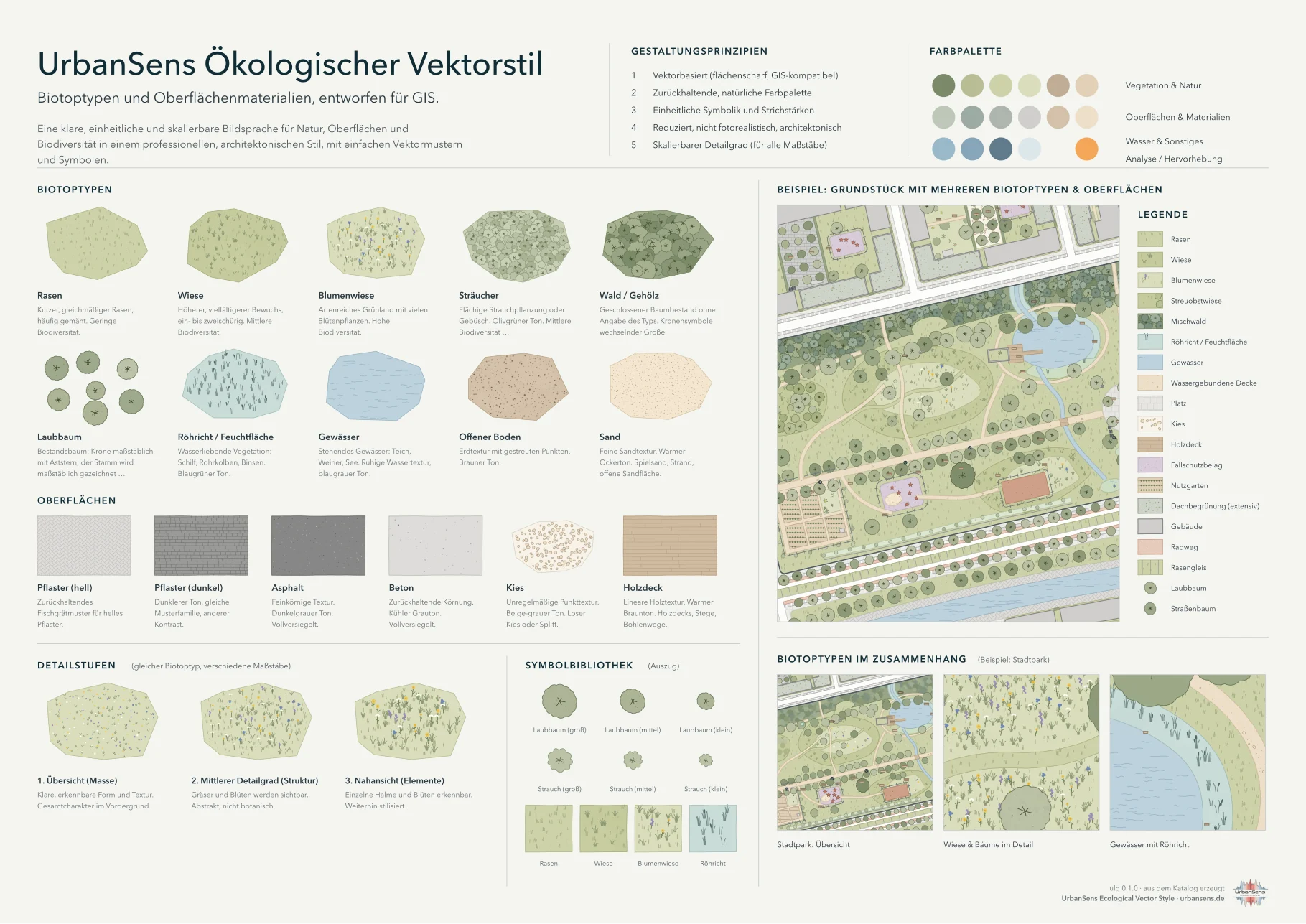
  • Logo (python tools/build_logo.py): the mark spells ulg with a pond, a tree-lined path and a tree crown with a stream, drawn by the library from catalog elements; lockups, a dark version, a small version and favicons in docs/img/logo/, described in style guide 2.12.

Known gaps (from the standards report)
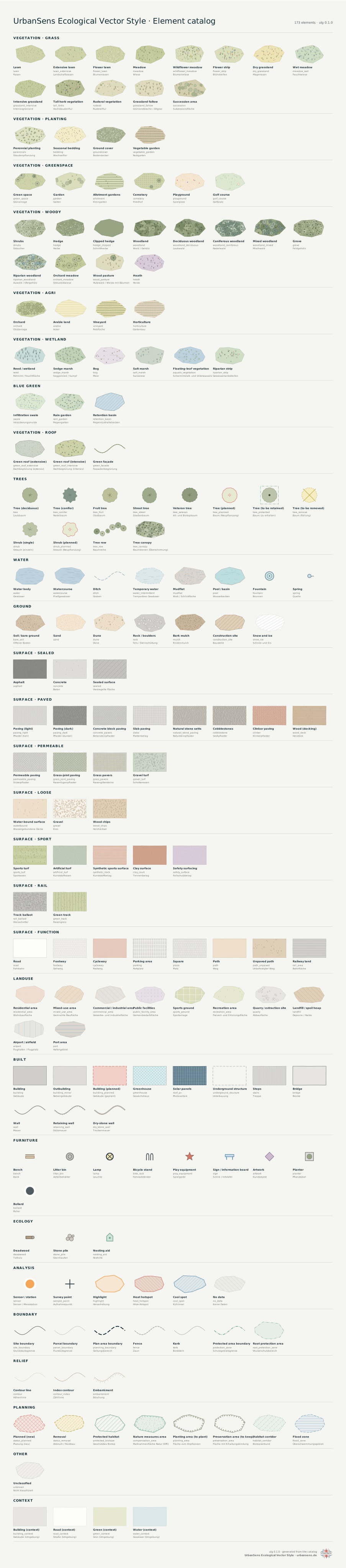
  • Elements not yet in the catalog: moss and lichen cover, biodiverse green roofs, pollard trees, neophyte stands, tree trenches (Baumrigolen), setback areas, PlanZV 11.1/11.2/15.8 areas.
  • No ATKIS theme, no BfN saturated series, SLD 1.0 only (no SE 1.1, no scale rules).
  • protected_biotope is green where Bavarian practice uses magenta; the site boundary and protected-area and flood-zone borders follow landscape-plan practice rather than every official line.
  • Only one of the Berlin BFF brochure examples is a test.

Project

Working on Urban Landscape Graphics (ulg)

Guidance for coding agents and contributors changing this repository. (Agents that only use the library in another project get ulg agent install, see docs/en/07-agents.md.)

What this is#

A style library: the UrbanSens Ecological Vector Style as data (src/ulg/data/) plus a renderer, exporters, crosswalks to external classifications and indicators. The documentation exists in German (the default, starting at docs/index.md) and in English (docs/en/index.md); the rules of the style are in docs/en/02-style.md and docs/02-style.md. The code is MIT licensed, see LICENSE.

Commands#

pip install -e ".[dev]"                 # editable install with test dependencies
python -m pytest                          # all tests; -m "not slow" skips sprite rasterising and the HTML docs build
ulg check                                 # legibility report, must end with OK
python tools/format_data.py               # normalise JSON layout after editing data files
python tools/build_reference.py           # regenerate docs/reference/*.md
python tools/build_docs.py [names]        # regenerate docs/img/* in both languages (sheets, maps, QGIS renders)
python tools/build_html.py                # regenerate docs/html (German and English site, single files); fails on broken links
python tools/build_logo.py                # redraw the logo and favicons (docs/img/logo) from the catalog
python tools/format_data.py --check       # what CI runs first; then `ulg check` and `python -m pytest`

Without an install, prefix commands with PYTHONPATH=src.

Rules#

  1. Data first. Elements, colours, themes and crosswalks are JSON in src/ulg/data/. Change code only for new kinds of marks (motifs, pictograms) or new capabilities.
  2. Palette tokens only. Element and texture colours are family.step tokens from palette.json; never hex values in element files. Themes may use hex values, each with an evidence note.
  3. Every value has a source. Coefficients, official colours and codes carry their source and an evidence mark (V, V*, S, R as in docs/research/). Never estimate a coefficient; leave it out.
  4. GIS-exact. Geometry is never altered for looks: the outline wobble is bounded by half the line width, textures are clipped to their polygon, marks are anchored to ground coordinates (use the helpers in render/geom.py and render/rand.py, never an unseeded random generator).
  5. Drawing order is by band (docs/en/02-style.md §2.7): ground 20 (largest first), water 30–33, lines and centre-line strips 35, built 50–66, trees and points 66–76, overlays 84–98.
  6. Bilingual data. Labels, descriptions and aliases in English and German.
  7. Bilingual documentation, German first. README.md and docs/*.md are German (the default, formal "Sie"), README.en.md and docs/en/*.md are English. Change both in the same commit, keep file names, heading numbers and images identical; images that contain text exist per language (name.png in English, name-de.png in German). tests/test_docs_i18n.py checks that both trees match. The reference pages, the research files, the changelog and this file stay English.
  8. No em dashes. Never write an em dash (U+2014), and avoid the spaced en dash as a substitute, in prose, UI text, comments or commit messages. Use commas, colons, parentheses or full stops. tests/test_style_rules.py checks the published text.
  9. Credit. The small UrbanSens mark (src/ulg/brand.py) sits on the sheets the library draws itself (style_sheet, catalog_sheet, legend_svg(credit=True)), never on users' maps. Keep it there, and keep the credit request of docs/en/licence-and-credit.md and the website https://urbansens.de/ in the README, the docs footer and CITATION.cff in step.
  10. After changing data or docs: format, ulg check, tests, regenerate reference pages, the images and the HTML (tools/build_html.py), and look at the sheets. Add a CHANGELOG entry.
  11. Do not bundle third-party symbol files (BfN, UKHab, OSM Carto icons); draw own symbols after the same conventions. Hotlink, do not copy, historical images in the docs.

Layout#

Path Content
src/ulg/data/elements/*.json the catalog, keyed by element id
src/ulg/data/crosswalks/*.json 26 schemes, format in docs/reference/crosswalk-format.md
src/ulg/data/themes/*.json official conventions
src/ulg/data/brand/ the UrbanSens logo files (shipped with the package, used by the credit mark)
src/ulg/render/ geometry helpers, motifs, scene building, SVG and Matplotlib backends
src/ulg/export/ QGIS, SLD, MapLibre, tokens
src/ulg/analysis.py indicators, flatten, root_protection_zone
docs/ German documentation (default), docs/en/ English, docs/reference/ generated, docs/img/ figures
docs/research/ the standards research and the synthesis report
examples/ runnable examples; examples/output/ is generated and ignored
tools/html/ style sheet, script and the bundled Rethink Sans (SIL OFL) of the HTML documentation
.github/workflows/ ci.yml (tests) and pages.yml (documentation site and live demo on GitHub Pages)
LICENSE, CITATION.cff MIT licence and the machine-readable reference

Project

Licence and credit

ulg is free software under the MIT licence. In return UrbanSens asks for one thing: say where the style comes from.

Licence#

The library, the catalog data (elements, palette, themes, crosswalks), the tools and this documentation are released under the MIT licence. You may use them, change them and ship them in commercial products. Keep the copyright and licence notice with the code you copy. The licence covers the software and its data files; it asks you to add nothing to the maps and sheets you draw with it.

MIT License

Copyright (c) 2026 UrbanSens

Permission is hereby granted, free of charge, to any person obtaining a copy
of this software and associated documentation files (the "Software"), to deal
in the Software without restriction, including without limitation the rights
to use, copy, modify, merge, publish, distribute, sublicense, and/or sell
copies of the Software, and to permit persons to whom the Software is
furnished to do so, subject to the following conditions:

The above copyright notice and this permission notice shall be included in all
copies or substantial portions of the Software.

THE SOFTWARE IS PROVIDED "AS IS", WITHOUT WARRANTY OF ANY KIND, EXPRESS OR
IMPLIED, INCLUDING BUT NOT LIMITED TO THE WARRANTIES OF MERCHANTABILITY,
FITNESS FOR A PARTICULAR PURPOSE AND NONINFRINGEMENT. IN NO EVENT SHALL THE
AUTHORS OR COPYRIGHT HOLDERS BE LIABLE FOR ANY CLAIM, DAMAGES OR OTHER
LIABILITY, WHETHER IN AN ACTION OF CONTRACT, TORT OR OTHERWISE, ARISING FROM,
OUT OF OR IN CONNECTION WITH THE SOFTWARE OR THE USE OR OTHER DEALINGS IN THE
SOFTWARE.

The same text is the file LICENSE in the repository.

Please credit UrbanSens#

Crediting is a request, not a condition of the licence, but it is how a small project gets found. If ulg or the UrbanSens Ecological Vector Style helped with a map, a plan, a report, a tender or a paper, please say so. The website of UrbanSens: urbansens.de.

In a map caption, a legend or the list of sources

Map style: UrbanSens Ecological Vector Style (ulg), urbansens.de

In German

Kartenstil: UrbanSens Ecological Vector Style (ulg), urbansens.de

In a reference list (APA style)

UrbanSens. (2026). Urban Landscape Graphics (ulg): the UrbanSens Ecological Vector Style as a library (Version 0.1.0) [Computer software]. https://github.com/UrbanSens/Urban-Landscape-Graphics

In BibTeX

@misc{urbansens_ulg_2026,
  author       = {{UrbanSens}},
  title        = {Urban Landscape Graphics ({ulg}): the {UrbanSens} Ecological Vector Style as a library},
  year         = {2026},
  note         = {Version 0.1.0, software},
  howpublished = {\url{https://github.com/UrbanSens/Urban-Landscape-Graphics}}
}

The file CITATION.cff in the repository holds the same reference in a machine-readable form.

In Python, ulg.credit_line() returns the caption line (ulg.credit_line("de") the German one), so that a script or an agent that draws a map can put it where the sources are named:

import ulg

ulg.credit_line()       # 'Style: UrbanSens Ecological Vector Style (ulg 0.1.0) · urbansens.de'
ulg.credit_line("de")   # 'Kartenstil: UrbanSens Ecological Vector Style (ulg 0.1.0) · urbansens.de'

The mark on the sheets#

The sheets the library draws itself carry a small UrbanSens mark (the logo with the name of the style, the version and the website) in the lower right corner: ulg.style_sheet(), ulg.catalog_sheet() (the inventory of all elements) and the images of this documentation. Leave the mark on when you share them. credit=False (or ulg sheet --no-credit) draws the sheet without it. Legends go into your layouts, so ulg.legend_svg() adds the mark only with credit=True.

Your maps are never stamped: ulg.render_svg(), ulg.plot() and the exported styles for QGIS, GeoServer, MapLibre and design tools add nothing.

The logos#

The UrbanSens logo (src/ulg/data/brand/urbansens-logo.png) and the ulg logo (docs/img/logo/) are UrbanSens' artwork. Use them to credit the project or to show that you work with the style; do not use them in a way that suggests UrbanSens endorses your work. The MIT licence grants rights to the software, not trademark rights.

Material from others#

  • Fonts. The headings of the HTML documentation and the wordmark of the ulg logo are set in Rethink Sans (SIL Open Font License 1.1, tools/html/fonts/OFL.txt).
  • Historical images in Origins are linked from Wikimedia Commons, not copied; each has its own licence, listed under Image credits in that chapter.
  • Standards, official colours and codes. Class codes, colour values and coefficients of external schemes (ALKIS, basemap.de, BfN, OpenStreetMap Carto, CORINE, PlanZV and others) are quoted with their source in the reference pages and in the standards report. The schemes and their names belong to their publishers.
  • OpenStreetMap. No OpenStreetMap data ships with ulg; the examples use an invented sample block. Maps you draw from OpenStreetMap data need OpenStreetMap's own credit: © OpenStreetMap contributors.