
4.1 Install#
pip install -e ".[all]"
Python 3.10 or newer. The core needs only NumPy and Shapely; geopandas (reading GIS files,
indicators on data frames) and matplotlib (plots, the MapLibre sprite) come with the all extra.
PNG output uses the first SVG rasteriser it finds: rsvg-convert, CairoSVG or Inkscape.
Check the installation:
ulg --version
ulg check
ulg check prints the legibility report of the catalog and ends with OK.
4.2 The style as data#
import ulg

lawn = ulg.element("lawn")
lawn.name("de"), lawn.fill              # ('Rasen', '#CDD2A9')

[el.id for el in ulg.find("Schotterrasen")]   # ['gravel_turf', 'lawn', 'gravel', 'wood_deck']
ulg.color("water.300")                  # '#BED2DD', a palette token
ulg.color("lawn")                       # '#CDD2A9', an element's fill
ulg.fills("polygon")                    # {'lawn': '#CDD2A9', 'meadow': '#C5CB9D', ...}
ulg.ramp("heat", 5)                     # ['#F7F1DC', '#F6D5A5', '#EFAC77', '#DB805F', '#B5574F']
ulg.categories("klimatop")              # climatope classes with labels and colours
ulg.themes()                            # {'mellow': 'UrbanSens mellow (house style)', 'alkis': ..., ...}
ulg.fills() alone already styles a map in any tool:
gdf.plot(color=gdf.element.map(ulg.fills()))
4.3 Your data#
Everything that draws or measures accepts
- a GeoDataFrame with a column of element ids (
by="element"by default), - a GeoJSON FeatureCollection (dict) with the id in the properties,
- a list of
(geometry, element_id)or(geometry, element_id, properties)tuples.
Use a projected CRS in metres (EPSG:25832 for Bavaria). Geographic GeoDataFrames are reprojected to UTM automatically; textures, widths and areas need metres.
Useful attributes are read when present: crown_diameter (also diameter_crown,
kronendurchmesser …) sizes tree crowns, stammumfang (cm) or stem_diameter (m) draws stems to
scale, and width, lanes or the OSM highway class set the width of roads and paths given as
centre lines.
If your data uses another classification, translate it (4.5). If it uses your own codes, pass a
mapping:
ulg.render_svg(gdf, by="nutzung", mapping={"Rasen": "lawn", "Weg": "waterbound", "Teich": "water"})
4.4 Drawing#
SVG, true to scale#
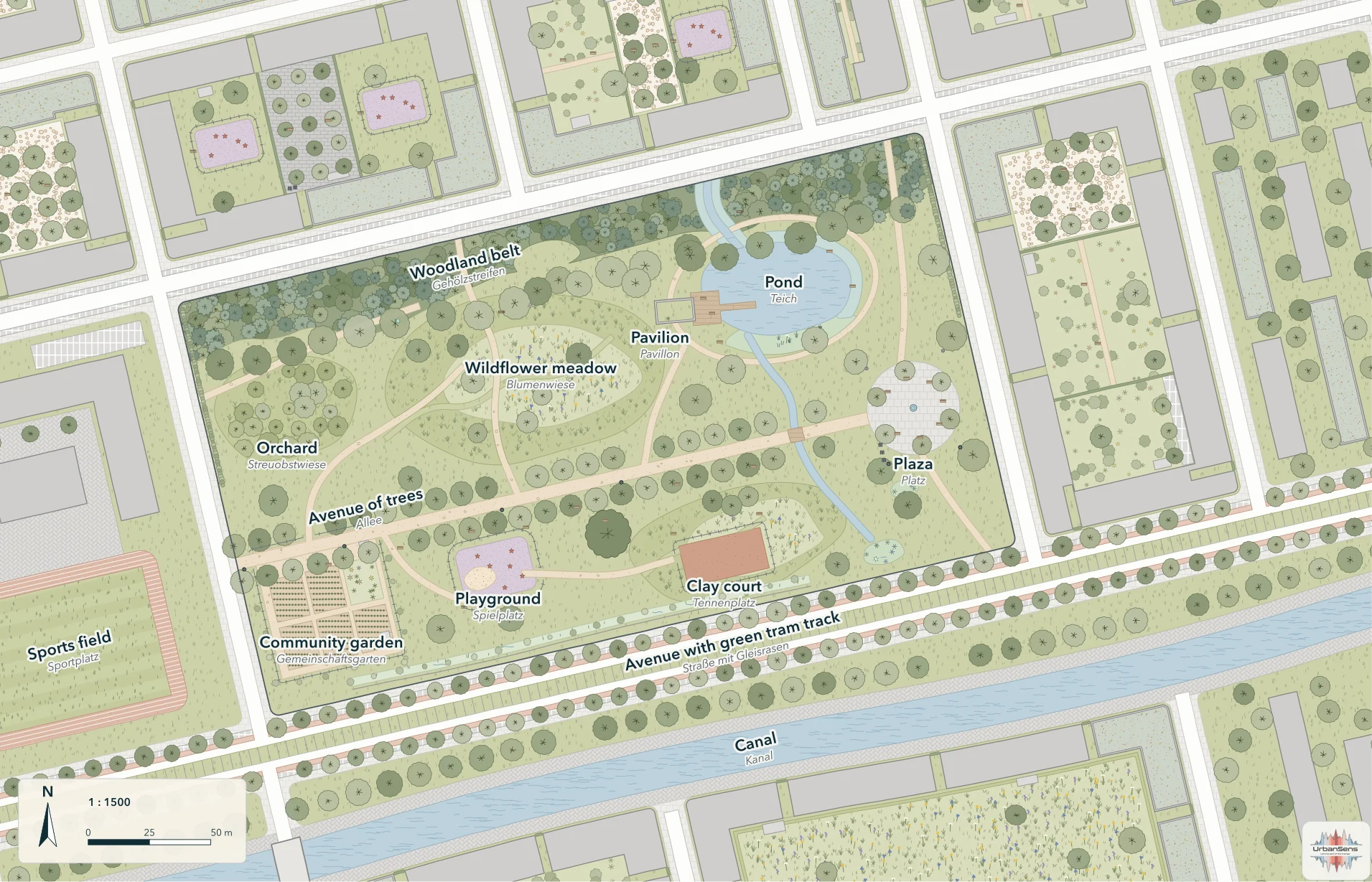
from ulg.datasets import demo_park_gdf

gdf = demo_park_gdf()                                  # Angerpark, the demo quarter, EPSG:25832
svg = ulg.render_svg(gdf, scale=1500, path="park.svg") # 1:1500, in paper millimetres
svg.lod                                                # 2, the level of detail chosen from the scale
Options that matter:
| Argument | Effect |
|---|---|
scale=500 / width=180 |
map scale, or the page width in mm (the scale follows) |
extent=(minx, miny, maxx, maxy) |
the window to draw, in data coordinates |
theme="planzv" |
draw in another convention (ulg.themes()) |
lod=3 |
force a level of detail (normally chosen from the scale) |
handdrawn=0 |
exact lines; 1 house style; up to 2 sketchy. Official themes default to 0 |
seed=7 |
another, equally valid, arrangement of marks (deterministic for a seed) |
background=None |
transparent page (default: the theme's paper) |
options=ulg.Options(textures=False, outline_width=0.25, ...) |
fine control, see help(ulg.Options) |
PNG and PDF: ulg.render.rasterize("park.svg", "park.png", dpi=200), or convert the SVG with Inkscape
(inkscape park.svg --export-type=pdf). The SVG opens true to size in Inkscape, Illustrator and
Affinity, and every feature group carries its element id as data-element.
Matplotlib#
ax = ulg.plot(gdf, scale=3000)            # a new figure sized so that 1 paper mm is 1 mm
ax.figure.savefig("park.png", dpi=150)

import matplotlib.pyplot as plt
fig, ax = plt.subplots(figsize=(8, 6))
ulg.plot(gdf, ax=ax)                      # into an existing axes; the axes decide the scale
other_layer.plot(ax=ax, zorder=10)        # then draw your own layers on top
Legends#
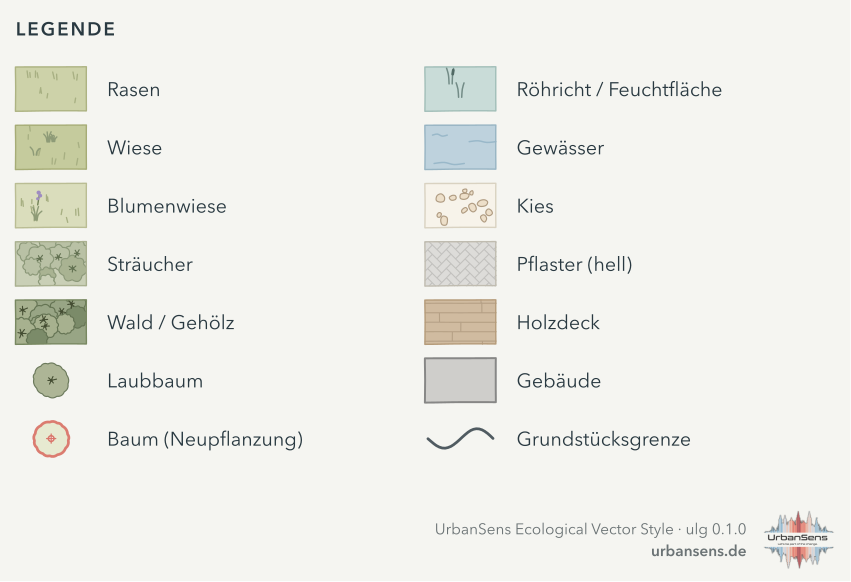
from ulg.legend import used_elements

ids = used_elements(zip(gdf.geometry, gdf.element))           # the elements on the map, in order
ulg.legend_svg(ids, lang="de", title="Legende", columns=2).save("legend.svg")

ax.legend(handles=ulg.legend_handles(["lawn", "meadow", "water"], lang="de"))   # flat Matplotlib legend
Style sheets#
ulg.style_sheet("style.svg")                       # the one-page overview (section 2)
ulg.style_sheet("style-de.svg", lang="de")
ulg.catalog_sheet("catalog.svg")                   # every element
ulg.catalog_sheet("trees.svg", groups=["trees"], title="Trees")
ulg.style_sheet("plain.svg", credit=False)         # without the small UrbanSens mark in the corner
The sheets carry that mark by default; ulg.legend_svg(..., credit=True) adds it to a legend, and your own maps
never get one. ulg.credit_line() returns the line for a caption or a list of sources
('Style: UrbanSens Ecological Vector Style (ulg 0.1.0) · urbansens.de', German with lang="de"). More in
Licence and credit.
4.5 Classifying external data#
A crosswalk translates the classes of another scheme (OSM tags, ALKIS object types, XPlanung, BKompV/BayKompV biotope codes, CORINE, Urban Atlas and 20 more) into element ids.
ulg.resolve("osm", landuse="grass")                       # 'lawn'
ulg.resolve("osm", highway="footway", surface="compacted") # 'waterbound'
ulg.resolve("alkis", objart="41008", funktion="4420")     # 'green_space'
ulg.resolve("clc", "141")                                 # 'green_space'
ulg.explain("clc", "141")
# {'code': '141', 'name': 'Green urban areas', 'element': 'green_space', 'fit': 'exact',
#  'color': '#FFA6FF', 'evidence': 'V', 'level': 3, 'maes': 'Urban', 'note': 'Pink in the official legend, not green.'}

gdf["element"] = ulg.classify(gdf, "osm")        # every column of every row takes part in matching
gdf["element"] = ulg.classify(gdf, "clc", column="code_18")   # or a single code column
ulg.official_colors("clc")["141"]                 # '#FFA6FF', the scheme's own legend colour
ulg.codes_for("wildflower_meadow")                # the reverse: which classes map onto an element
Rules worth knowing:
- The most specific entry wins (
natural=wetland + wetland=reedbedbeatsnatural=wetland). - Column names are matched through aliases (
Objektart,OBJART,objartall work). - Hierarchical codes fall back to their group (
EUNIS E2.64→E2.6→E2). - Unmatched rows become
unknownand are drawn as a neutral hatch, so gaps stay visible. Passdefault=Noneto getNoneinstead. - Each entry has a fit grade (
exact,narrower,broader,nearestornone), so you can see how faithful a translation is.
All schemes: ulg.schemes(), or reference/crosswalks.md.
4.6 OpenStreetMap: stacked areas and centre lines#
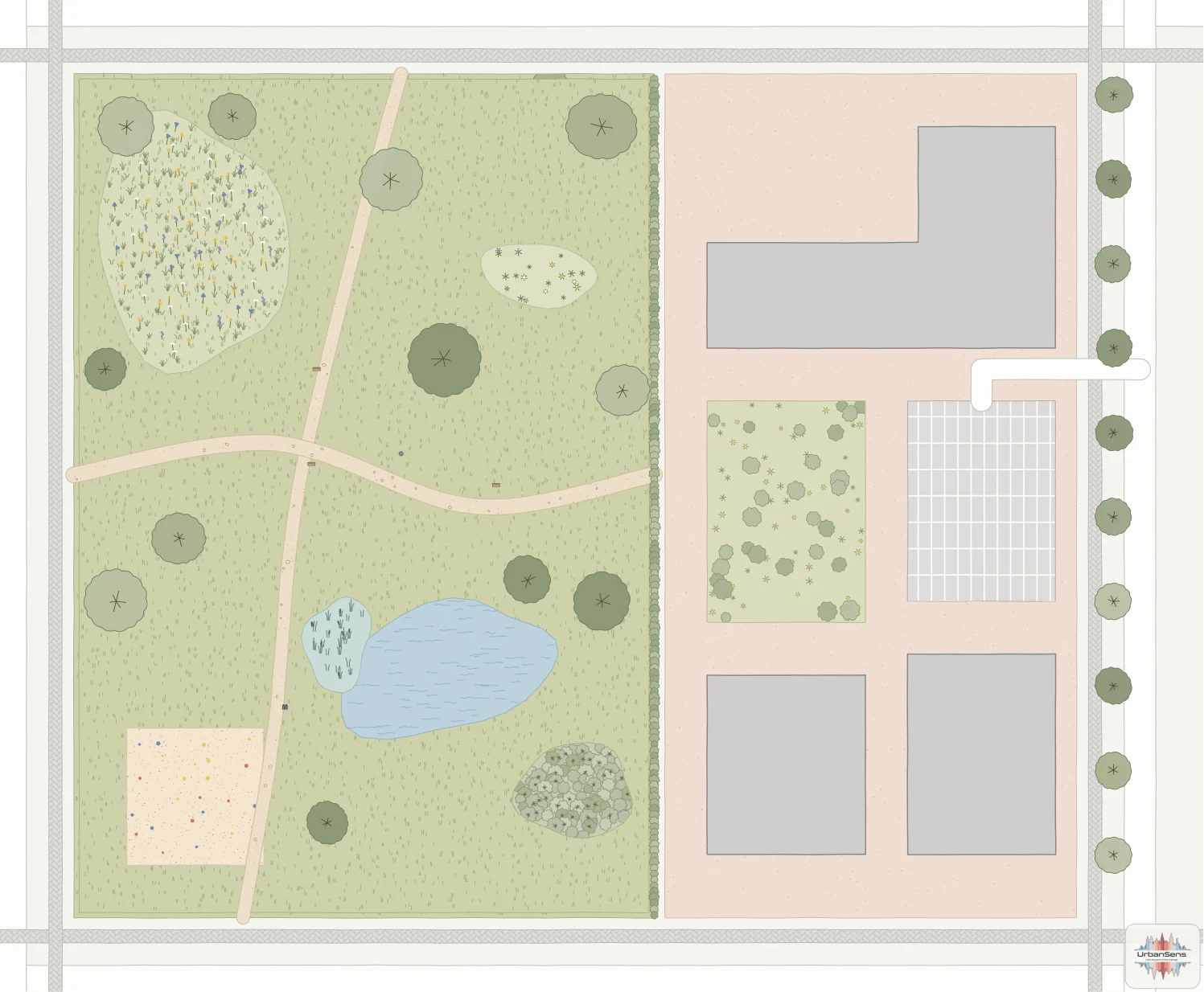
OSM data stacks areas (park → grass → pond) and maps streets and paths as lines. The renderer handles both: areas are layered like OSM Carto (smaller on top within the land-cover band), and roads, footways and squares that arrive as lines are drawn as strips of their real width.
import geopandas as gpd

osm = gpd.read_file("examples/data/osm_sample.geojson").to_crs(25832)
osm["element"] = ulg.classify(osm, "osm")
ulg.render_svg(osm, scale=1000, path="block.svg")
For figures, flatten first: ulg.flatten() cuts every area by those drawn above it and turns
centre lines into areas, so each square metre is counted once.
flat = ulg.flatten(osm)          # GeoDataFrame in a metric CRS, no overlaps in the ground cover
ulg.indicators(flat)["sealed_share"]
Carriageways are drawn as road whatever their surface tag; paths, squares and pitches show their
material. The full walk-through is examples/osm_workflow.py.
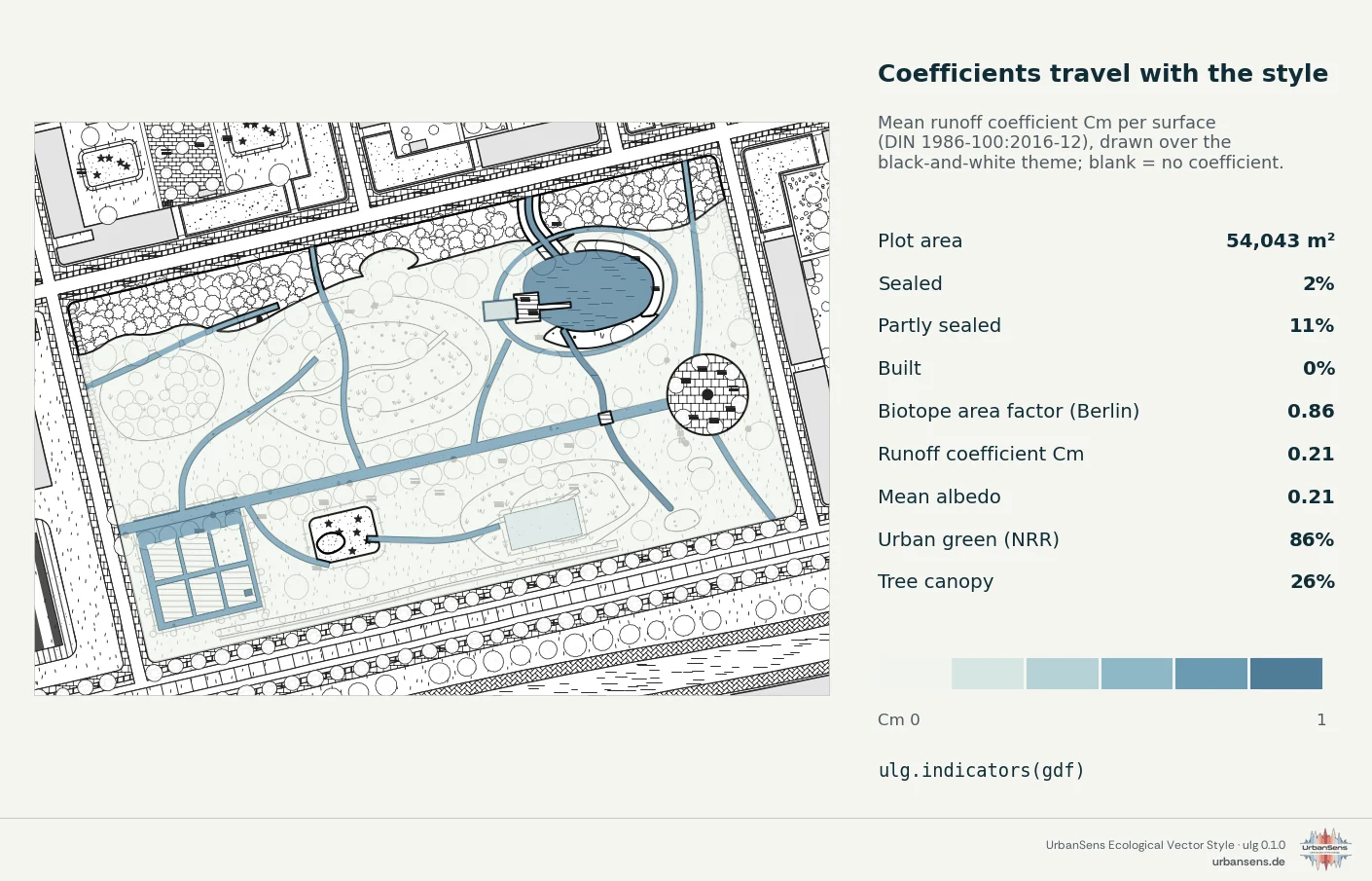
4.7 Site figures#
site = gdf[gdf.layer.isin(["landcover", "trees"])]
figures = ulg.indicators(site)
| Key | Angerpark | Meaning |
|---|---|---|
plot_area_m2 |
54 043 | plot area (or pass plot_area=) |
sealed_share, partly_share, unsealed_share, built_share |
2 %, 11 %, 83 %, 0.3 % | sealing in UBA terms |
bff |
0.86 | Berlin biotope area factor: ground factors plus roof credits over the plot |
runoff_cm, runoff_cs |
0.21, 0.31 | area-weighted runoff coefficients (DIN 1986-100) |
albedo |
0.21 | area-weighted albedo (PALM tables) |
nrr_green_share |
86 % | urban green space in the sense of the EU Nature Restoration Regulation |
canopy_share |
26 % | tree canopy seen from above, from canopy areas and crown discs of point trees |
*_coverage |
0.83 to 0.98 | share of the area for which a coefficient was known |
by_element_m2 |
{...} | area per element |
Coefficients are never guessed: a surface without a published value lowers the coverage figure instead. Green roofs and solar panels count on top of the buildings they cover.
Trees. ulg.root_protection_zone(trees) returns DIN 18920 root protection zones (crown drip line
plus 1.50 m, columnar trees plus 5.00 m) and the minimum trench distance
(min_trench_distance_m, four times the girth, at least 2.50 m):
zones = ulg.root_protection_zone(trees, columnar_field="saeulenform")
zones.to_file("root_zones.gpkg")
4.8 From the terminal#
The ulg command (also python -m ulg) does the same without writing code; add --json for
machine-readable output and --lang de for German names.
| Command | Does |
|---|---|
ulg list --group surface |
list elements |
ulg find Rasengitter / ulg show gravel_turf |
search / everything about one element |
ulg schemes / ulg resolve osm landuse=meadow meadow=wildflower |
crosswalks |
ulg themes / ulg categories utci |
themes and class palettes |
ulg render plan.gpkg --layer flaechen --by nutzung --scheme alkis --scale 500 --png |
draw a GIS file |
ulg indicators plan.gpkg --scheme osm |
site figures |
ulg sheet -o style.svg --lang de / ulg sheet --catalog -o catalog.svg |
style sheets |
ulg export qgis out/ --lod auto --theme mellow |
style files for other tools (chapter 5) |
ulg check |
legibility report |
ulg agent / ulg agent install |
the guide for coding agents (chapter 7) |
4.9 Recipes#
A 1:500 site plan from an ALKIS extract
alkis = gpd.read_file("alkis.gpkg", layer="tatsaechliche_nutzung")
alkis["element"] = ulg.classify(alkis, "alkis")
ulg.render_svg(alkis, scale=500, path="lageplan.svg")
A Bauleitplan look for a draft
ulg.render_svg(plan, scale=1000, theme="planzv", path="entwurf.svg")
Analysis colours on top of the style
ax = ulg.plot(site, theme="mono", lod=1)                       # quiet base map
cells.plot(ax=ax, zorder=50, alpha=0.8,
           color=[ulg.category_of("utci", v)["color"] for v in cells.utci])
A web map with folium
import folium
m = folium.Map(location=[48.15, 11.58], zoom_start=17, tiles=None)
folium.GeoJson(gdf.to_crs(4326), style_function=ulg.style_function()).add_to(m)
More: examples/ · API: reference/api.md